iPECS eMG80 & eMG800 & UCP
Administration and Programming Manual Issue 1.6
390
4.4.5.25 SNMP Attribute - PGM 196
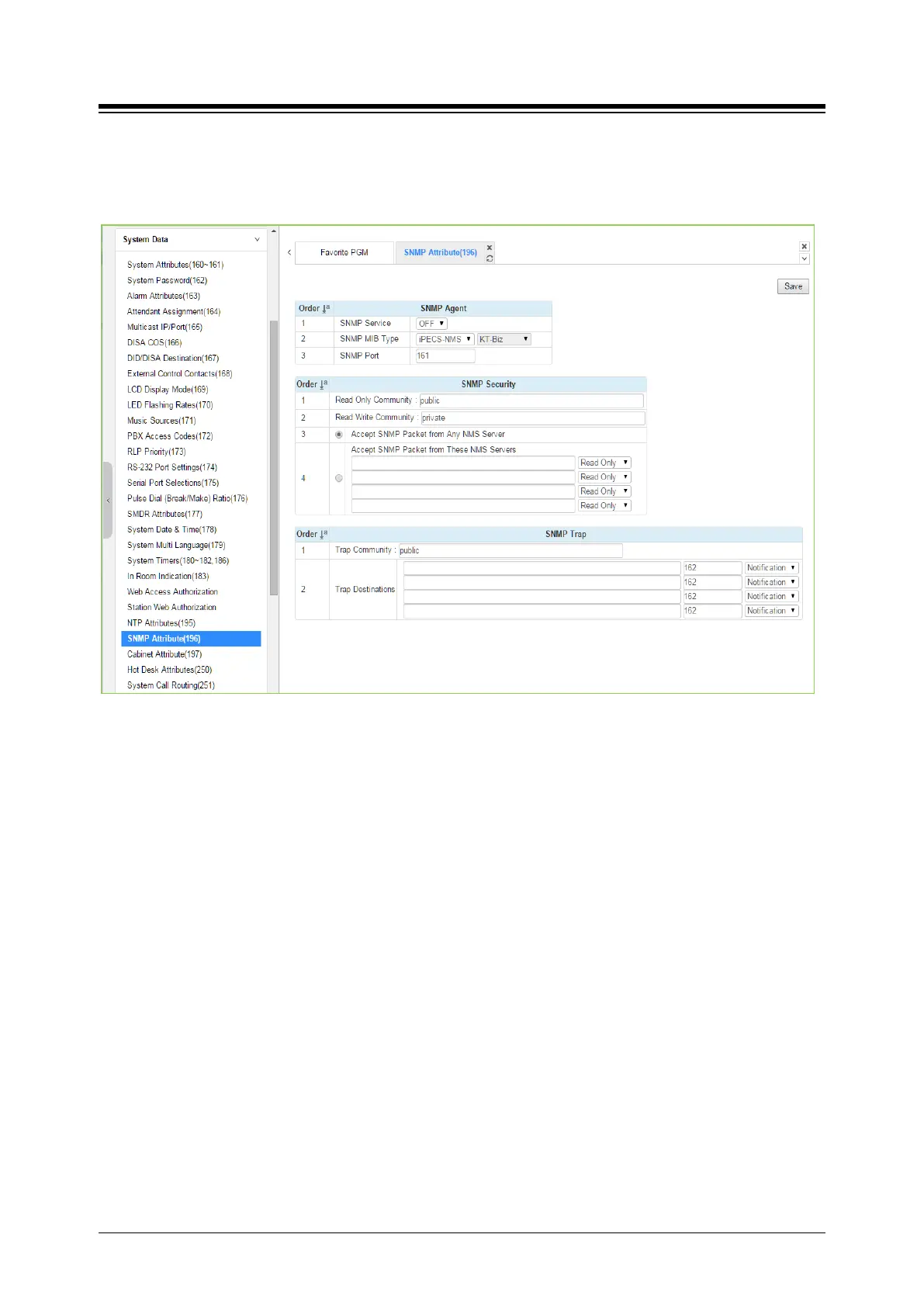
Selecting SNMP Attribute will display the SNMP Attributes entry page. Click [Save] button after
changing Value.
Figure 4.4.5.25-1 SNMP Attribute
SNMP Attributes, as shown on the screen, are divided into three categories: SNMP Agent, SNMP
Security, and SNMP Trap. The SNMP Service field enables the SNMP agent running in the
iPECS call server. The SNMP port field defines the UDP port used for communications from
iPECS system for SNMP messages. This port should not be changed.
In SNMP Security are the Read Only and Read Write SNMP Community fields, 4 to 16
characters. The SNMP community designates an SNMP communication group to which an
SNMP message belongs, and is a logical relationship between the SNMP agent (iPECS system)
and SNMP manager (iPECS NMS). The SNMP community settings must be the same for the
iPECS systrem and the iPECS NMS server.
Read Only Community (default=Public)—Defines a community string used when the
iPECS NMS reads data from iPECS system.
Read Write Community (default=Private)—Defines the community string used when
iPECS NMS reads or writes data to iPECS system.
Although iPECS system can accept packets from any SNMP manger such as iPECS NMS, for
improved security, the IP address of specific servers can be defined and allowed Read only or
Read Write access. It is recommended that the system be assigned with the IP address of a
specific NMS server with Read Write access.
The SNMP Trap configuration defines the Trap Community, and the Trap Destination, which





 To Next Page