iPECS eMG80 & eMG800 & UCP
Administration and Programming Manual Issue 1.6
563
4.4.16.1 DECT Registration (0#)
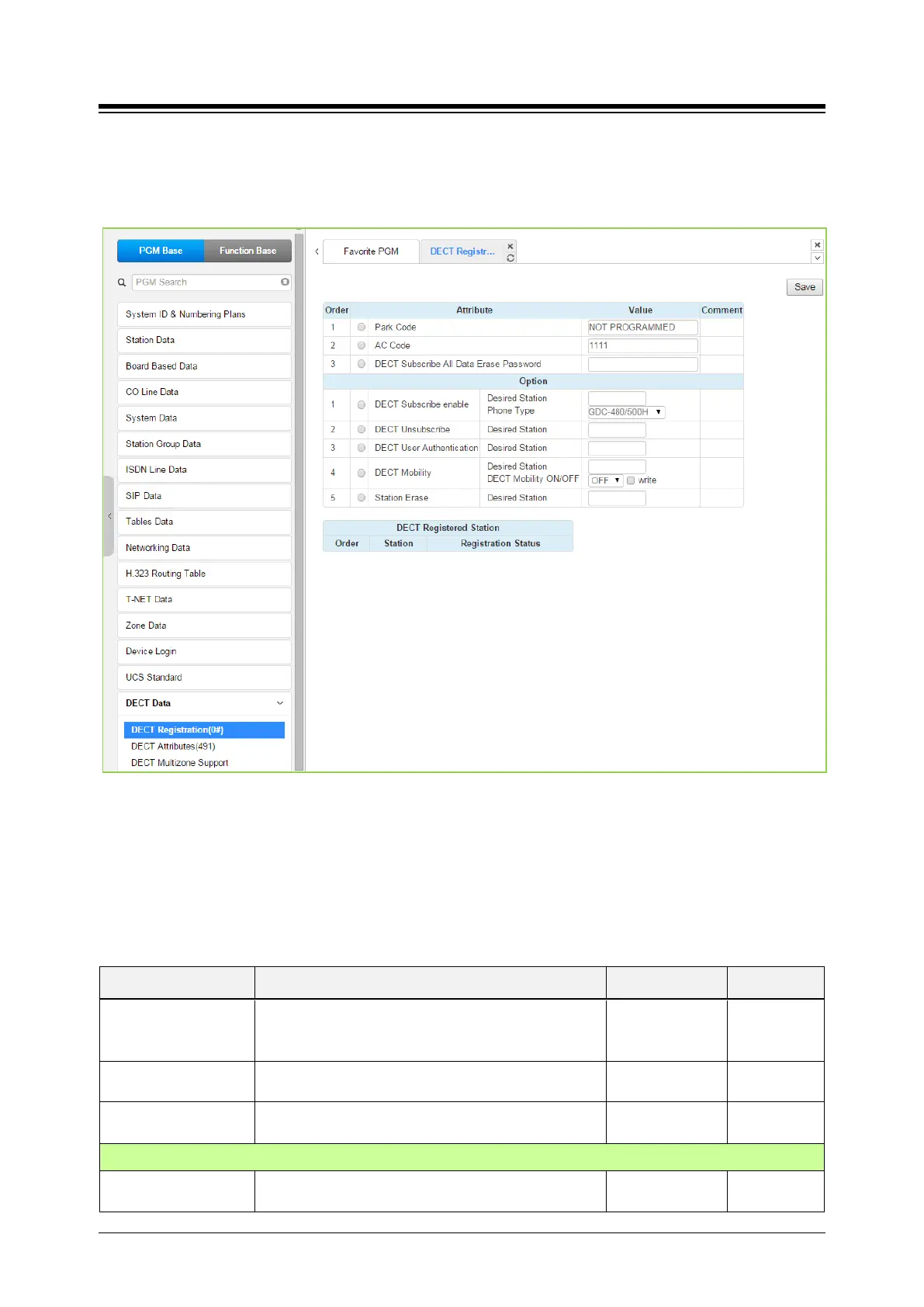
Selecting DECT Registration returns the DECT Registration input page. Use the check mark to
indicate which attributes to modify; data for checked attributes is stored by clicking [Save] button.
Figure 4.4.16.1-1 DECT Subscription Screen
On this page, the DECT PARK and authorization codes are defined. Several “Options” are
available to enable subscription, unsubscribe a DECT station, enable mobility, etc. A chart is
included displaying the registered and subscribed DECT terminals.
Table 4.4.16.1-1 DECT Registration
ATTRIBUTE DESCRIPTION RANGE DEFAULT
Park Code
The PARK (Portable Access Rights Key) Code is a
unique system Id entered at the DECT handset during
the subscription process.
14 digits
Not
programmed
AC Code
The Authentication Code is entered at a DECT handset
Up to 8 digits 1111
DECT Subscribe All
To erase all data of DECT, enter the password.
Option
DECT Subscribe
Enables the system to accept subscription from a





 To Next Page