iPECS eMG80 & eMG800 & UCP
Administration and Programming Manual Issue 1.6
316
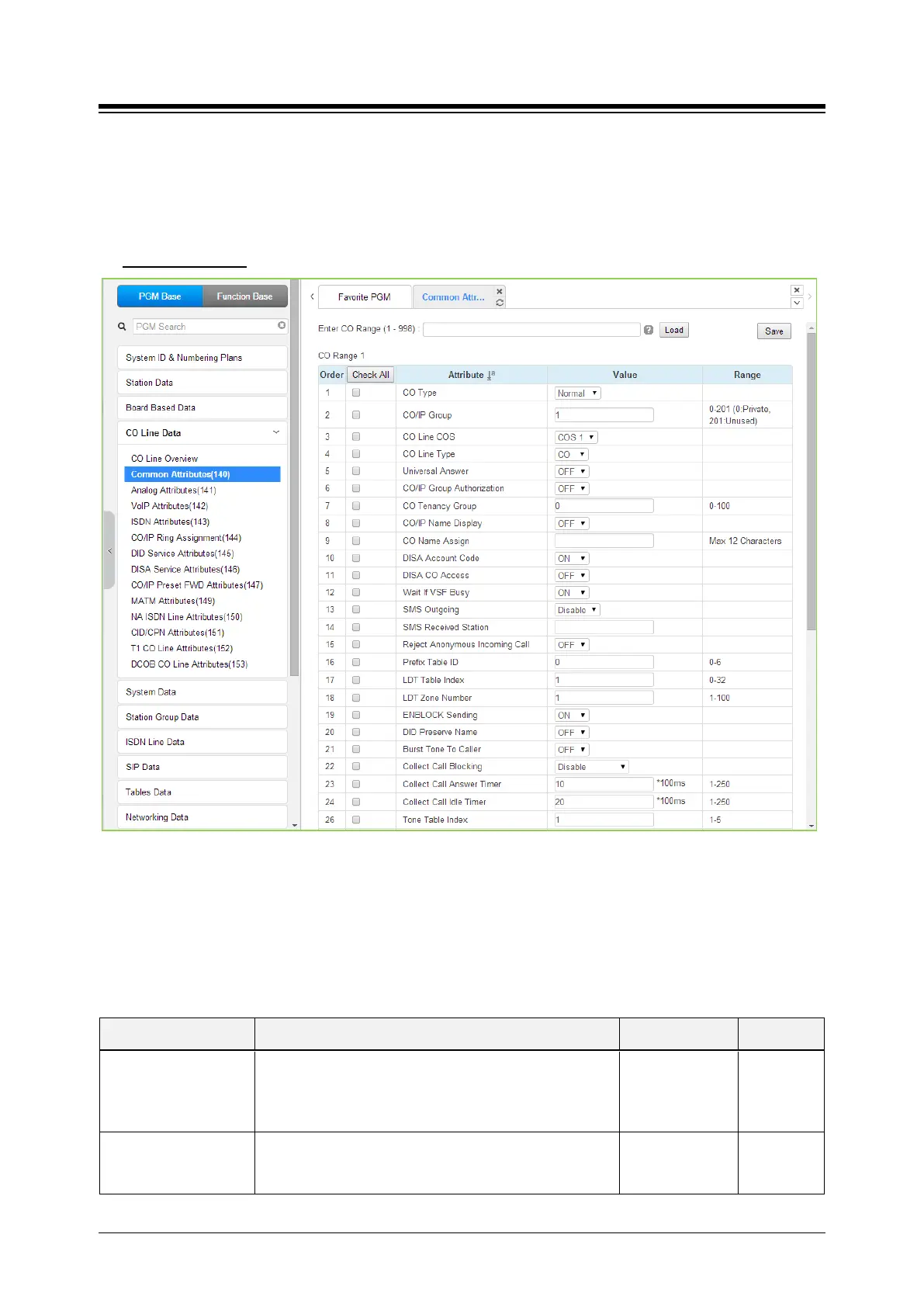
4.4.4.1 Common Attributes - PGM 140
Selecting Common Attributes will display the Common Attributes data input page. Enter a valid
CO range and click [Load] to enter the Common Attributes data. Use the check mark to indicate
which attributes to modify; data for checked attributes is stored by clicking [Save] button.
Enter CO Range
: eMG80: 1-74 / eMG800: 1-600 / UCP: 1-998
Figure 4.4.4.1-1 Common Attributes
Common Attributes define various characteristics of CO lines facilities under control of the system.
Most characteristics require an On/Off setting; refer to the following table. Specific descriptions for
Class-of-Service and CO line Call Metering tones are provided in Table 4.4.4.1-3.
Table 4.4.4.1-1 Common Attributes
ATTRIBUTE DESCRIPTION RANGE DEFAULT
CO Type
Each CO Line is assigned a type, Normal, DID or TIE
Line.
Normal/
DID/
TIE/
Normal
CO/IP Group
Each CO/IP Line is assigned to a group; grouping should
be based on the Line type, technology and COS.
eMG80:0-21
eMG800:0-201
1





 To Next Page