iPECS eMG80 & eMG800 & UCP
Administration and Programming Manual Issue 1.6
287
4.4.2.10 Preset Call Forward - PGM 120
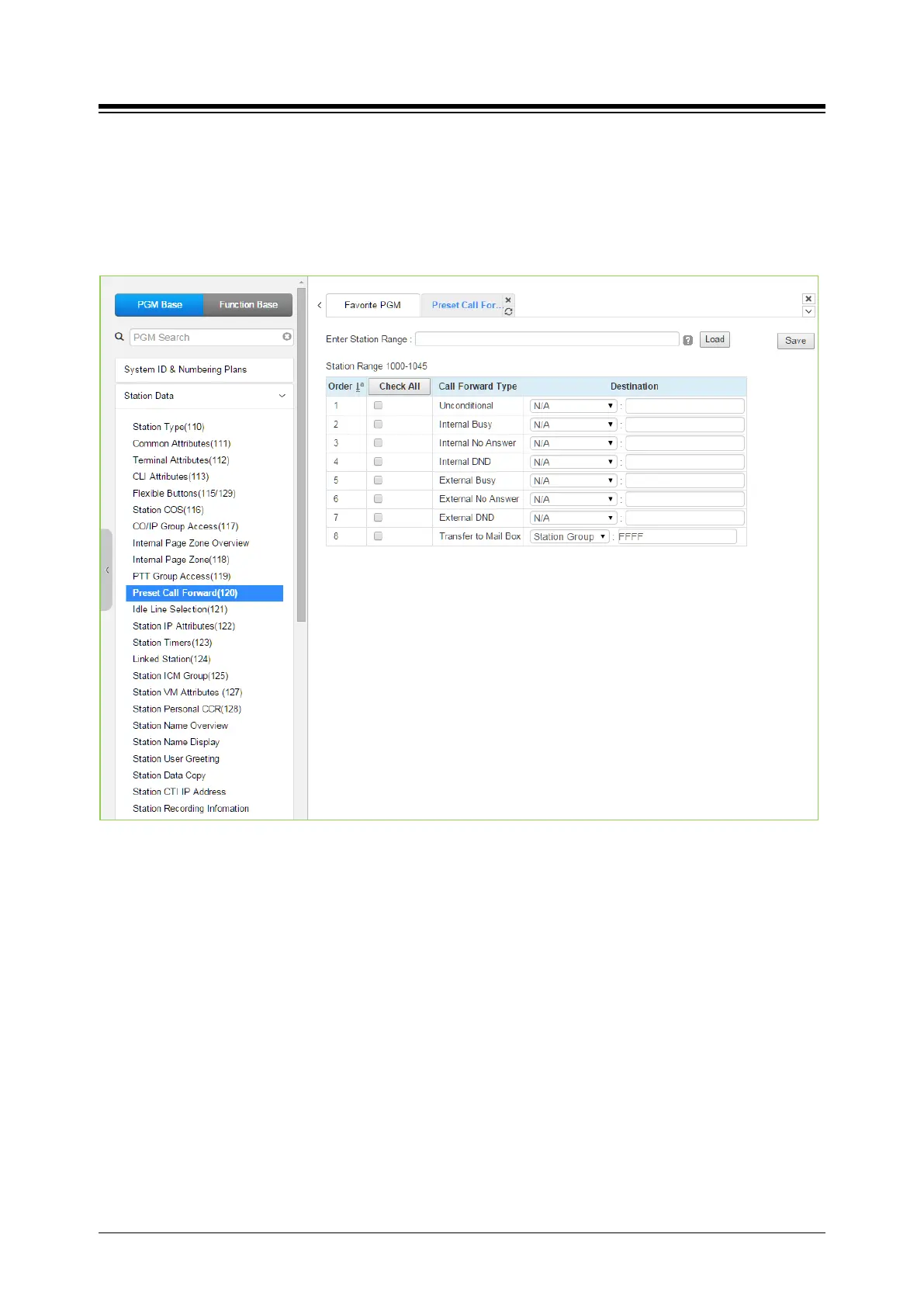
Selecting Preset Call Forward will display the Preset Call Forward data input page. Enter a valid
station range and click [Load] to enter the Station Preset Call Forward data. Use the check mark
to indicate which attributes to modify; data for checked attributes is stored by clicking [Save]
button.
Figure 4.4.2.10-1 Preset Call Forward
Stations can be programmed so that incoming CO/IP and Intercom calls forward to a preset
station or station group. This allows an external or internal call to initially ring at a station and
forward to a pre-determined destination. Preset Forward can be separately assigned
Unconditional, Internal Busy, Internal No Answer, Internal DND, External Busy, External No
Answer, External DND preset forwarding to any station, Station group, system speed dial bin (off-
net) or Station ICR. As a default, no Preset Call Forward is assigned.
For “Transfer Mail-Box” enter the Station Group number of the Voice Mail group (external VM,
VSF or Feature Server Voice Mail group). This will permit other users to transfer calls directly to
the desired user‘s Voice Mailbox.





 To Next Page