iPECS eMG80 & eMG800 & UCP
Administration and Programming Manual Issue 1.6
349
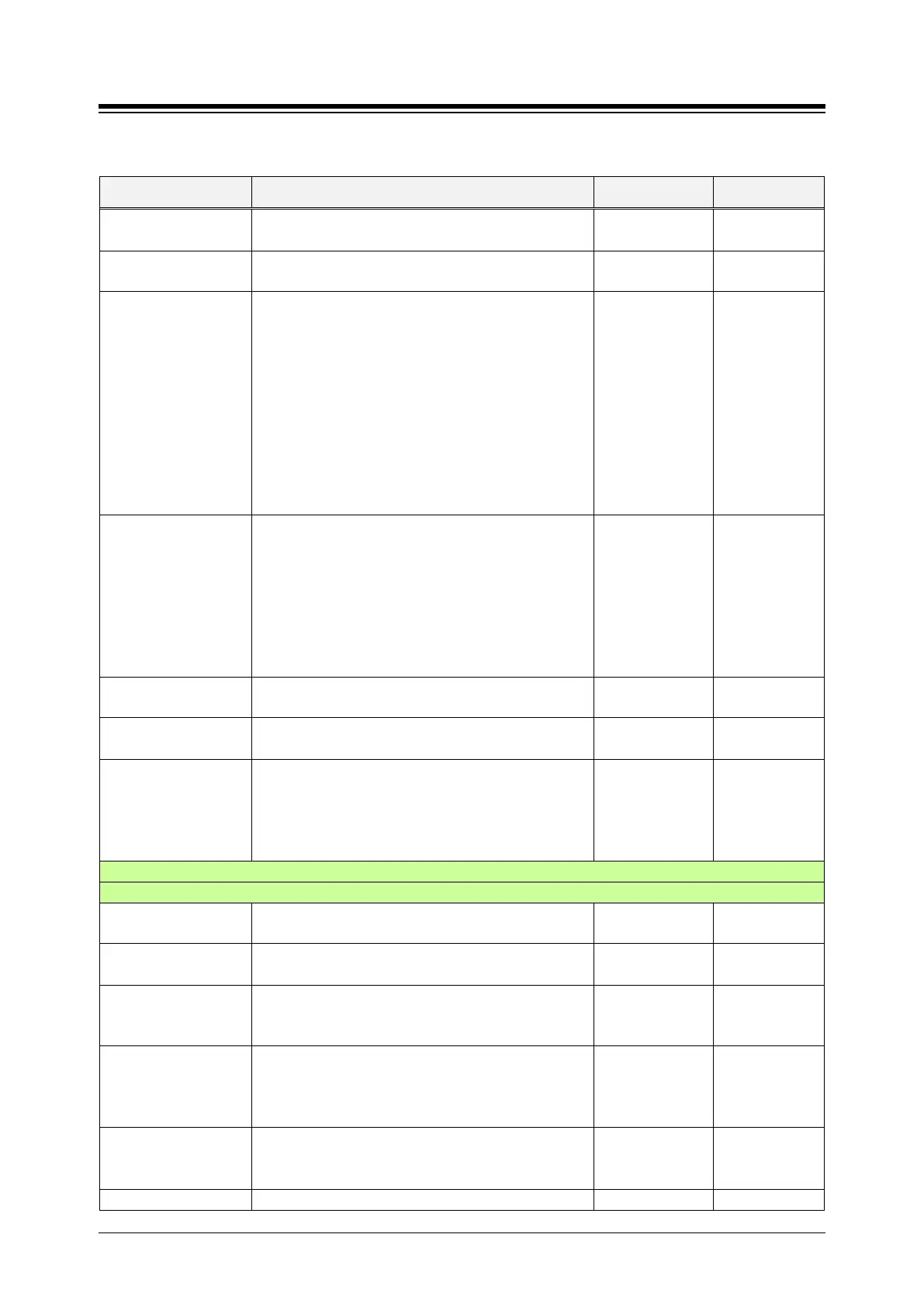
Table 4.4.5.1-1 SYSTEM ATTRIBUTES
ATTRIBUTE DESCRIPTION RANGE DEFAULT
- Supported G/W & Boards: UCP-SLTM, UCP100
SLT Line Monitor Time
The system monitors if SLT Line functions correctly at
a preset time in this field.
0-23 0
UCS Ring ACK Count
UCS Client can be checked by Ring ACK Message. If
the Ring ACK message is sent and get no ACK
message, System set the state of UCS Client on OOS
(Out of service) after the set of Ring ACK count.
If the Ring ACK Count is 0, the UCS Client goes to
OOS (Out Of Service) after 1 time. If the count is 2,
UCS Client can go to OOS (Out Of Service) at 3
times.
UCS Client is ringing before expiring the Ring ACK
timer set on System Timers ‘UCS Ring ACK Timer’
and afterwards will hear Error tones.
0-9 0
Dial Back to Caller
from Remote VM
Access
A user accesses to voice mail from remote, the user
can make a call to the caller of the voice mail like
below.
If ‘Toll Free’ is selected, the user can make a call to
the caller of the voice mail.
If ‘toll check’ is selected, Station COS will be applied.
If ‘Rejected’ is selected, the user can’t make a call to
the caller of the voice mail.
Toll Free,
Toll Check,
Rejected
Toll Free
Web Admin Login
For security, administrator can set the limited count to
log in Web admin from 5 to 99.
5-99, o: unused 5
Web Admin Hacking
This setting time is the duration of blocking the access
to Web admin if Web admin login fails.
5-60 minutes 5
Web Admin Hacking
Block Email
Notification
If this option is Enable, System send the notification
by email about blocking the web admin. The email
address is following the below ‘Alarm Receiver E-Mail
Address(To) & Notification Receiver E-Mail
Disable,
Enable
Disable
SMDR/ACD/Alarm Mail Attribute
SMTP Server IP
SMTP server IPv4 address to receive the SMDR E-
12-digits 0.0.0.0
SMTP Server Domain
SMTP Mail server Domain address to receive the
SMDR e-mail reports. Check DNS IP address setting.
SMTP Port
This field defines the TCP/IP port that the system will
employ when communicating with the SMTP E-mail
server. (It is moved to web admin PGM 160-161)
1-65535 25
SMTP Security
Connection
The system can support basic security policies when
communicating with the SMTP E-mail server. Note
the server must also be configured for the selected
No security/
SSL/
TLS
No security
E-Mail Account ID
This field defines the user’s ID for SMTP server. If the
user’s ID and password is assigned, SMTP server will
check the validity of the user ID and password.
Max. 40
characters
This field defines the user‘s password for SMTP





 To Next Page