iPECS eMG80 & eMG800 & UCP
Administration and Programming Manual Issue 1.6
274
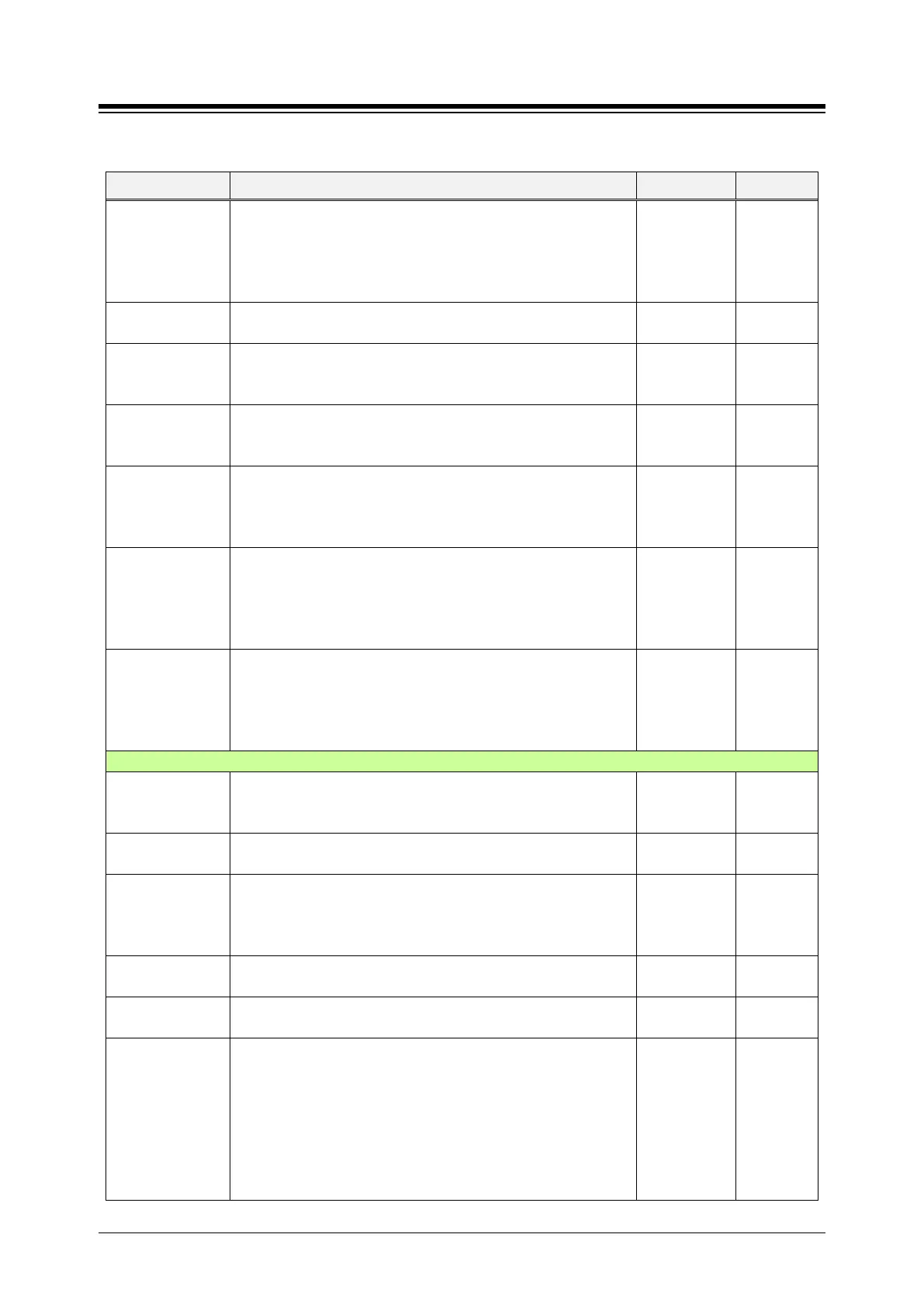
Table 4.4.2.3-1 Terminal Attributes
ATTRIBUTE DESCRIPTION RANGE DEFAULT
1. MWI All: LED is blinking about all calls and Message
2. VM MWI: blinking in case of getting Voice mail
3. CLI MWI: blinking in case of Calling Line Identification
4. SMS MWI: blinking in case of getting Short message
5. ICM MWI: blinking in case of Incoming call
CLI MWI,:
SMS MWI,
ICM MW
NFC Authorization
If this option is ON, User enters Authorization code to use NFC
OFF
ON
LCD Dimming
Apply
If this option is ON, LCD dimming is available only for LIP-9000
Series and LDP-9240D. LCD is dark when the phone is paused
so some light is needed. So we provide the dimmable lights.
OFF
ON
OFF
UCS ACD Use
If the ACD (Automatic Call Distribution) option is set to ON, the
ACD menu is displayed on Tools of UCS. UCS can use ACD
login/logout and ACD On/Off Duty.
OFF
ON
OFF
UCS CRM Use
If the CRM (Customer Relationship Management) option is set
to ON, the CRM menu is displayed and CRM installation tray
icon is displayed on Tools of UCS. UCS can use CRM function
after installation CRM integration.
OFF
ON
OFF
UCS DIALING
RULE USE
UCS client user can use ‘Dialing Rule’ of UCS client such as CO
Access, PBX code, Country Code, Area code, International Call,
Long distance call, Add zero setting, etc. by setting ON. But, if
this option is OFF, UCS Client user follows ‘System Dialing
Rule’ such as Digit Conversion and LCR.
OFF
ON
OFF
UCS MOBILE
DIAL USE
(ANDROID’S)
This option is only for Android UCS Client. If this option is ON,
UCS client user can place a call by using UCS client application.
But, if this option is OFF, UCS client user places a call by Mobile
Network (Commnuication network where the last link is
OFF
ON
OFF
Data Security
Disables override and camp-on tones to the station. This feature
is commonly used for an analog modem or FAX to assure tones
do not affect received information.
OFF
ON
OFF
ECM Faxes in
ECM stands for Error Correction Mode. If you failed to send
something via Faxes, you can send it again until it is successful.
Allow,
Allow
MODEM Enable
When an SLT port is connected to a Modem, the port can be
enabled for Modem operation. This will activate Echo
Cancellation and disregard any Camp-on/Call Wait to improve
OFF
ON
OFF
SLT CID TYPE Caller ID can be sent to an SLT as FSK or DTMF signals.
FSK
FSK
Send SLT CLI Info
When allowed, the system sends CLI (Calling Line Identification)
OFF
ON
SLT Flash Mode
When an SLT activates a Hook-flash the system will perform
one of the following operations:
Flash Transfer – the active call placed on hold and the dial
tone is returned.
Flash-Drop – the active call is dropped.
Flash-Ignore – the Hook-flash is ignored, no action is taken.
Hold Release – the active call is placed on hold and if the
SLT returns to idle the call is dropped.
Flash xfer/
Flash Drop/
Flash Ignore/
Hold Release
FlashTransf
er





 To Next Page