iPECS eMG80 & eMG800 & UCP
Administration and Programming Manual Issue 1.6
347
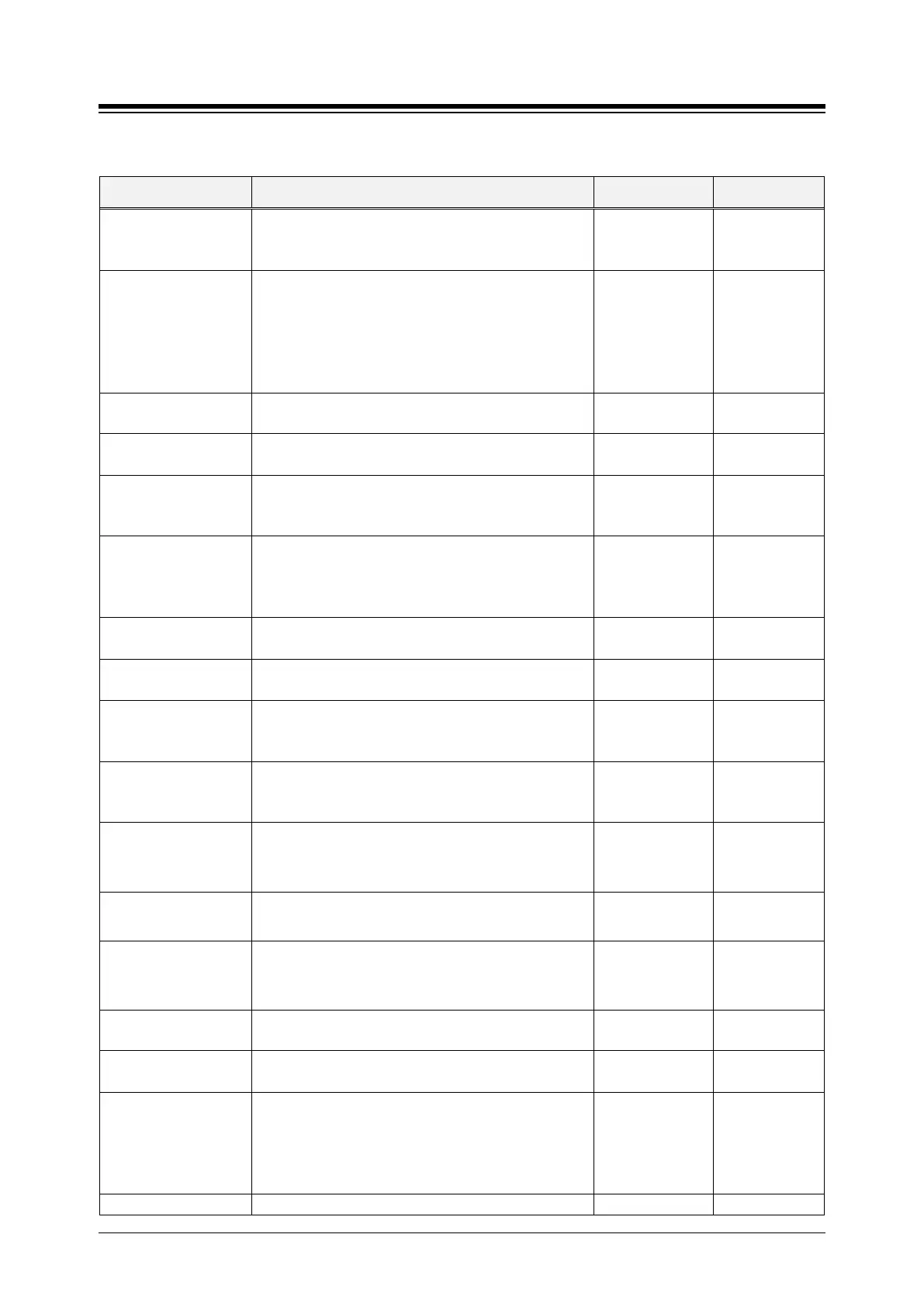
Table 4.4.5.1-1 SYSTEM ATTRIBUTES
ATTRIBUTE DESCRIPTION RANGE DEFAULT
Mobile Phone
Presence Force Idle
The system will return a station’s state to idle if there
is no updated presence information from external
server for the duration of this timer.
0~3600
(Sec.)
0
Attendant Password
Usage
If this value is set to ON, system requests a
password:
When a user enters Attendant program ([PGM] + 0,
When an Attendant enters Speed program,
When a user assigns attendant program code ([PGM]
OFF
ON
OFF
Picked-up station
Name of picked up station is display when pickup
OFF
ON
Display LCR mode Display “LCR MODE” when LCR is activated.
OFF
ON
VM Notify to Mobile
Extension over CO
If this value is set to ON, an analog Loop Start CO
Line can be used for the VM notification call to the
Disable
Enable
Disable
MODEM Associated
Station/CO line
When a call is received by the assigned CO Line, the
call is routed to the system’s built-in modem. This
option is available only for eMG80 & eMG800.
CO/STA
eMG80:STA/
239
eMG800:STA/2
Display {MEET ME}
If this value is set to OFF, {MEET ME} soft button is
not displayed during a paged.
OFF
ON
Number of CLI Wait
The system check the status of each device with a
polling message periodically using this timer.
0-255 0
Emergency Mailbox
Station
When an Emergency Mailbox Station is assigned, an
emergency call placed by a station is recorded
automatically to the assigned mailbox.
MSVC XML Port
The XML port used to support Web callback, call-
through and iPECS ClickCall application for MSVC
(Mobile Service) must be defined.
00001~65535 7878
IPCR Announce for
recording warning
When ON, the IPCR server Call Recording notification
announcement is played to the caller in place of the
warning tone.
OFF
ON
OFF
IPCR Announce for
only incoming
User can select IPCR Announce only when it’s
incoming by setting ON.
OFF
ON
OFF
Mobile EXT CO
Access Password
Check
When a mobile extension places an external call
using an iPECS CO/IP Line, the user may be required
to enter a valid Authorization code to place the call.
OFF
ON
OFF
Hold key usage on
When ON, the Hold key is used for paging.
OFF
ON
Device Info Request
The system checks the status of each device with a
polling message at intervals of this timer.
15 ~ 255 seconds 15
Dial By Name List
The Dial by Name feature can allow stations in any
ICM tenancy groups to call a station any in ICM
Tenancy group. When desired, Dial by Name can be
limited to function within allowed Tenancy calling
All,
Accessible ICM
Group only
ALL
If this value is set to "Accessible System Speed Zone





 To Next Page