4.3 Drawing Methods
4-41
4
Drawing
Paint Properties
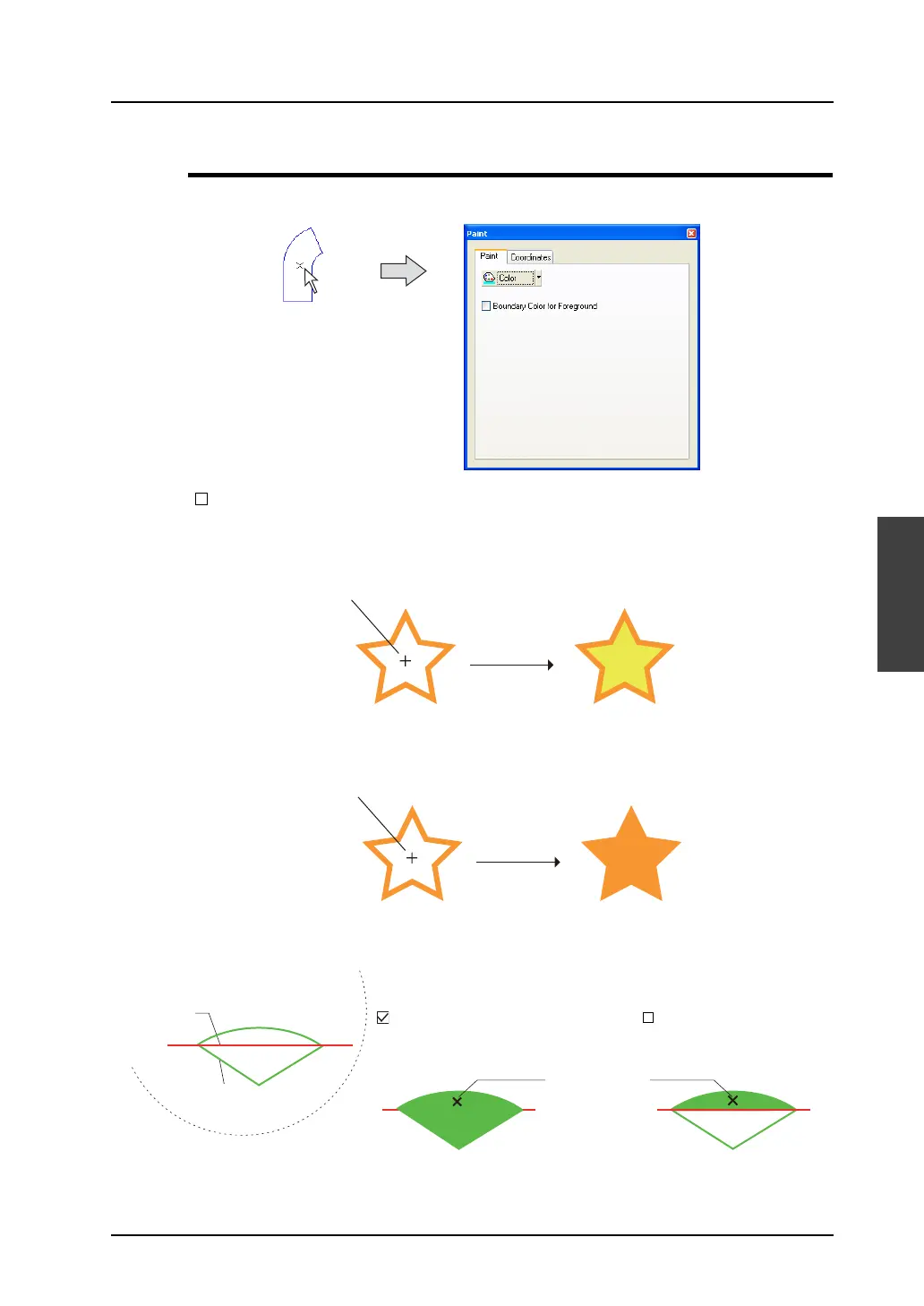
Click or double-click the painted area (“×” mark). The [Paint] dialog appears.
[ Boundary Color for Foreground]
• Unchecked:
The enclosed area can be painted in a color different from the one selected for [Foreground].
• Checked:
The enclosed area can be painted in the same color as the one selected for [Foreground].
Example: If you draw an elliptical sector on the line and paint the enclosed area, it is painted as shown
below.
Click.
(or double-click.)
Painting is possible even if the foreground color is different from the boundary color.
Painting is possible in the same color as the boundary color.
Paint the graphic drawn as below.
1. Line (red)
In the [Paint] tab window:
[ Boundary Color for
Foreground]
[Foreground: Green]
In the [Paint] tab window:
[ Boundary Color for
Foreground]
[Foreground: Green]
Painted area
(Paint color (green) runs through red
area, and stops at the green area.)
(Paint color (green) stops at
the red (or green) area.)
2. Elliptical sector
(green)



 To Next Page