5.16 Animation
5-73
5
Registration
Animation Editing
In the [Animation] dialog, the number of frames and an animation speed are set, and the actual
animated image can be checked.
Follow the procedure below.
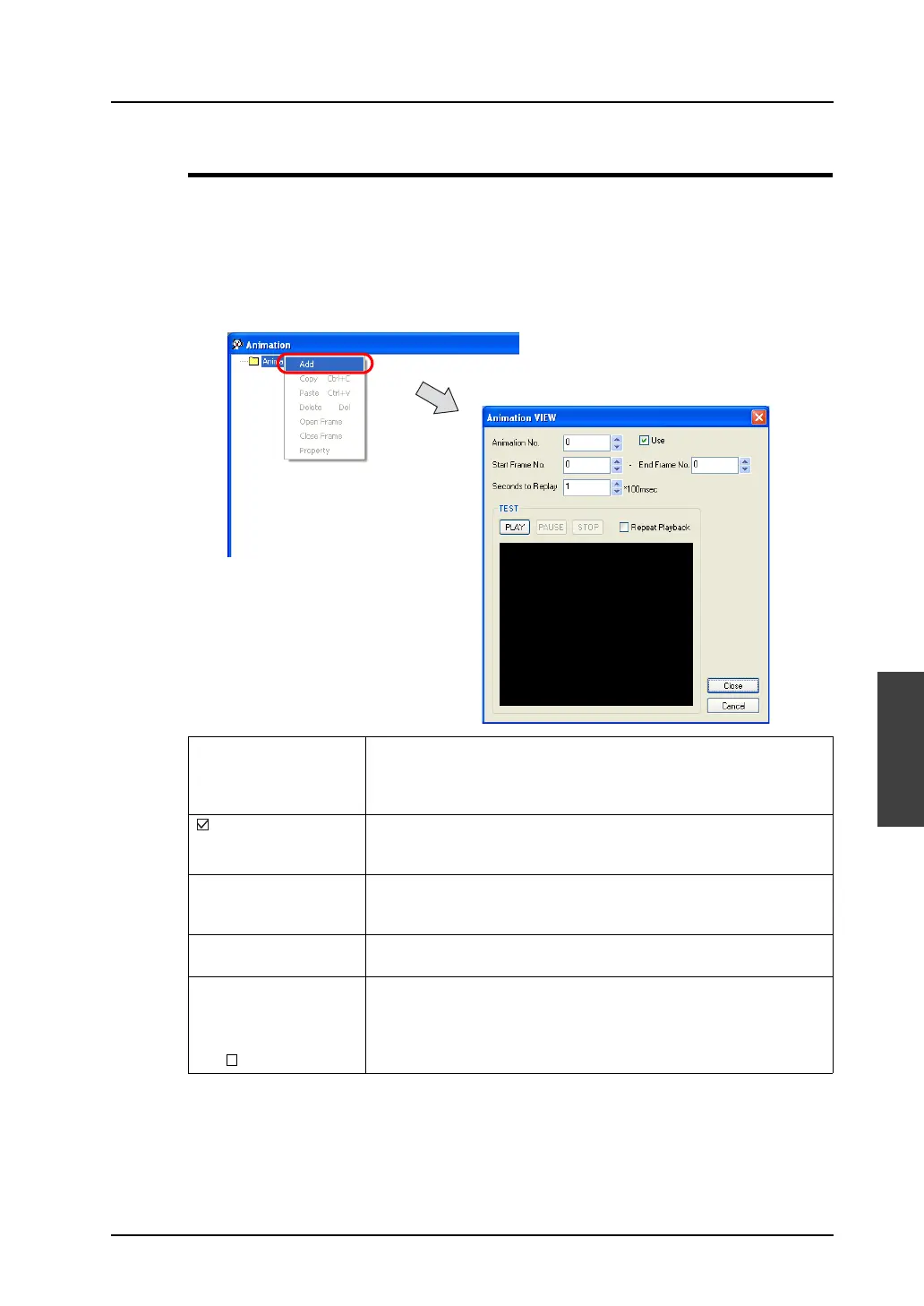
1. Right-click [Animation] and click [Add].
2. The [Animation VIEW] dialog is displayed.
Start setting from animation No. 0.
3. When the dialog setting is concluded, click the [Close] button.
The [Animation] window is displayed again.
Animation No. (0 - 1,023) The animation number you are currently editing is displayed.
You can change the animation number by clicking the up/down arrow
buttons. You can also enter the number directly without using the
buttons.
Use A check mark for this option denotes that the animation number has
been set.
To clear the setting, uncheck this box.
Start Frame No.
End Frame No.
(0 - 1022)
Specify the number (range) of frames to be used for this animation.
Seconds to Replay
(×100 msec)
Set the switching cycle (speed) in which you switch and display the
frames that you specified for [Start Frame No.] and [End Frame No.].
[TEST]
[PLAY]
[PAUSE]
[STOP]
[ Repeat Playback]
When the frames have been registered, you can check the actual
motion of animation.



 To Next Page