6.5 Transfer Procedure (Using a Card)
6-40
2. Transfer Procedure from the CF Card to MONITOUCH
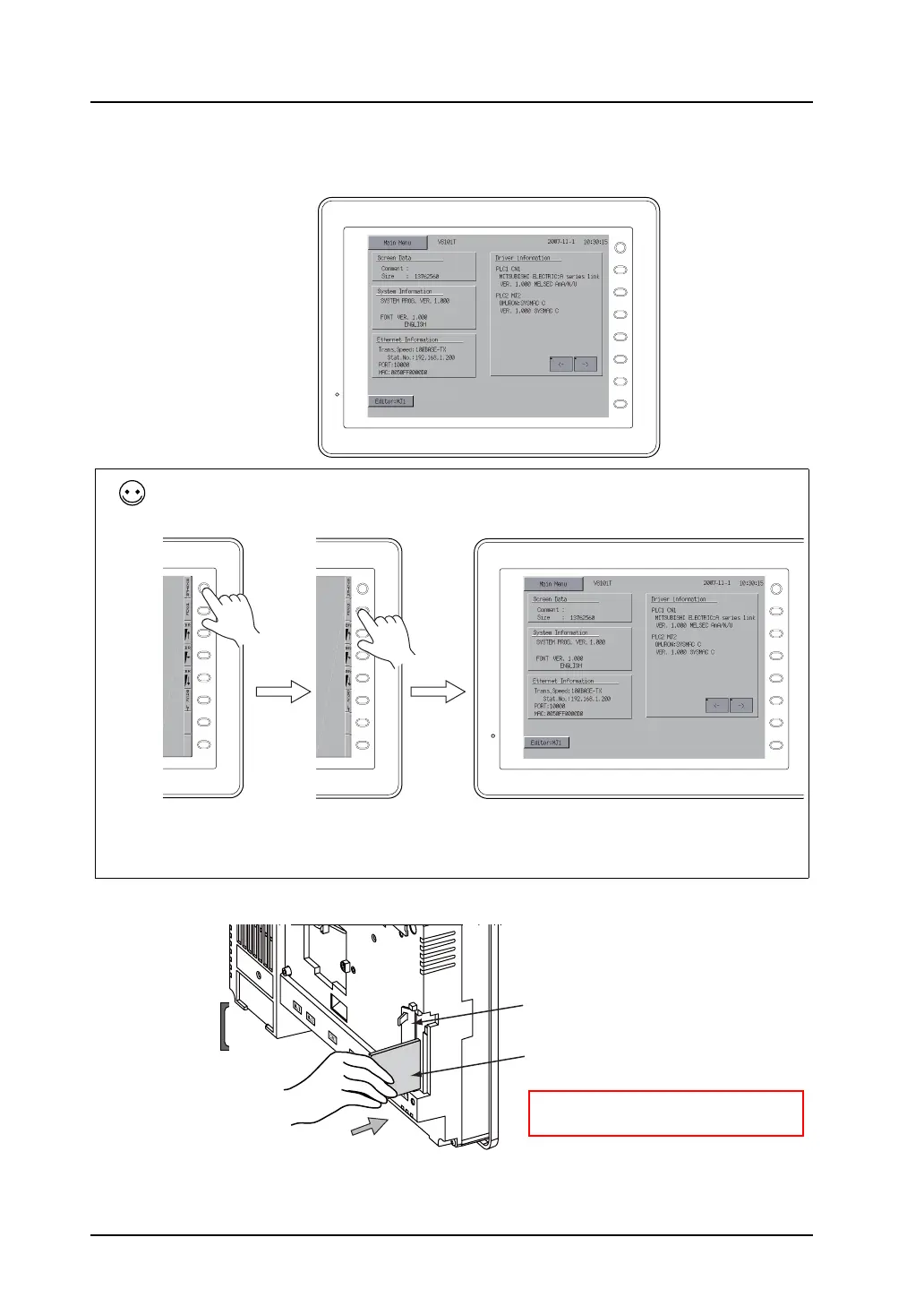
1) Display the Main Menu screen on MONITOUCH.
2) Insert the CF card that contains the screen data into MONITOUCH.
F 1
F 2
F 3
F 4
F 5
F 6
F 7
SYSTEM
To display the Main Menu screen:
Press the [SYSTEM] switch. When the menu is displayed, press the [F1] switch. Then the Main Menu screen is
displayed.
If the screen is not changed by pressing the [SYSTEM] or [F1] switch, the switch may be prohibited or set to
become active when the switch is held down for a certain time.
For more information, refer to the description regarding the function switch in the V8 Series Hardware
Specifications.
F 1
F 2
F 3
F 4
F 5
F 6
F 7
SYSTEM
F 1
F 2
F 3
F 4
F 5
F 6
F 7
SYSTEM
F 1
F 2
F 3
F 4
F 5
F 6
F 7
SYSTEM
96MB
CompactFlash Card
F1
F2
F3
F4
F5
F6
F7
SYSTEM
POWER
Backside
CF card cover
CF card
* Be sure of the orientation of the CF
card.



 To Next Page