6.5 Transfer Procedure (Using a Card)
6-41
6
Transfer with V8
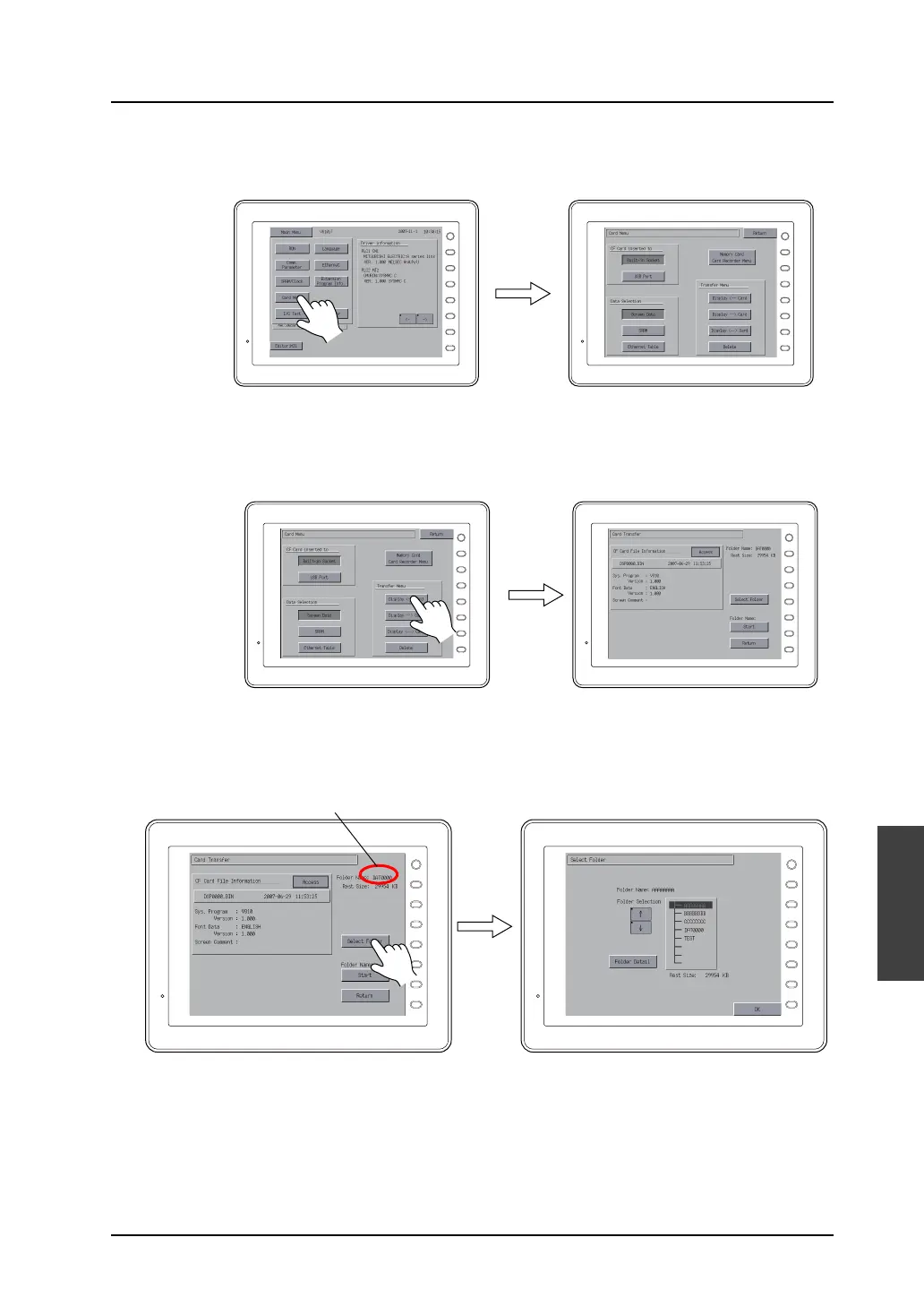
3) On MONITOUCH, press the [Main Menu] switch → [Card Menu] switch.
The Card Menu screen is displayed.
4) Select [Screen Data] under [Data Selection] and an option as desired under [CF Card inserted
to].
Press the [Display <--- Card] switch.
The [CF Card File Information] window is displayed.
5) When the name of the access folder created in the CF card is shown as [Folder Name], go to
the next step (step 6).
When a different name is displayed as [Folder Name], press the [Select Folder] switch and
select the appropriate folder.
F 1
F 2
F 3
F 4
F 5
F 6
F 7
SYSTEM
F 1
F 2
F 3
F 4
F 5
F 6
F 7
SYSTEM
F 1
F 2
F 3
F 4
F 5
F 6
F 7
SYSTEM
F 1
F 2
F 3
F 4
F 5
F 6
F 7
SYSTEM
F 1
F 2
F 3
F 4
F 5
F 6
F 7
SYSTEM
F 1
F 2
F 3
F 4
F 5
F 6
F 7
SYSTEM
When the target folder name is not displayed:
Press the [Select Folder] switch.
Select the target folder.



 To Next Page