3.2 Setting Up Editing Environment
3-7
3
Screen Editing
Display Environment Setting
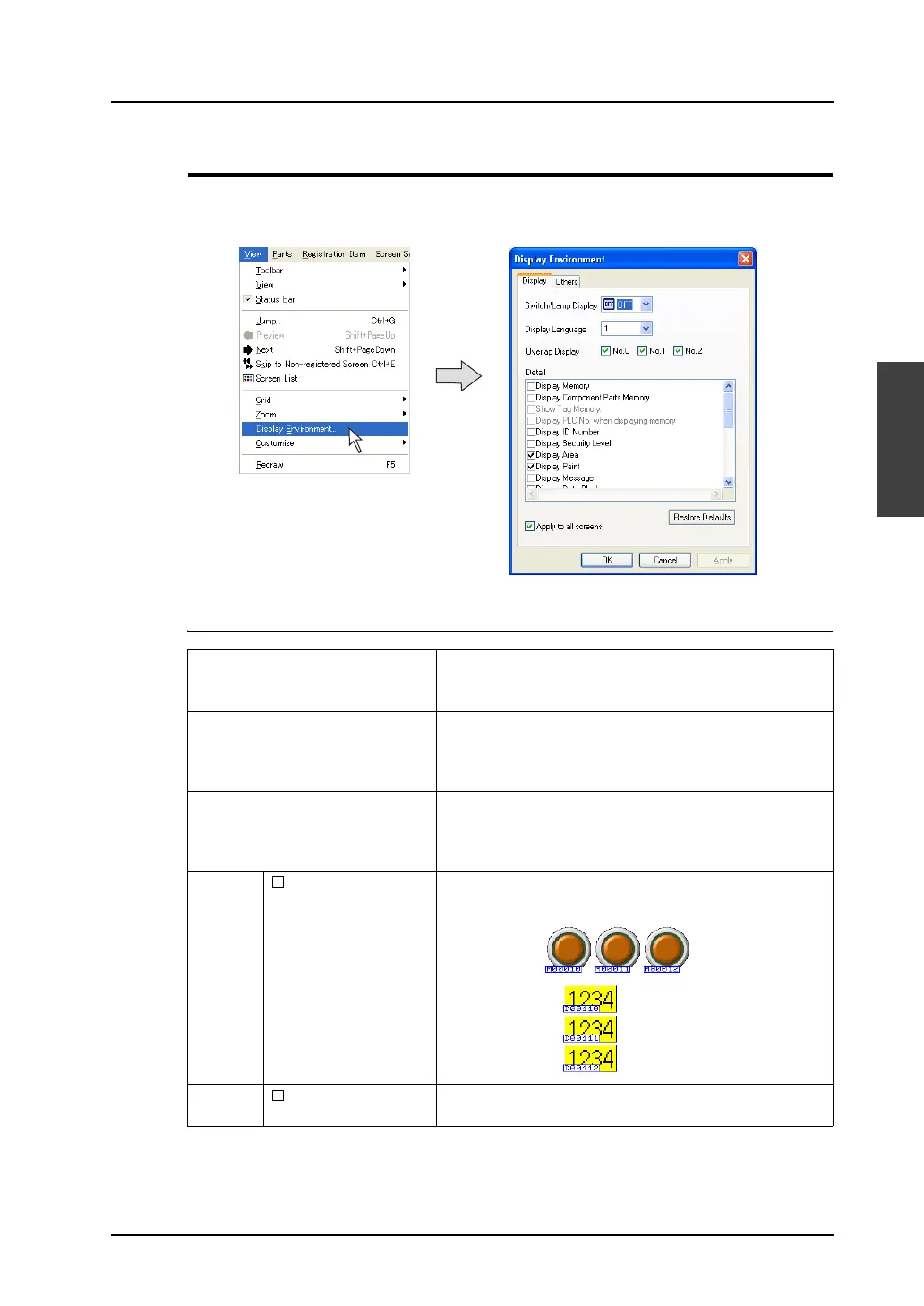
The display environment on the screen can be set all at once.
Click [Display Environment] from the [View] menu. The [Display Environment] dialog is displayed.
[Display] Tab Window
Switch/Lamp Display Allows you to select the display status of switch parts or
lamp parts selecting from [ON], [OFF], and [P3] - [P16].
* This option can also be set from the [Standard] toolbar.
Display Language This option is set to select an interface language.
The interface language is changed selecting from [1] to [8].
* This option can also be set from the [Multi-language]
toolbar.
Overlap Display Allows you to select respectively whether to show or hide
overlap ID numbers from 0 to 2.
* This option can also be set from the [Overlap] toolbar or
from the right-click menu.
Detail Display Memory When this option is checked, the memory set for each item is
displayed.
Display Component
Parts Memory
When this option is checked, the memory set for each item
of component parts is displayed.



 To Next Page