5.4 Message
5-11
5
Registration
Mark
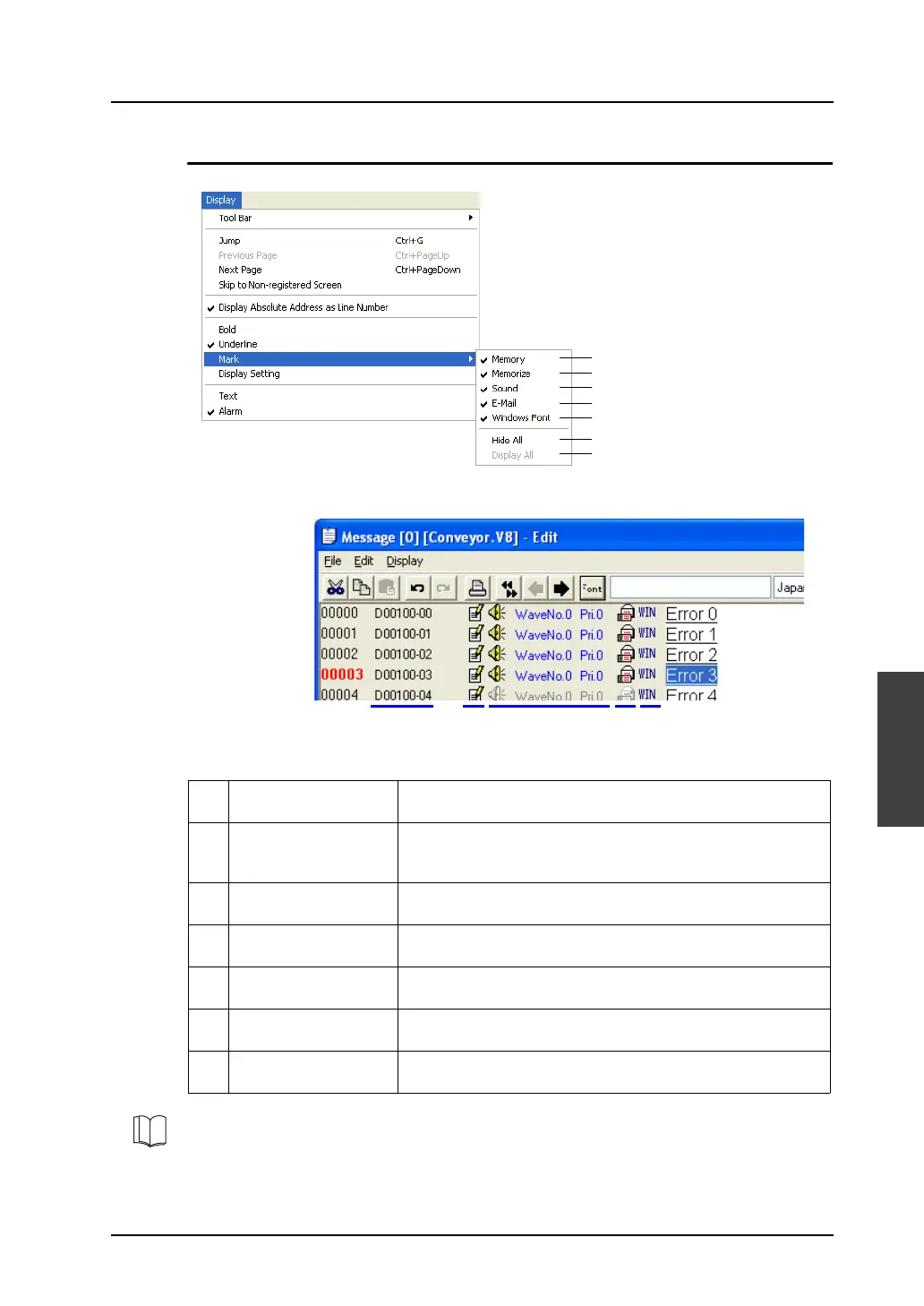
The following displays are available.
1 Memory
(with [Alarm] checked)
When this command is selected, the allocation of memory used
for alarm display is displayed.
2 Memorize
(with [Alarm] checked)
Checked lines are stored as history records in the alarm tracking
mode.
Unchecked lines are not stored in history records.
3 Sound
(with [Alarm] checked)
When this command is selected, the column that indicates
settings with/without sound output is displayed.
4 E-mail
(with [Alarm] checked)
When this command is selected, the column that indicates
settings with/without e-mail is displayed.
5 Windows Font When this command is selected, the column that indicates
whether or not Windows fonts are used is displayed.
6 Hide All
(with [Alarm] checked)
When this command is clicked, the sub-menu items are
unchecked all at once.
7 Display All
(with [Alarm] checked)
When this command is clicked, the sub-menu items are checked
all at once.
1
2
3
4
5
6
7
1 2 3 4 5
Refer to the V8 Series Reference Manual for more information on the following: For alarm tracking,
refer to “Chapter 10.3 Alarm Tracking (Historical).” For sound output, refer to “Chapter 14.4 Sound.”
For e-mail, refer to “Chapter 19.4 E-Mail.”



 To Next Page