3.8 Useful Functions for Screen Editing
3-99
3
Screen Editing
Multi Copy
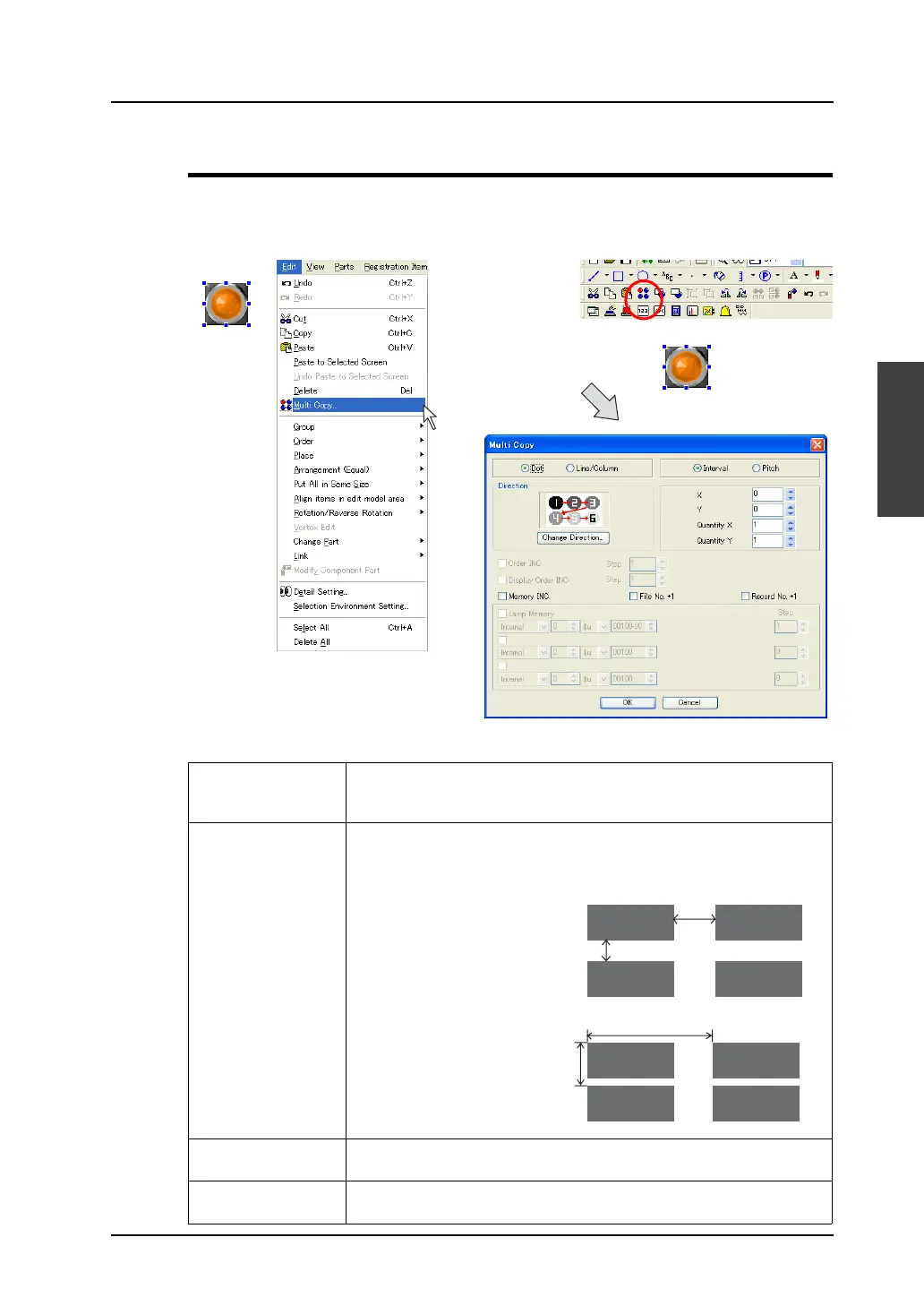
A part or a graphic (parts or graphics) can be copied multiple times at one time.
Select a part or a graphic (or parts or graphics), and click this menu (or the [Multi Copy] icon).
The [Multiple Copy] dialog is displayed.
Dot
Line/Column
Choose either option for placing copied parts on the screen, by dots or by
lines/columns.
For more information on the line and column, refer to page 2-36.
Interval /
Pitch
Choose either option for placing copied parts on the screen, by pitch or at
intervals.
X /
Y
Specify distances along the X and Y directions for placing copied parts.
The unit for these values is [Dots] or [Line/Column] that is selected.
Quantity X /
Quantity Y
Specify the number of required copies. The copy source must be included
in this number.
OR
Y: 10 dots
X: 20 dots
(Copy source)
Y
: 20 dots
X
: 60 dots
(Copy source)
When [Interval] is chosen:
X: 20
Y: 10
Quantity X: 2
Quantity Y: 2
When [Pitch] is chosen:
X: 60
Y: 20
Quantity X: 2
Quantity Y: 2



 To Next Page