2.6 Screen Composition
2-37
2
Editor
Screen Capacity
• There is no limitation of available memory per screen for the V8 series. (Available memory on a
screen is limited to 256 KB for the V7 series, and to 128 KB for the V6 series.)
However, there is the limitation of the number of items registered with one screen.
For more information, refer to “Capacity for Parts Placement” (page 3-47).
• One file is capable of storing 4,000 screens.
• The memory capacity of one file differs depending on the V8 series model as well as the font type
in use.
For more information, refer to “Appendix 3 Display Language” in the V8 Series Reference Manual.
• Make sure to check the use environment and available memory when registering screens.
* If a screen data file exceeds the maximum capacity, an attempt to transfer the file causes an
alarm message “The size is too large to communicate” and results in transmission failure.
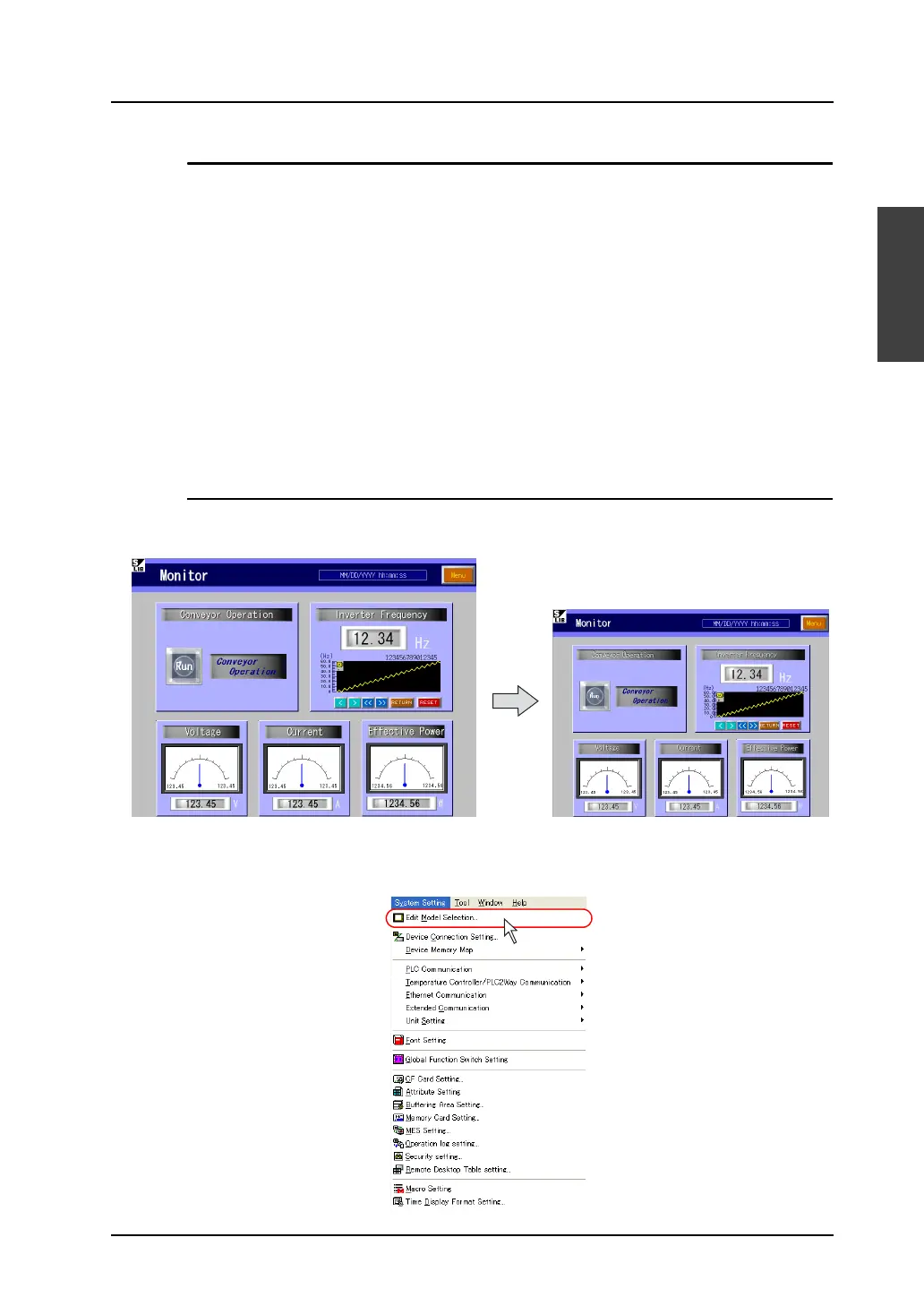
Auto Adjustment for Screen Resolution
When you change the current edit model to another, it is possible to make the screen resolution adjust
automatically to fit in its own screen display.
As an example, change the edit model from V810T to V812S following the procedure shown below.
1. Click [Edit Model Selection] from the [System Setting] menu.
The resolution of 800 × 600 is changed to
640 × 480 when the edit model is changed.



 To Next Page