HK Gothic and HK Times
A1-25
A1
Font
3. Manual Font Setting
In the case of the HK fonts, character codes used on screens will be recognized automatically or
manually, depending on the used functions (part or mode) (see the table on the previous page).
Automatic Font Setting
By means of automatic font setting, character codes used on the screen are recognized and only
partial sections of the font data including the codes are transferred to the V series.
There is no special operation to be performed by the user.
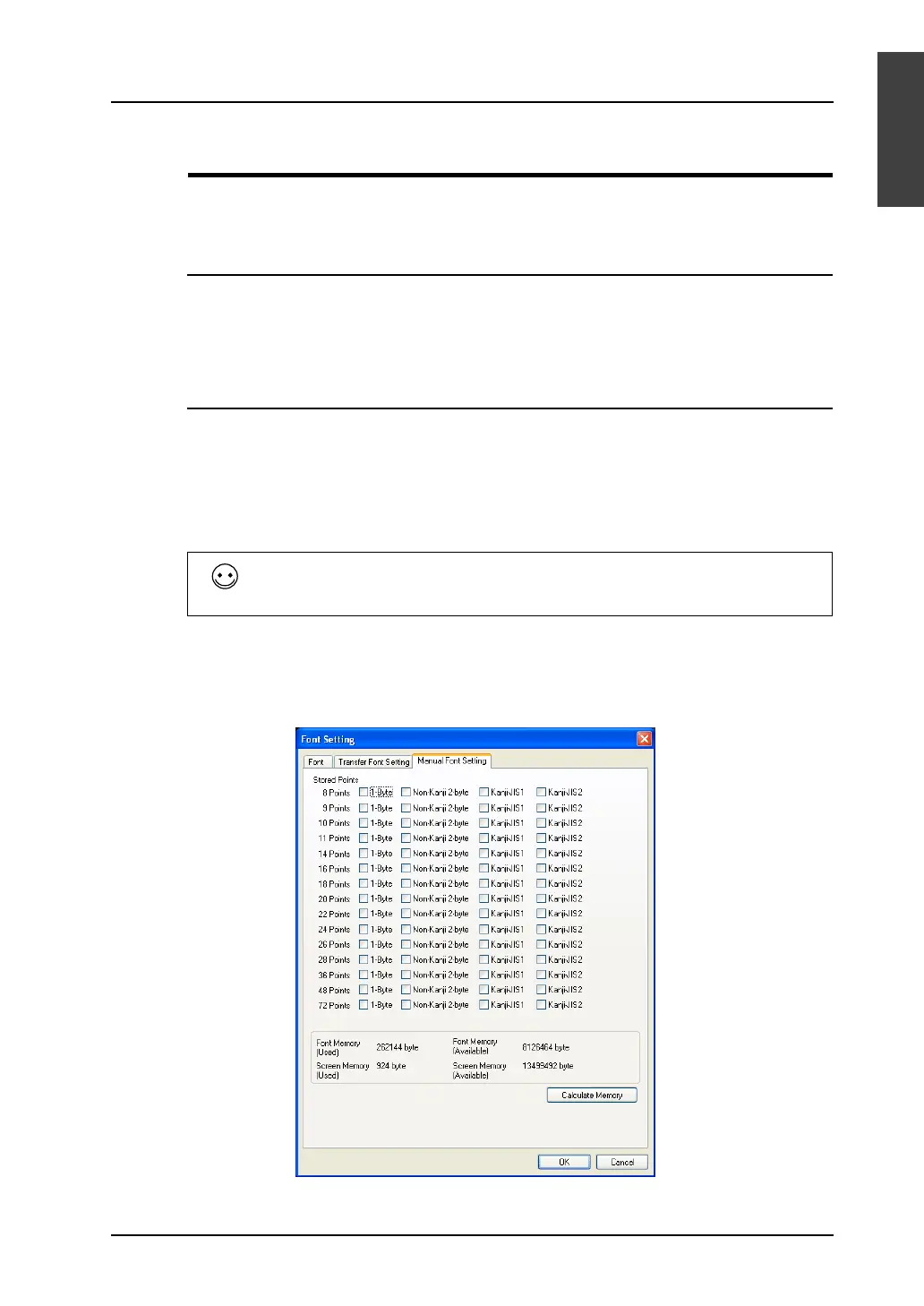
Manual Font Setting
When text data, for instance, to be displayed on a character display or message display will vary, such
text data is not determined on the software. In such a case, select probable items of font data to be
used and transfer them to the V series. This operation is a manual font setting.
It is necessary to check the number of points specified for the placed text as well as the function (mode
or part) in which the text is placed. Whether or not to make manual font settings is determined as a
result. (See the table on page A1-24 in this chapter.)
When any function (mode or part) that needs manual font setting is used on the screen, proceed to set
the [Font Setting] dialog.
1. Open the [Font Setting] dialog from the [System Setting] menu. Open the [Manual Font Setting]
tab window.
Since the 12-point size data is transferred to the V series first, manual font setting is not
necessary. For more information on the 12-point size data, see page A1-27 in this
chapter.



 To Next Page