6.1 Transfer Methods
6-3
6
Transfer with V8
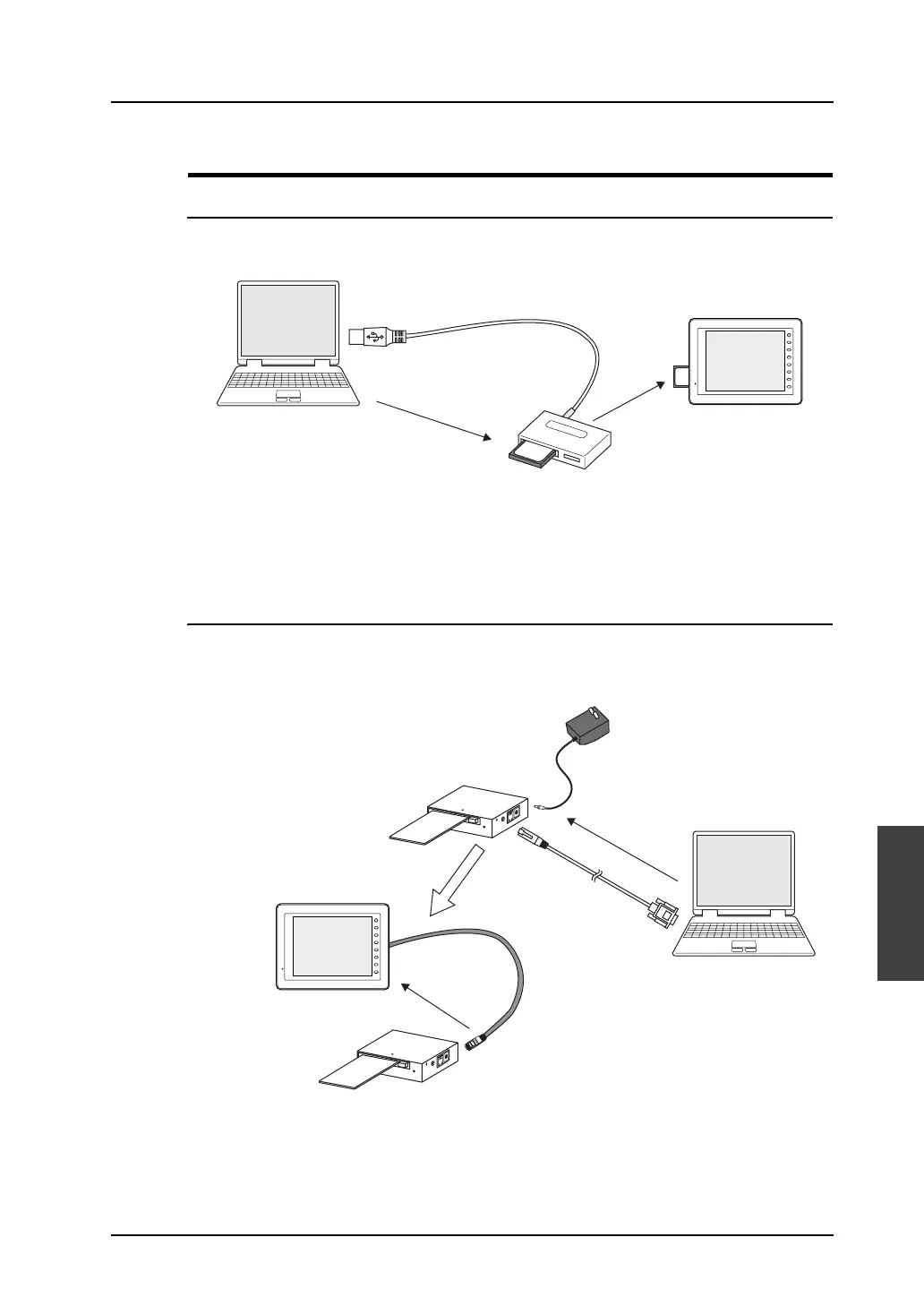
Using a Card
CF Card
Data in the computer is first stored on a CF card which is commercially available, and then insert the
CF card into MONTOUCH to transfer the data.
The appropriate environment to read from or write to the CF card is required on the computer side.
For transfer procedure, refer to page 6-36.
Memory Card
Data in the computer is first stored on a memory card using Hakko Electronics’ “CREC” (card recorder)
and “REC-MCARD” (memory card) and then attach CREC with REC-MCARD to MONITOUCH. Data
is then transferred to MONITOUCH.
When connecting CREC and the computer, use the AC adaptor included with CREC as well as V-CP.
For transfer procedure, refer to page 6-43.
96MB
CompactFlash Card
F 1
F 2
F 3
F 4
F 5
F 6
F 7
SYSTEM
96
MB
CF card
manager
CF card
V8 series
CF card reader/writer
CREC
CREC-CP
CREC
V-CP
F 1
F 2
F 3
F 4
F 5
F 6
F 7
SYSTEM
Memory card
V8 series
Memory card
AC adaptor
Connecting to serial port



 To Next Page