6.5 Transfer Procedure (Using a Card)
6-47
6
Transfer with V8
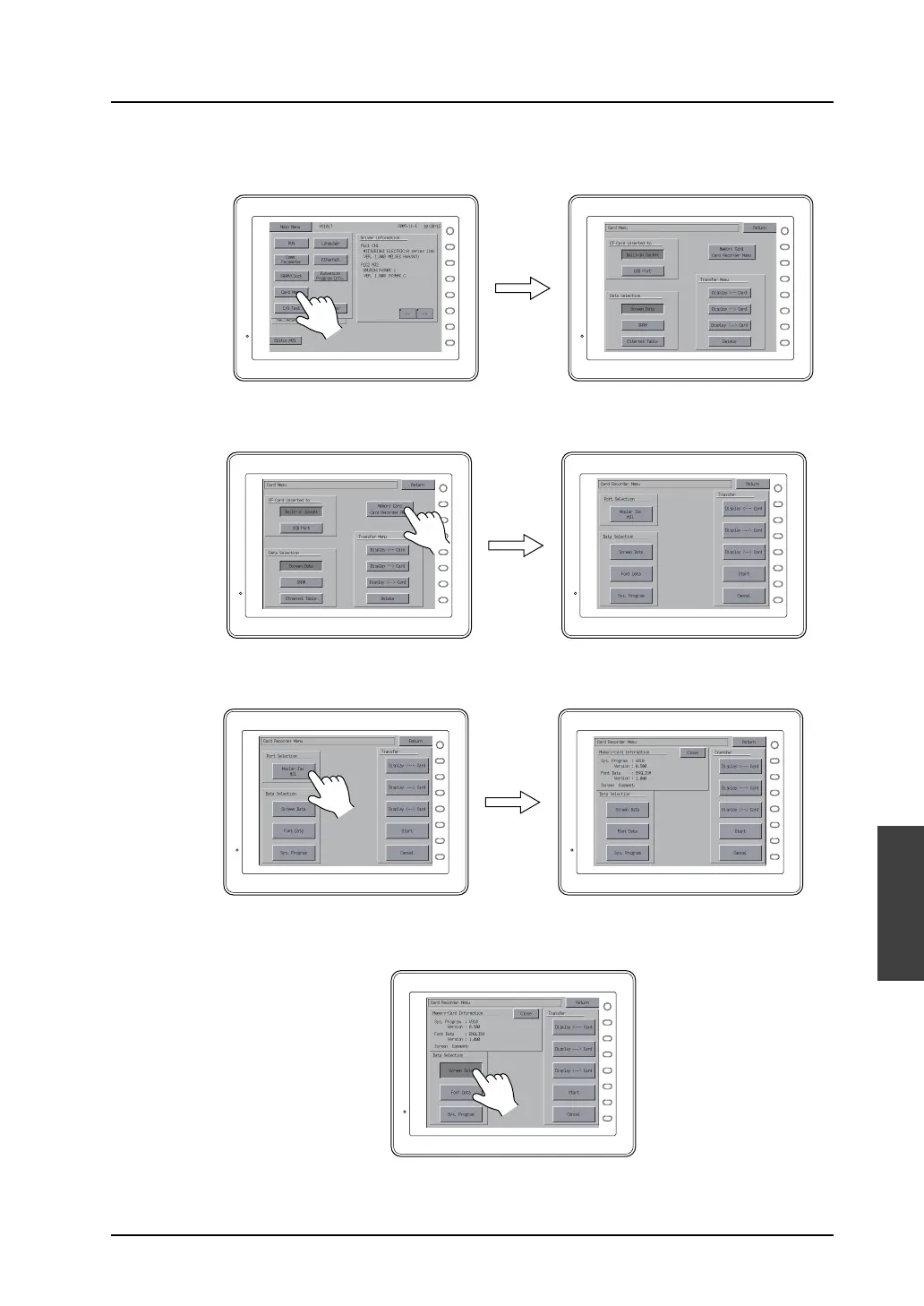
3) Press the [Card Menu] switch.
The Card Menu screen is displayed.
4) Press the [Memory Card Card Recorder Menu] switch.
The Card Recorder Menu screen is displayed.
5) Press the [Modular Jack MJ1 (or 2)] switch in the [Port Selection] field.
The [Memory Card Information] dialog is displayed.
6) Press the [Screen Data] switch under [Data Selection]. (If information on the system program
or font data is displayed, [Font Data] or [Sys. Program] can also be selected.)
F 1
F 2
F 3
F 4
F 5
F 6
F 7
SYSTEM
F 1
F 2
F 3
F 4
F 5
F 6
F 7
SYSTEM
F 1
F 2
F 3
F 4
F 5
F 6
F 7
SYSTEM
F 1
F 2
F 3
F 4
F 5
F 6
F 7
SYSTEM
F 1
F 2
F 3
F 4
F 5
F 6
F 7
SYSTEM
F 1
F 2
F 3
F 4
F 5
F 6
F 7
SYSTEM
F 1
F 2
F 3
F 4
F 5
F 6
F 7
SYSTEM



 To Next Page