5.6 Graphic Library
5-17
5
Registration
[Parameter Setting] tab window
• [Parameter] dialog
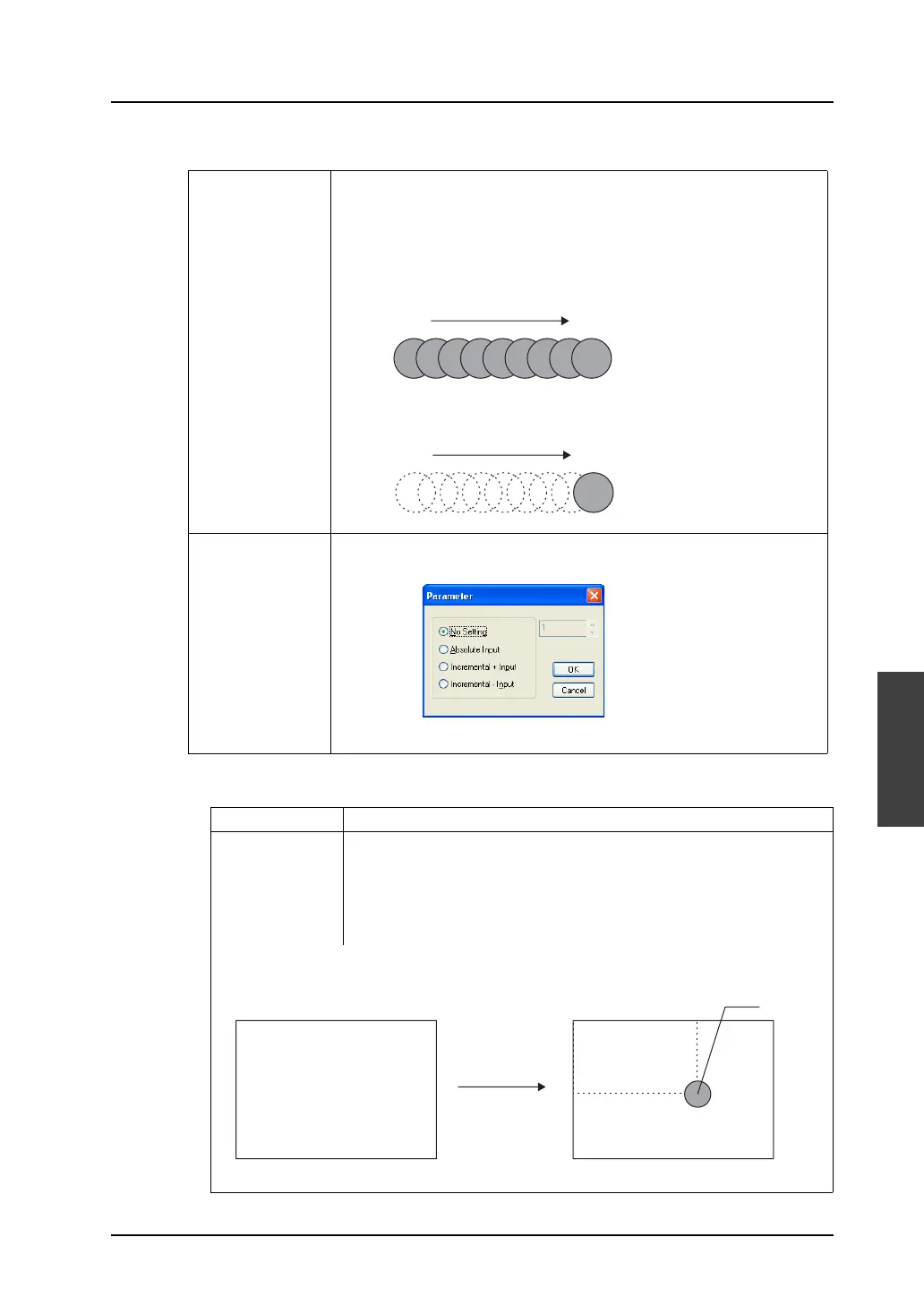
Action When moving, transforming, or changing graphics, the new one is placed
over the previous one, or the previous one is cleared before the new one is
placed on the screen. Select either manner.
[Replace]
The new graphic is placed over the previous one.
Therefore, the previous one remains on the screen.
[Animation]
Only the new graphic is placed on the screen.
Set
(For each option)
When you go to a setting item and click its [Set] button, the [Parameter]
dialog is displayed.
Refer to the following description for details.
No Setting No memory is allocated.
Absolute Input Allows you to specify the parameter value in absolute coordinates.
Specifying coordinates:
With respect to coordinates (0, 0) at the top left corner of the screen and
(639, 479) at the bottom right corner (or (319, 239) or (799, 599) or (1023,
767)), specify the coordinates for moving a graphic in memory.
(0, 0)
(639, 479)
(300, 200)
When (300, 200) is specified in parameter memory with [Absolute Input]
checked, the graphic is moved to the position below.



 To Next Page