Labeling systems Instruction manual GLM-I
54 38.019.129.001 en
6
6.7 Adjusting rotary arm labeler
After lossening a knurled nut the labeler can be moved on a rail. Therefore, the chute if the
rotary arm labeler can be adjusted centrally to the respective label width. Proceed as fol-
lows:
Loosen the knurled screw.
Move labeler until the middle of the chute is positioned centrally above the label.
Tighten knurled screw.
6.7.1 Selecting position of label with rotary arm labeler
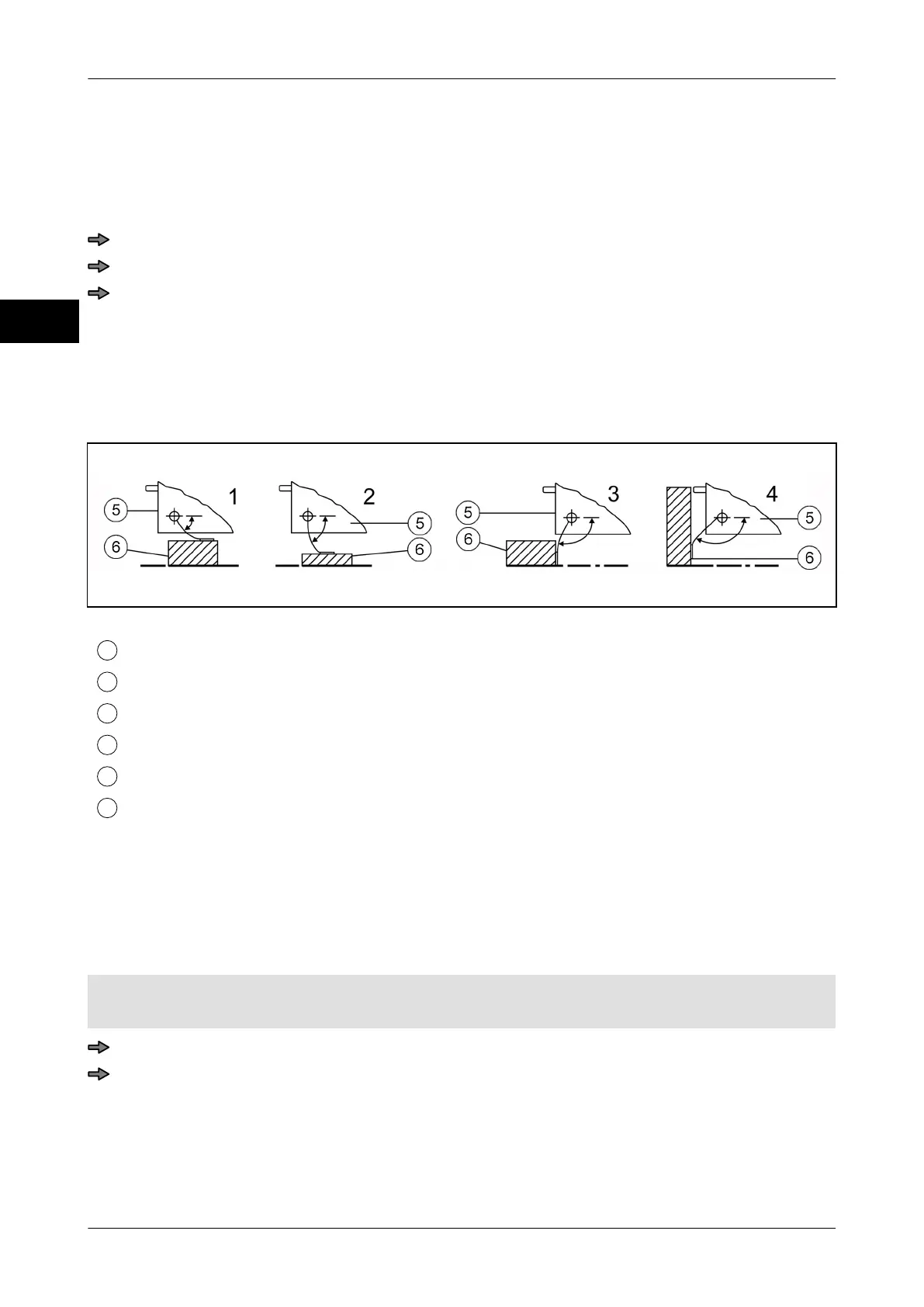
In devices with rotary arm labelers, labels can be applied on to the top, side or front-side of
the package. Depending on required label application and package size the respective po-
sition 1- 4 can be set.
Illustration 20: Overview of label position
Label position 1: for labeling from top
Label position 2: for labeling from top and flat packages
Label position 3: for labeling on front side
Label position 4: for side labeling and high packages
Labeler
Packages
Therefore the following settings are possible:
–
<Position 1>
– <Position 2>
– <Position 3>
– <Position 4>
Labeler type: <Rotary arm labeler>
Mode level: 1
<Device menu> / <Labeler> / <Label position>
Press softkey with respective setting.



 To Next Page