Operating InstructionsFacsimile Reference (option) <Advanced Features>
148
When There is No Paper of the
Correct Size
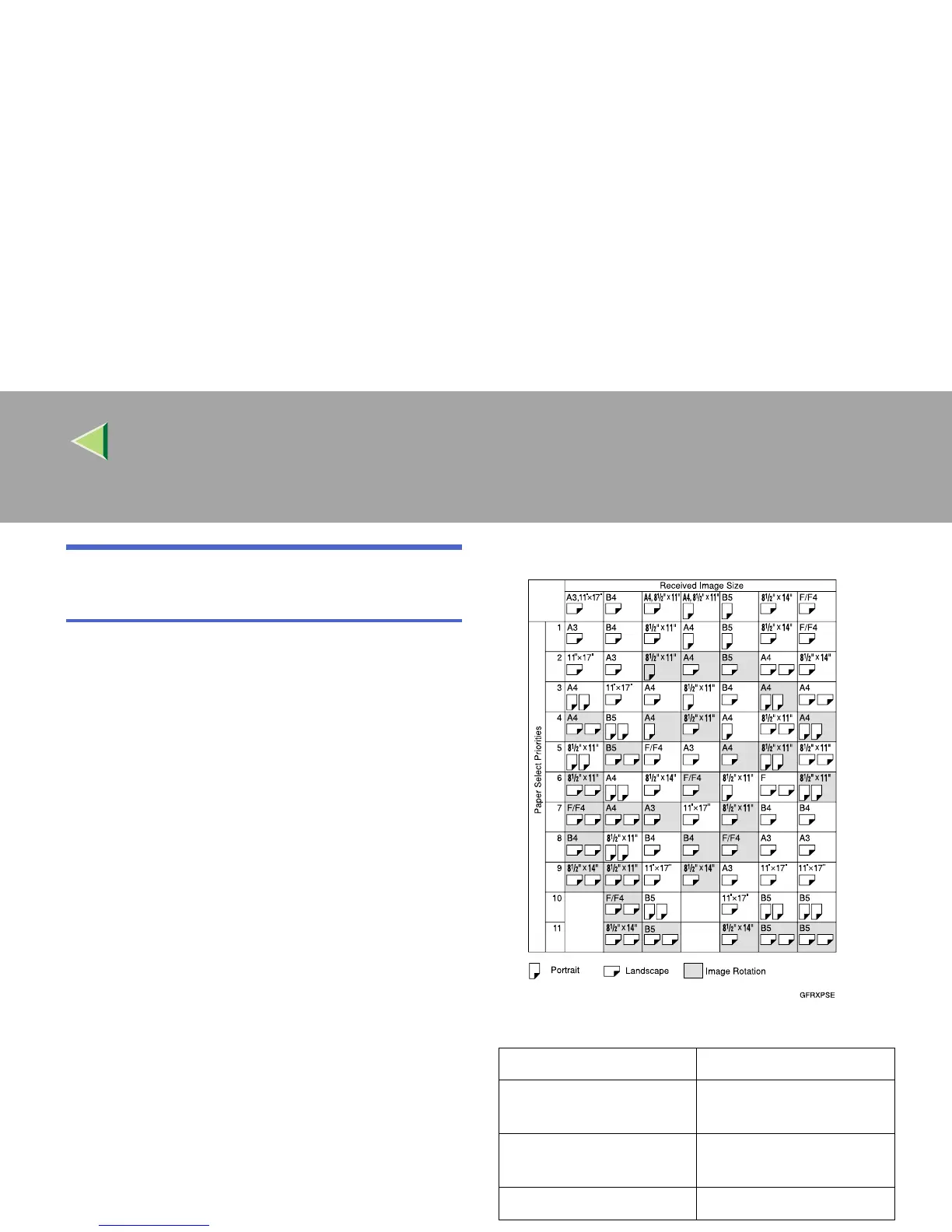
If there is no paper in your machine that matches
the size of a received message, the machine will
choose a paper size based upon the paper you
have available. For example, if your machine has
8
1
/
2
"×11"K and A3L loaded and you receive a
A4L size message, check the A4L column of
the following table. The paper size at the top has
the highest priority. In this case, since
8
1
/
2
"×11"K is a higher priority than A3L, the
message is printed on 8
1
/
2
"×11"K.
If only B5L is loaded and you receive an A3L
message, the received message is stored in mem-
ory and will not be printed.
❖
❖❖
❖ Priority Table
Page Reduction Disabled
Reduction in Sub-scan
Direction
Enabled
Page Separation Thresh-
old
20mm (0.79")
Width or Length Priority Width



 To Next Page