Solving Problems
77
4
Solving Problems
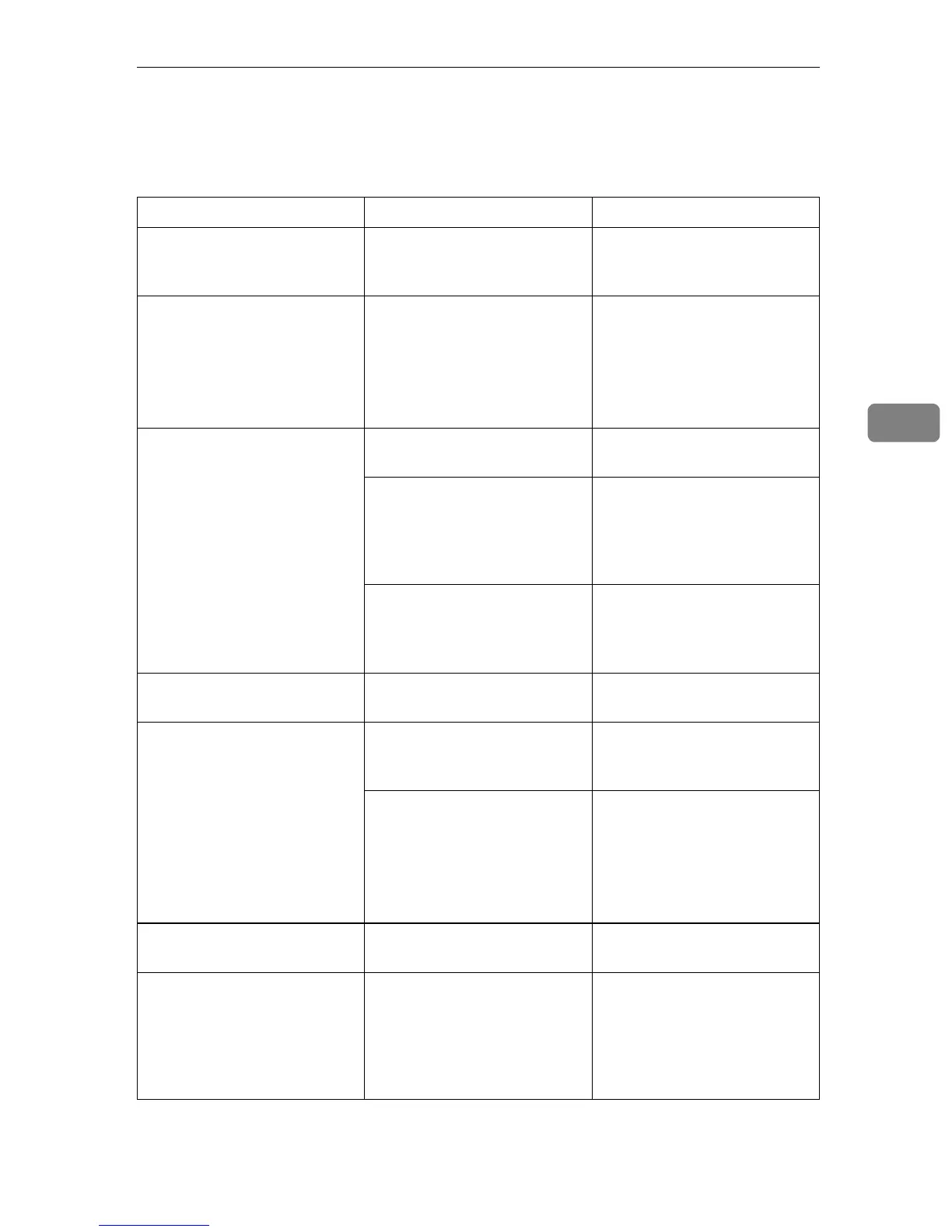
This table lists some common problems and their solutions.
Problem Solution Refer to
Image background appears
dirty when received at the
other end.
Adjust the scan density. ⇒ p.36 “Image Density (Con-
trast)”
Printed or sent image contains
spots.
The optional Document Feed-
er (ADF) or exposure glass is
dirty. Clean them.
Make sure that ink or correc-
tion fluid is dry before placing
the original.
⇒“Cleaning and Adjusting
the machine” in Maintenance
Guide 1 Copier System Edi-
tion
Received image is too light. Request the sender to increase
the image density.
---
When using moist, rough or
processed paper, the printed
image may be partly invisible.
Only use recommended pa-
per.
⇒“Paper Recommendations”
in Maintenance Guide 2 Copi-
er System Edition
When D appears on the dis-
play, toner is beginning to run
out. Replace the toner car-
tridge soon.
⇒“Replacing the Toner Car-
tridge” in Maintenance Guide
1 Copier System Edition
Message appears blank at the
other end.
The original was placed up-
side down. Place it properly.
⇒ p.16 “Placing Originals”
You want to cancel a Memory
Transmission.
If the original is being
scanned, press [Cancel] or the
{
{{
{Clear/Stop}
}}
} key.
⇒ p.27 “Canceling a Memory
Transmission”
If the original is being sent or
if it is in stand-by, press
[Change/Stop TX File] or the
{
{{
{Clear/Stop}
}}
} key.
⇒ p.27 “Canceling a Memory
Transmission”
⇒ Chapter 2, “Checking and
Canceling Transmission
Files” in the Advanced Fea-
tures manual
You want to cancel an Imme-
diate Transmission.
Press the {
{{
{Clear/Stop}
}}
} key. ⇒ p.33 “Canceling an Imme-
diate Transmission”
You cannot add any destina-
tions to a Group although the
number of destinations has
not reached the maximum.
100 destinations have been
programmed with the num-
ber keys (1,000 with the op-
tional Fax Function Upgrade
Unit). Program more numbers
with Quick Dials.
⇒ p.39 “Dialing”



 To Next Page