Inside
5
1
Inside
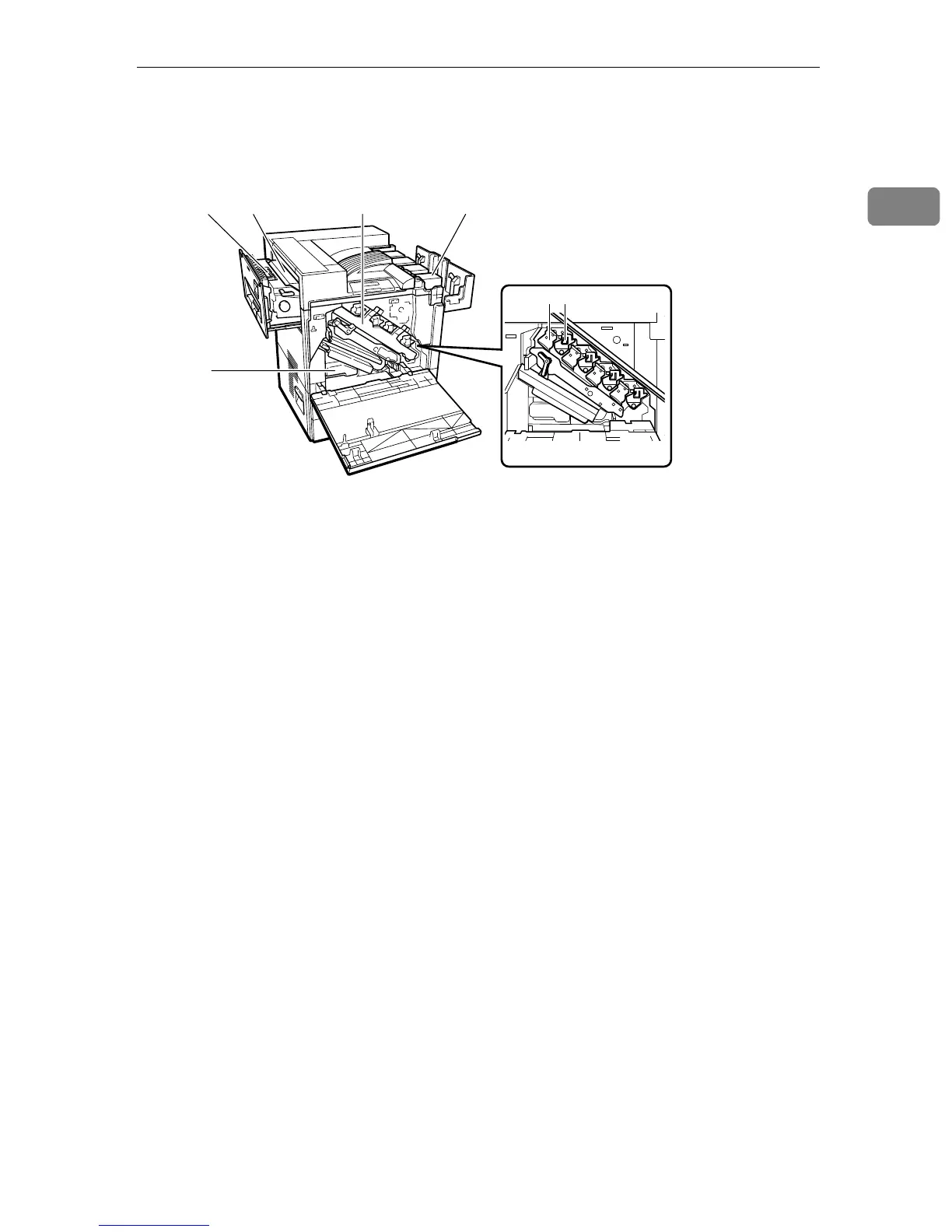
1. Fusing Unit
Fuses the image on paper.
When "Fusing Unit Replacement" ap-
pears on the panel display, replace this
unit.
2. Fusing Oil Unit
Attach to the Fusing Unit.
When "Fusing Oil Unit Replacement" ap-
pears on the panel display, replace this
unit.
3. Used Toner Bottle
Collects toner that is wasted during
printing.
When "Used toner bottle is full." appears
on the panel display, replace with a new
Used toner bottle.
4. Inner Cover
Open this cover when replacing the Pho-
toconductor Unit or Development Unit.
5. Photoconductor Unit
The printer comes with one black Photo-
conductor Unit and three color (yellow,
cyan, magenta) Photoconductor Units.
When "Replacement of Photoconductor
Unit is required." appears on the panel
display, replace the appropriate Photo-
conductor Units.
6. Development Unit
The printer comes with one black Devel-
opment Unit and three color (yellow, cy-
an, magenta) Development Units.
When "Replacement of Development
Unit is required." appears on the panel
display, replace the appropriate Devel-
opment Units.
7. Toner Cartridge
Loads from the printer rear in the order
of magenta (M), cyan (C), yellow (Y), and
black (K).
When "Add Toner" appears on the panel
display, replace the appropriate toner
cartridge.
ZDJX703J
12
3
47
65



 To Next Page