Operating InstructionsFacsimile Reference (option) <Advanced Features>
261
D
DD
D
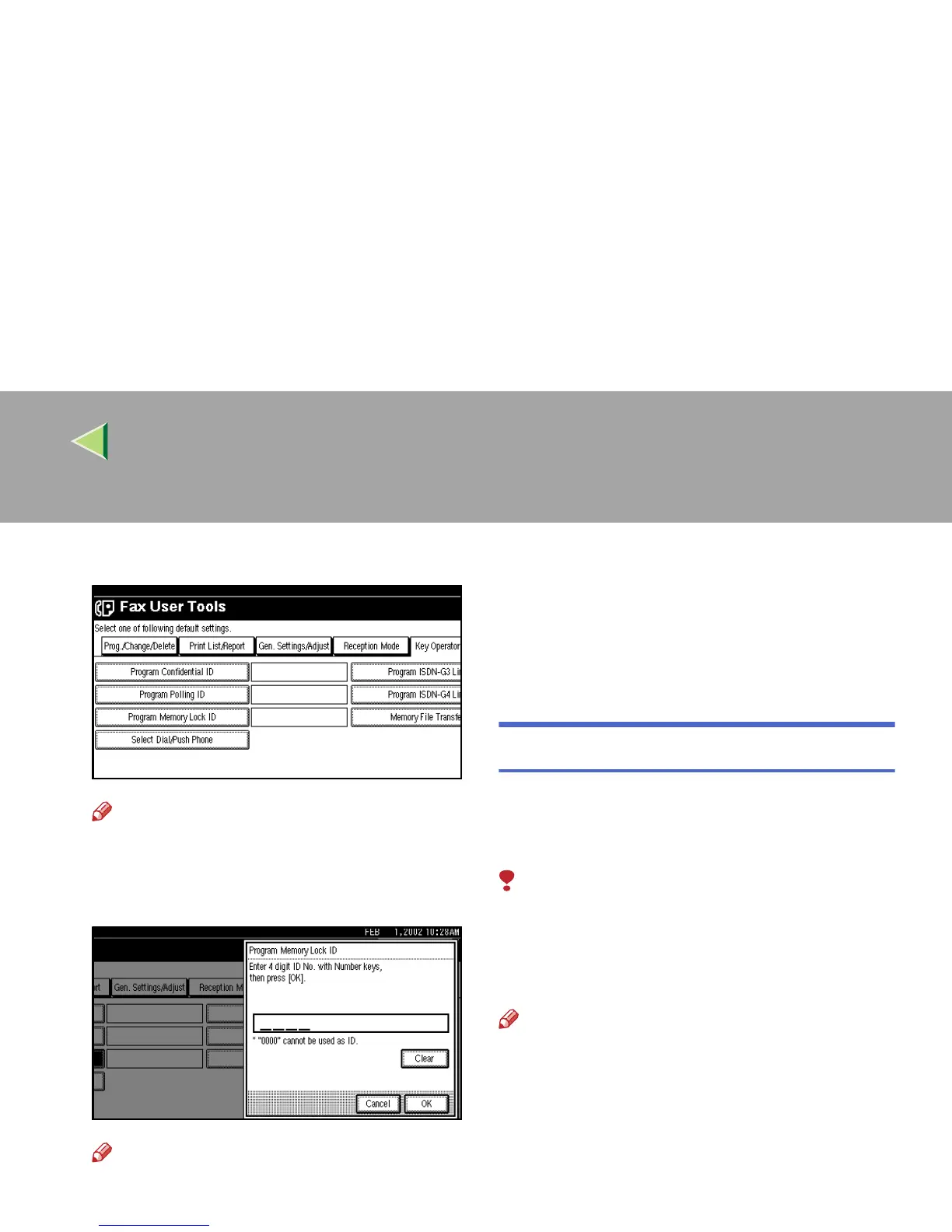
Select [Program Memory Lock ID].
Note
❒ If “Program Memory Lock ID” is not shown,
press [U
UU
U Prev.
] or [T
TT
T Next
].
E
EE
E
Enter an ID with number keys.
Note
❒ If you make a mistake, press [Clear] or the
{
{{
{Clear/Stop}
}}
} key and try again.
F
FF
F
Press [OK].
To cancel programming an ID, press [Cancel].
The display will return to step
D
.
G
GG
G
Press the {
{{
{User Tools/Counter}
}}
} key.
The initial display is shown.
Selecting Dial/Push Phone
Use this function to select a line type when the
machine is connected to a G3 analog line.
A Dial and Push line are available for selection.
Limitation
❒ When the optional G3 expansion unit is in-
stalled, “G3-2” is displayed.
❒ If you are only connected to an ISDN line, this
function is not available.
Note
❒ “G3-2” is shown on the display, depending on
the number of Extra G3 Interface Units in-
stalled.
❒ Use the same procedure to program and
change this function.
❒ This function is not available in some areas.



 To Next Page