Operating InstructionsFacsimile Reference (option) <Advanced Features>
84
E
EE
E
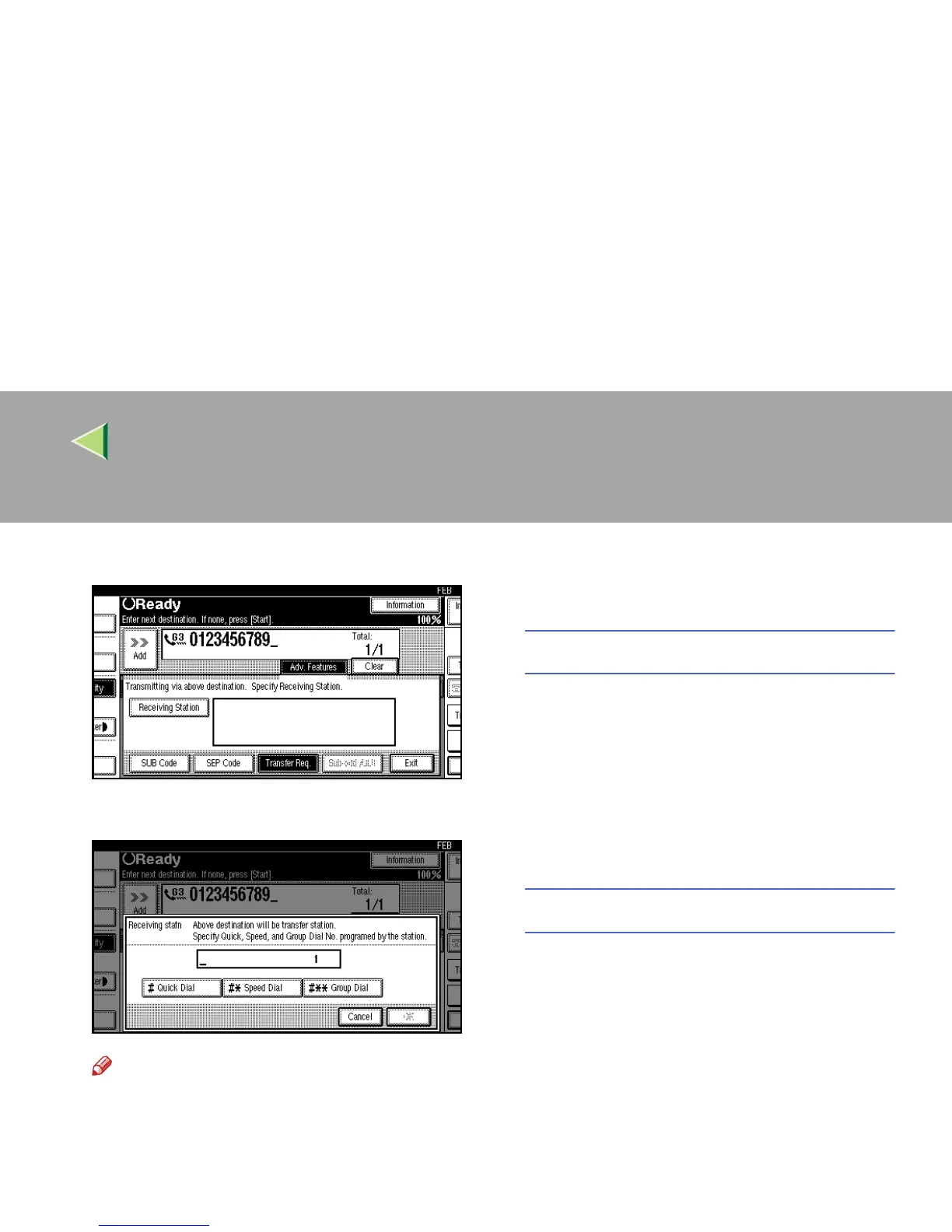
Press [Receiving Station].
F
FF
F
Dial an End Receiver.
Note
❒ You cannot enter the numbers of the End
Receivers directly. The numbers must be
stored in Quick Dials or Groups in the
Transfer Station(s). To specify an End Re-
ceiver, use the special format described
below.
❒ To cancel the Transfer Request, press
[Cancel] and the display will return to step
D
.
Quick Dial
A
AA
A Press [q
qq
q Quick Dial].
B
BB
B Enter the number (2 or 3 digits) of the
Quick Dial where the End Receiver is
stored.
For example, to choose the number stored
in Quick Dial 01 in the Transfer Station,
enter: {
{{
{0}
}}
} {
{{
{1}
}}
}.
Speed Dial
A
AA
A Press [q
qq
qp
pp
p Speed Dial].
B
BB
B Enter the number (2 or 3 digits) of the
Speed Dial code.
For example, to choose the number stored
in Speed Dial 12 in the Transfer Station,
enter: {
{{
{1}
}}
} {
{{
{2}
}}
}.



 To Next Page