Registering
68
3
Deleting
Limitation
❒ When a programmed group is being
used for a Memory Transmission on
standby, the message “
Specified
destination is used by trans-
mission standby file. It can-
not be changed or deleted.
Specify it again after trans-
mission is completed.
” is
shown. You cannot delete destina-
tions for this Group at this time.
Deleting a destination programmed
in a Group
A
AA
A
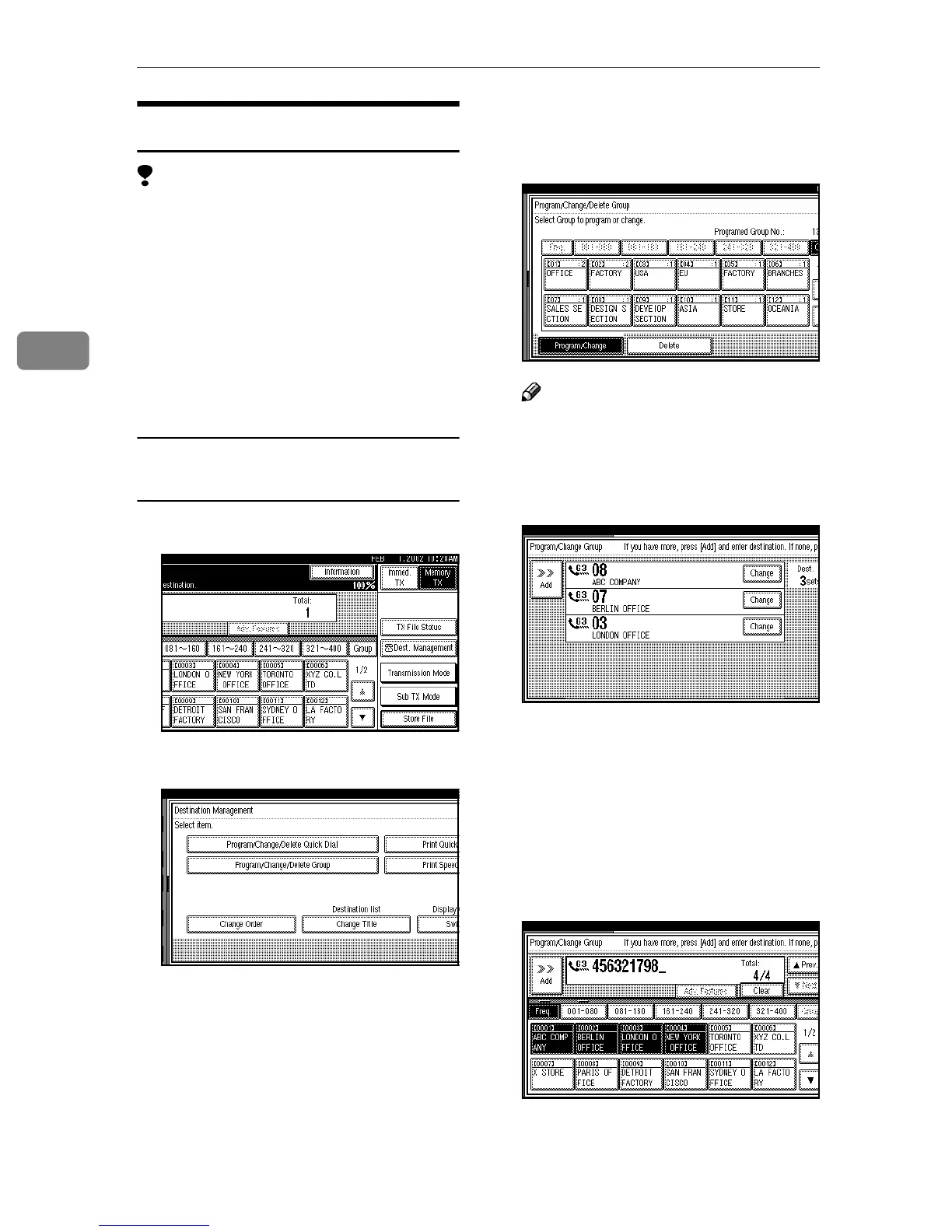
Press [Dest. Management].
B
BB
B
Press [Program/Change/Delete Group].
C
CC
C
Select the Group key which con-
tains the destination you want to
delete.
Note
❒ If the Group key you require is
not shown, press [U
UU
U] and [T
TT
T].
D
DD
D
Press [Change] for the destination
you want to delete.
E
EE
E
Press [Clear] or the {
{{
{Clear/Stop}
}}
} key
to delete the facsimile number.
If you programmed the destina-
tion with the number keys, the
number will clear one digit at a
time. If you programmed it with
the Quick Dial Table, the number
will clear all at once.



 To Next Page