30
Operating InstructionsFacsimile Reference (option) <Advanced Features>
2. Checking and Canceling Transmission Files
After you have pressed the {
{{
{Start}
}}
} key (after scanning originals), you can check and edit the destination
or settings of Memory Transmission. You can also cancel a transmission, change the settings of a trans-
mission, print a stored file, print a list of stored files and resend a file which failed to transmit.
This feature is available for Memory Transmission, Confidential Transmission, Transfer Request, Poll-
ing Reception and Polling Transmission.
Limitation
❒ You cannot check or edit a file being sent or received. Also a Confidential Transmission file or stored
file to be printed as a report cannot be checked or edited.
Note
❒ There is no file being sent, received or stored by Memory Transmission, if [Change/Stop TX File] does
not appear on the display. ⇒ Chapter 2, “Memory Transmission” in the Basic Features manual
Checking Destinations
A
AA
A
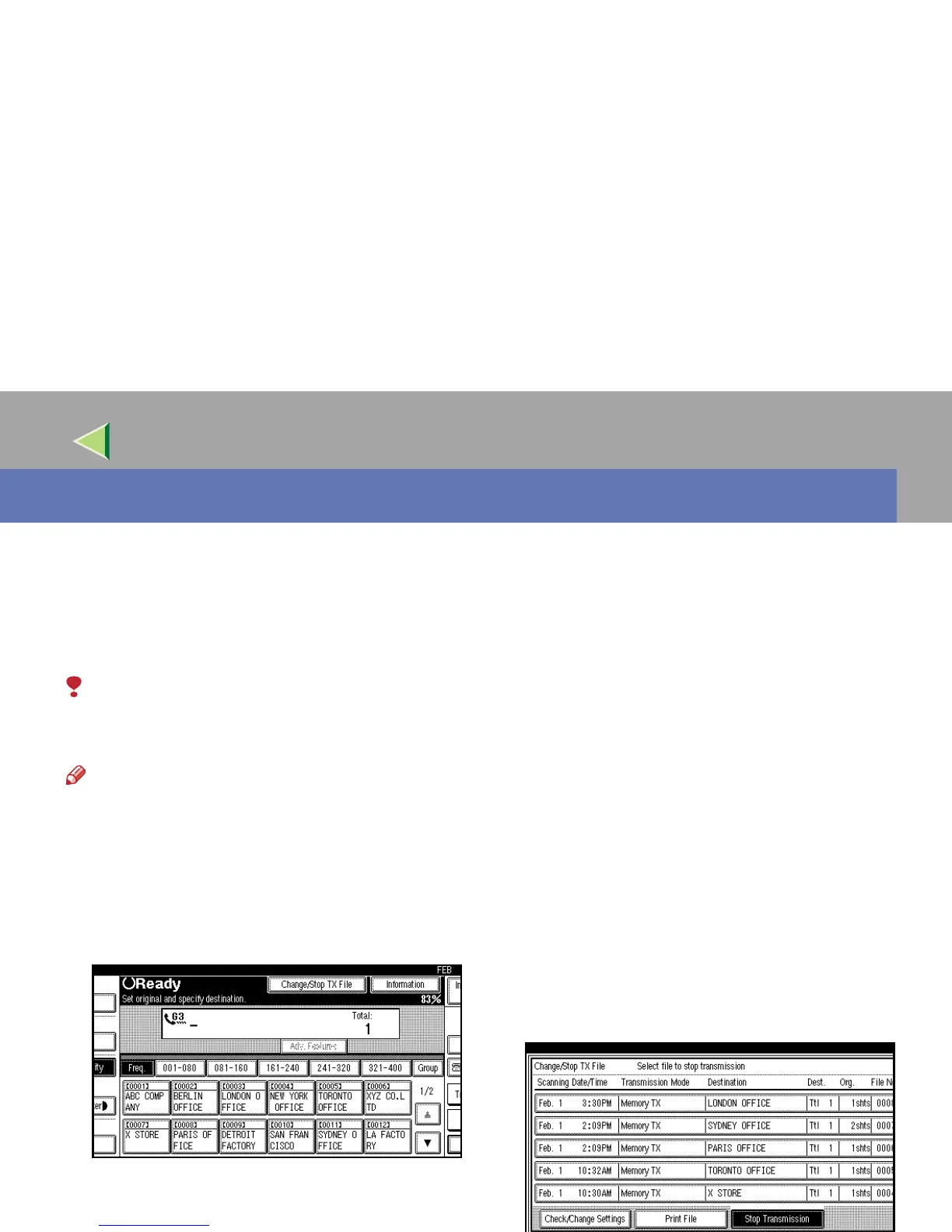
Press [Change/Stop TX File].
B
BB
B
Select [Check/Change Settings].
Scanning date/time, transmission mode, destina-
tion, total number of destinations, total number of
originals, file number and Status are displayed.



 To Next Page