Clearing and Adjusting the Machine
50
2
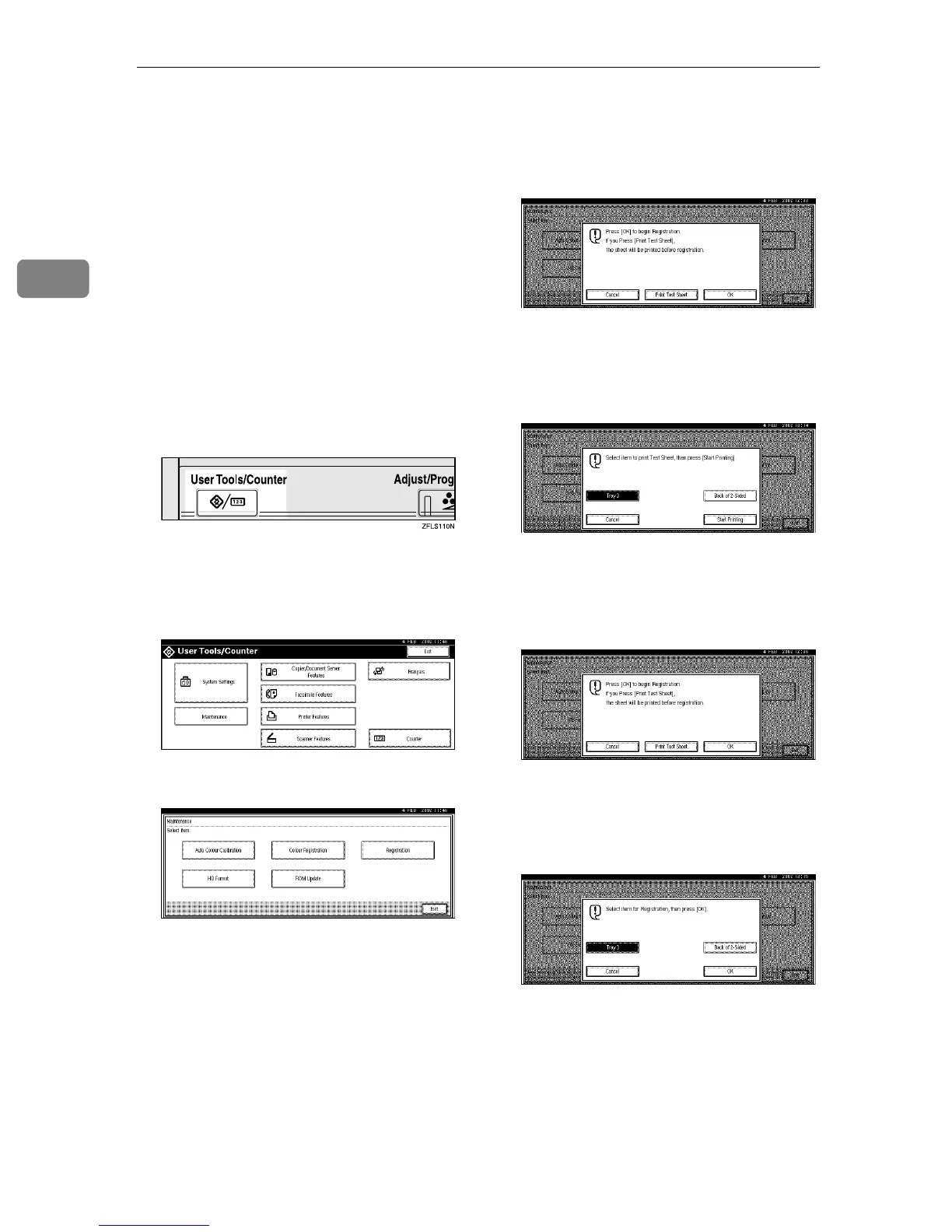
Adjusting the Registration of the Trays
You can adjust the registration of
each tray. The vertical adjustment is
used for all trays. Normally, you need
not update the registration. But when
the optional Paper Feed Unit or the
Duplex Unit is installed, updating the
registration is useful in some cases.
The following procedure describes
how to adjust Tray 3. You can use the
same procedure to adjust the other
tray as well.
A
AA
A
Press the {
{{
{User Tools/Counter}
}}
}key.
"User Tools/Counter" appears on
the panel display.
B
BB
B
Press [Maintenance].
C
CC
C
Press [Registration].
D
DD
D
Print the test sheet to preview the
registration.
A Press [Print Test Sheet].
B Press either [Tray3] or [Back of 2-
Sided] to select the tray you
want to adjust the registration
for.
C Press [Start Printing].
E
EE
E
Select the item to adjust.
A Press [OK].
B Press either [Tray3] or [Back of 2-
Sided] to select the tray you
want to adjust the registration
for.
C Press [OK].



 To Next Page