Basic Copying
22
1
F
FF
F
Place the aligned originals face
up into the optional document
feeder (ADF).
G
GG
G
Press the {
{{
{Start}
}}
} key.
Note
❒ After all the originals have been
read, press the {
{{
{#}
}}
} key in Sort,
Combine, 1 Sided→2 Sided
mode.
Placing Custom Size Originals
When placing custom size originals in
the optional document feeder (ADF),
specify the size of the originals.
Limitation
❒ The paper that can be placed with
this function can have a vertical
length of 128-297mm (5.1" – 11.6"),
and a have a horizontal length of
128-432mm (5.1" – 17").
A
AA
A
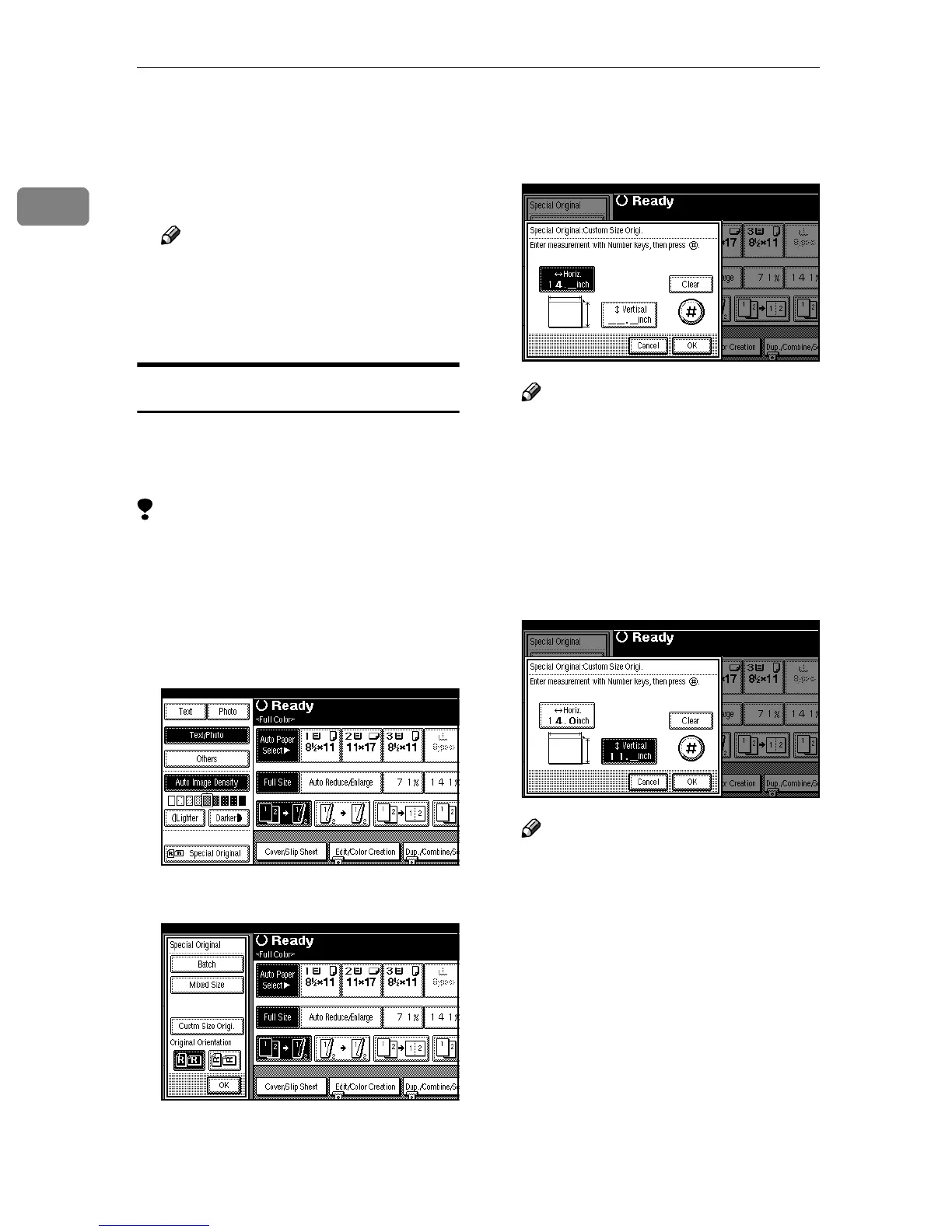
Press [Special Original].
B
BB
B
Press [Custm Size Origi.].
C
CC
C
Enter the horizontal size of the
original with the Number keys,
and then press [#].
Note
❒ You can enter the horizontal
size of up to 432mm (17").
❒ If you make a mistake, press
[Clear] or the {
{{
{Clear/Stop}
}}
} key,
and then enter the value again.
D
DD
D
Enter the vertical size of the origi-
nal with the Number keys, and
then press [#].
Note
❒ You can enter the vertical size of
up to 297mm (11.6").
E
EE
E
Press [OK].
F
FF
F
Place your originals, and then
press the {
{{
{Start}
}}
} key.



 To Next Page