5
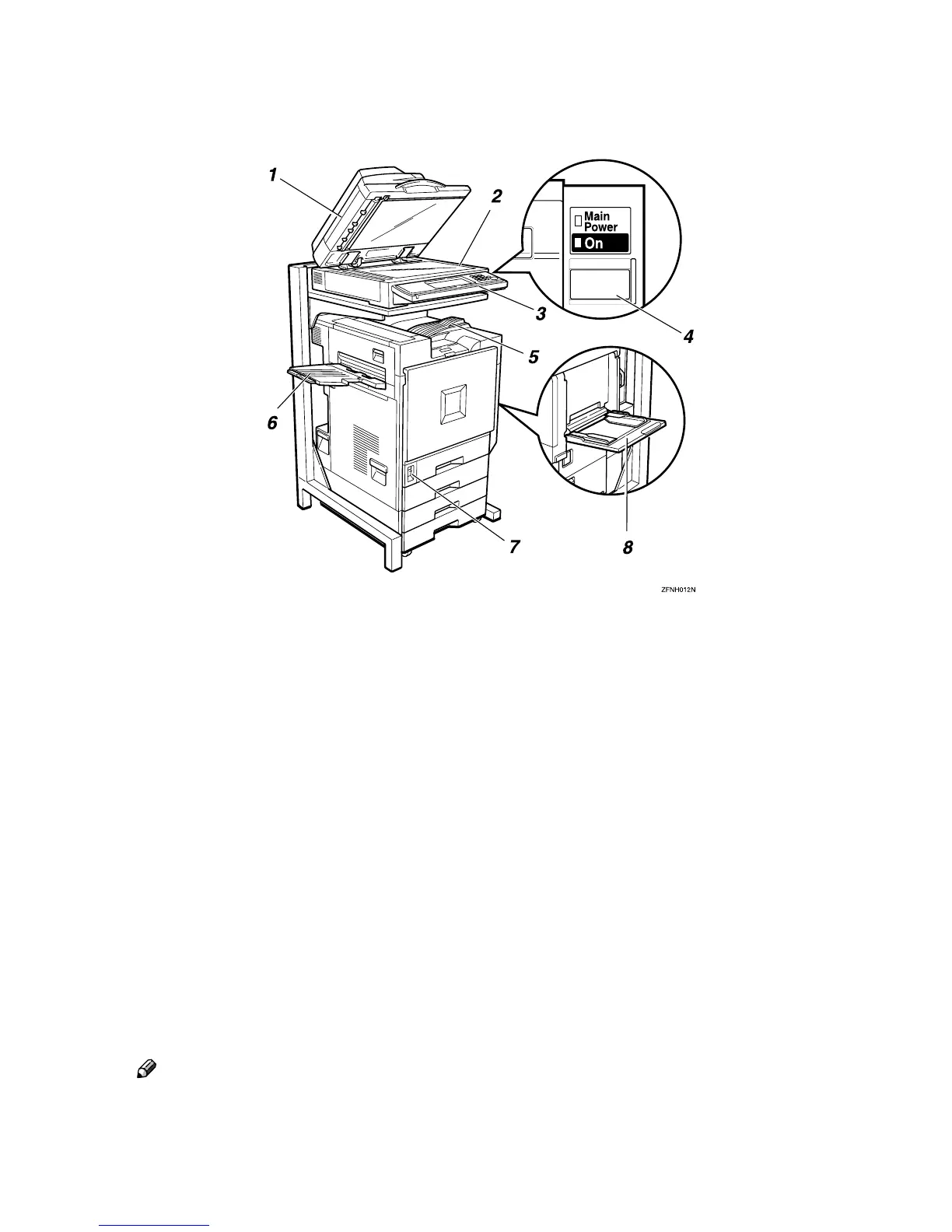
Guide To Components
1. Exposure Glass Cover<op-
tion>/Document Feeder (ADF)<op-
tion>
The illustrations in this manual show the
optional document feeder (ADF) in-
stalled. The optional document feeder
(ADF) automatically feeds a stack of orig-
inals one by one.
2. Exposure Glass
Place originals face down here for copy-
ing. ⇒ p.17 “Placing Originals”
3. Control Panel
⇒ p.6 “Control Panel”
4. Operation Switch
Press this switch to turn the power on
(the On indicator lights up). To turn the
power off, press this switch again (the On
indicator goes off).
Note
❒ If the machine does not operate, check
if the main power switch is turned on.
If it is off, turn it on.
5. Standard Tray
Copied paper is delivered here face
down.
⇒ “Output: Copy”, Administrator Refer-
ence 2 Copier System Edition
6. External Tray
Copied paper is delivered here face up.
7. Main Power Switch
When the main power switch is turned
off, the main power indicator will turn
off, and the power will be shut off. Do not
touch this switch normally.
8. Bypass Tray
Use when copying onto thick paper,
OHP transparencies, and custom size pa-
per. ⇒ p.32 “Copying from the Bypass
Tray”



 To Next Page