Placing Originals
17
1
Placing Originals
Limitation
❒ Place originals after correction flu-
id and ink have completely dried.
Not taking this precaution could
dirty the exposure glass with
marks that will to be copied.
Note
❒ Some copy functions may produce
different results depending on the
orientation of the originals. For de-
tails, see the explanation for each
function.
❒ : When the text or images on
the original are straight on Portrait
or Landscape orientation.
: When the text or images on
the original are sideways on Por-
trait or Landscape orientation.
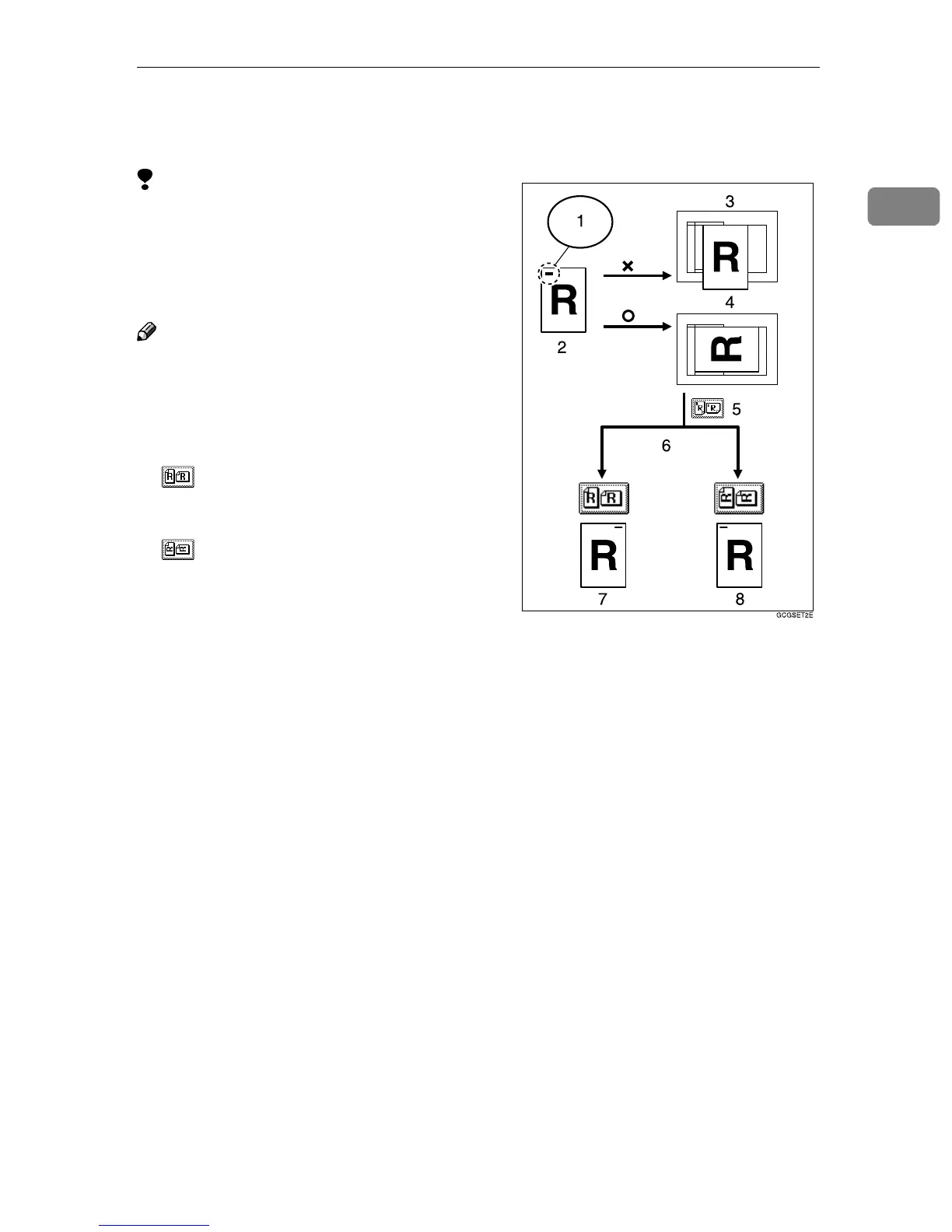
❒ To use the Staple or Punch func-
tion on originals such as A3K,
B4K or 11" × 17"K, which cannot
be scanned if the original's orienta-
tion is not changed, select the ori-
entation to staple, punch or for
duplex, combine copying correctly
as shown below:
1. Staple here
2. A3 K
KK
K, 11" ×
××
× 17"K
KK
K
3. Unable to place
4. Change the orientation
5. Staple
6. Select the orientation
7. Wrong stapling position
8. Correct stapling position
❒ It is recommended to use this func-
tion together with the Auto Paper
Select, Preset Reduce/Enlarge
function.
❒ Each of the following options is
necessary when using the Staple,
Punch, Duplex and Combine (2
Sided) functions:
• Staple → 2 Tray Finisher
• Punch → 2 Tray Finisher, Punch
Kit



 To Next Page