Operating InstructionsFacsimile Reference (option) <Advanced Features>
64
Information Boxes
Information Boxes
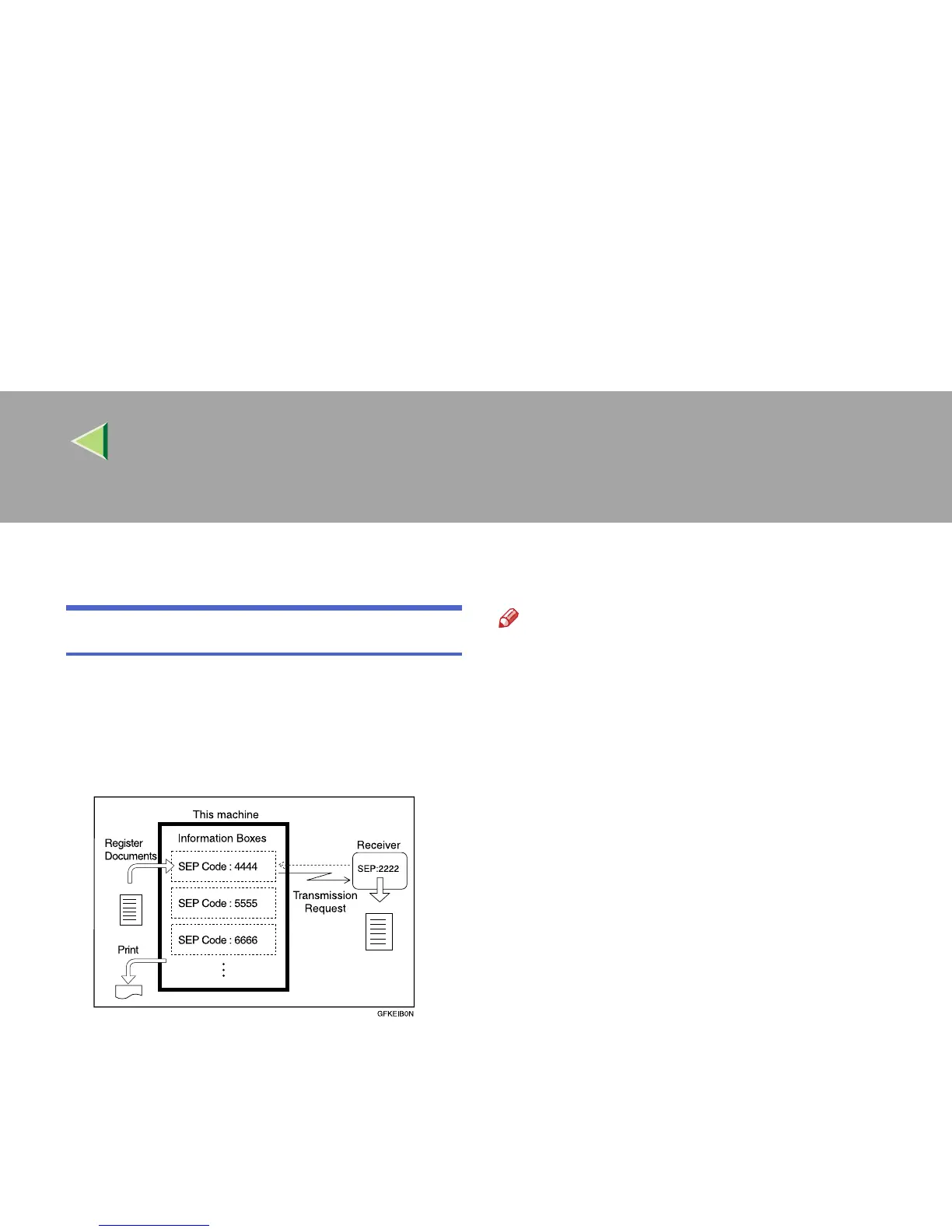
Use the Information Box feature to set up the ma-
chine as a Fax Information service or Document
Server. By scanning documents into Information
Boxes, other parties can receive these messages
whenever they request them.
Note
❒ Program documents for this feature using the
“Storing Messages in Information Boxes”
⇒
p.65
❒ For other parties to be able to retrieve a mes-
sage programmed in an Information Box, you
need to inform them of the SEP Code as-
signed to that Information Box.
❒ When a SEP Code Polling Reception request
is made by another party, the SEP Code they
specify is compared with the SEP Codes pro-
grammed in that Information Boxes. If a code
matches, the message stored in the Informa-
tion Box is sent to the other party automatical-
ly.
❒ To check on the contents of Information Box-
es, use “Printing Information Box Messages”
⇒
p.67
❒ You can set a password for Information Boxes
in advance. A password can be set in “Key
Operator Setting”. ⇒ p.244 “Program-
ming/Editing Information Boxes”



 To Next Page