1
1. Guide to the Machine
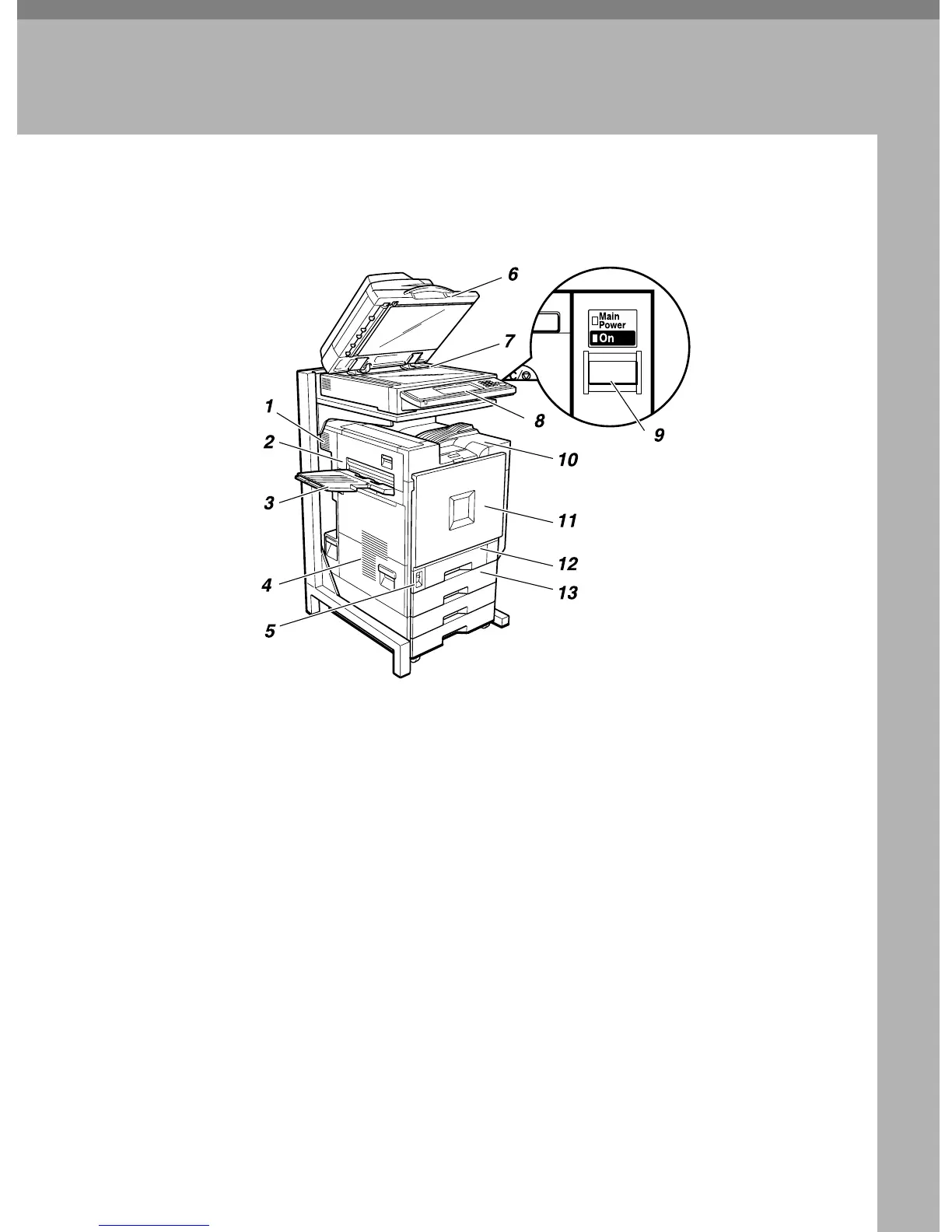
Outside: Front and Left
1. Ventilator and Dustproof Filter
This hole helps to keep components in-
side the printer from overheating. Do not
block or obstruct the ventilator. A mal-
function may occur due to overheating.
Remove the ventilator to replace the in-
ternal dustproof filter.
2. Upper Left Cover
Open this cover to remove misfed paper
or when replacing the Fusing Unit.
3. External Tray
Printed output is stacked here with the
print side up.
4. Ventilators
These holes help to keep components in-
side the printer from overheating. Do not
block or obstruct the ventilators. A mal-
function may occur due to overheating.
5. Main Power Switch
Use this switch to turn the main power
on and off. When the main power switch
is turned off, the Main Power indicator
goes off and the machine is turned off
completely. Normally, do not touch this
switch.
6. Exposure Glass Cover (option) or
Document Feeder (ADF) (option)
Lower the exposure glass cover over
originals placed on the exposure glass for
copying or scanning. If you have the doc-
ument feeder, load a stack of originals
here. They will be fed automatically one
by one.
(The illustration shows the document
feeder.)
7. Exposure Glass
Place originals face down here for copy-
ing or scanning.
ZFQH010N



 To Next Page