Replacing the Development Unit
15
1
Replacing the Development Unit
If the message "Replacement of De-
velopment Unit is required" appears
on the panel display, replace the ap-
propriate Development Unit accord-
ing to the indicated colors.
Note
❒ The Development Unit or units to
be replaced are indicated on the
panel display.
❒ If "Black" appears, replace the
black Development Unit.
❒ If "yellow/magenta/cyan" ap-
pears, replace the three color
(CMY) Development Units.
Note
❒ A dustproof filter is attached to the
black Development Unit. When re-
placing the black Development
Unit, also replace the dustproof fil-
ter. See p.23 “Replacing the Dust-
proof Filter”.
❒ When replacing the black Devel-
opment Unit, clean the registration
roller. See p.32 “Cleaning the Reg-
istration Roller”.
A
AA
A
Turn off the power switch, and
then unplug the power cable.
B
BB
B
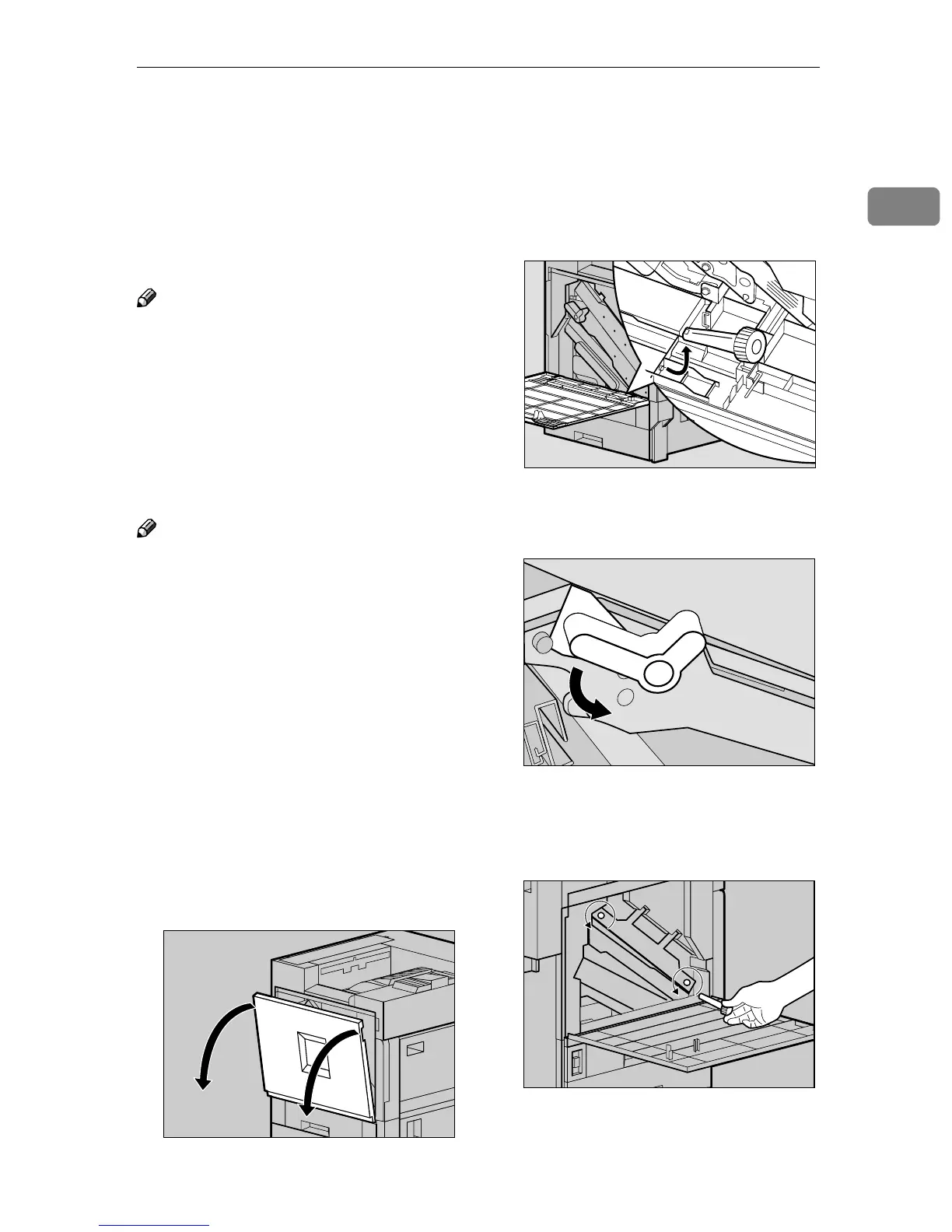
Open the front cover slowly by
pulling down from the two areas
on the left and right.
C
CC
C
Take out the green screwdriver.
Use this screwdriver to attach and
detach all screws.
D
DD
D
Turn the light brown lever coun-
terclockwise.
E
EE
E
Loosen the two screws that fasten
the inner cover using the provid-
ed screwdriver.
You cannot remove these two
screws.
ZDJH007J
ZDJH013J
ZDJH014E
ZDJH015J



 To Next Page