Replacing Consumables and Maintenance Kit
14
1
Important
❒ If you do not attach the green
arrow of the Photoconductor
Unit securely to the rail, you
might damage the Photocon-
ductor Unit.
❒ Do not touch the light-sensi-
tive area of the Photoconduc-
tor Unit.
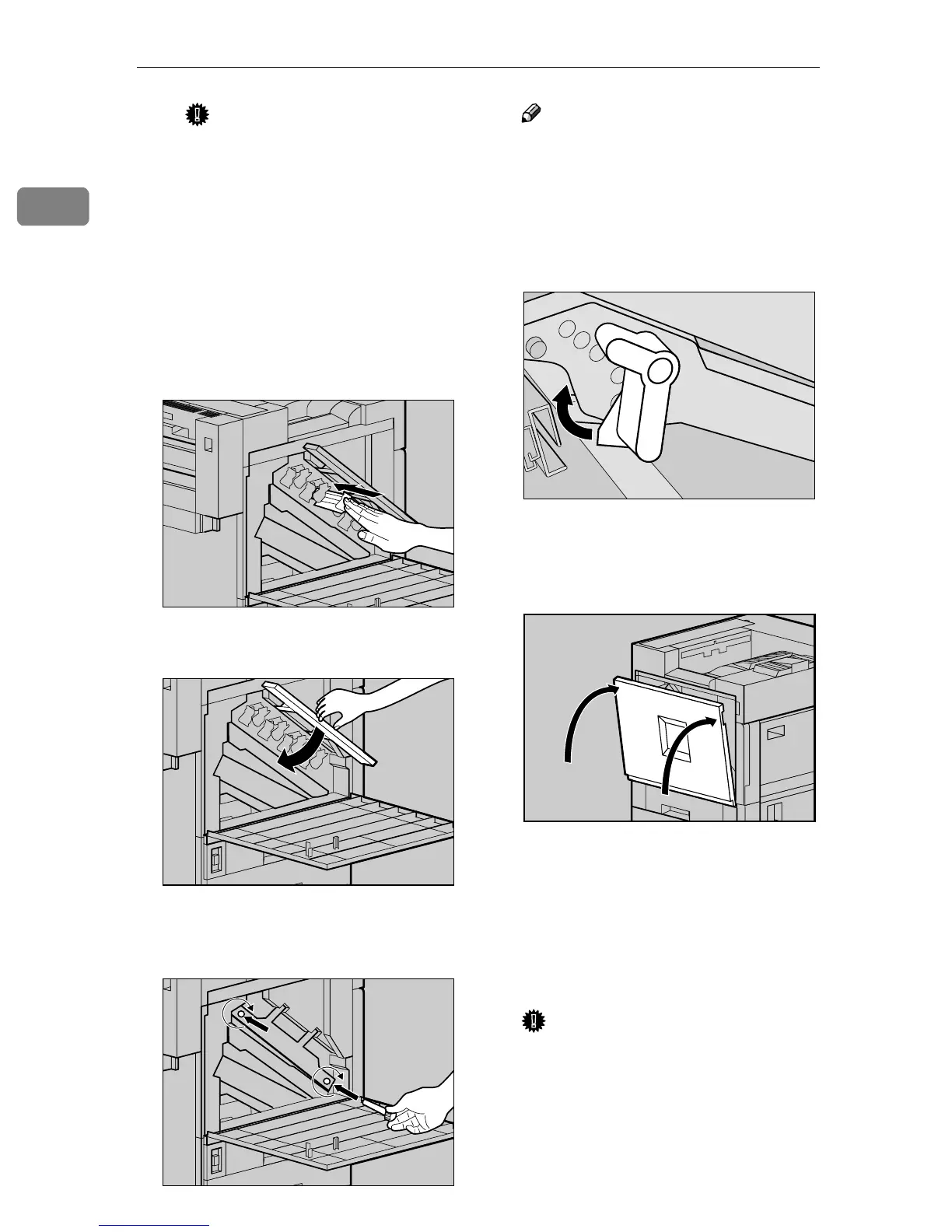
E Remove the cover and push in
the Photoconductor Unit until
it stops.
I
II
I
Lower the inner cover slowly.
J
JJ
J
Tighten the two screws using the
provided screwdriver.
Note
❒ Be sure to return the provided
screwdriver to its original posi-
tion on the back of the front cov-
er.
K
KK
K
Turn the light brown lever clock-
wise.
L
LL
L
Close the front cover slowly by
pushing the two areas on the left
and right.
M
MM
M
Plug in the power cable, and then
turn on the power switch.
“Color is being adjusted” appears
on the panel display. The printer
starts calibration. Please wait until
it stops.
Important
❒ Do not turn off the power
switch while calibration. This
will cause a printer malfunc-
tion.
ZDJX702E
ZDJH018J
ZDJH019J
ZDJH020E
ZDJH041J



 To Next Page