53
Operating Instructions Scanner Reference
3. Setting Originals
This chapter explains the procedure for placing the original on the exposure glass and in the automatic
document feeder (ADF), and setting original scan area and orientation according to the placement
method.
To correctly display the top/bottom orientation of the scanned original on a computer, the correct place-
ment must be chosen by setup on the control panel and scanner driver.
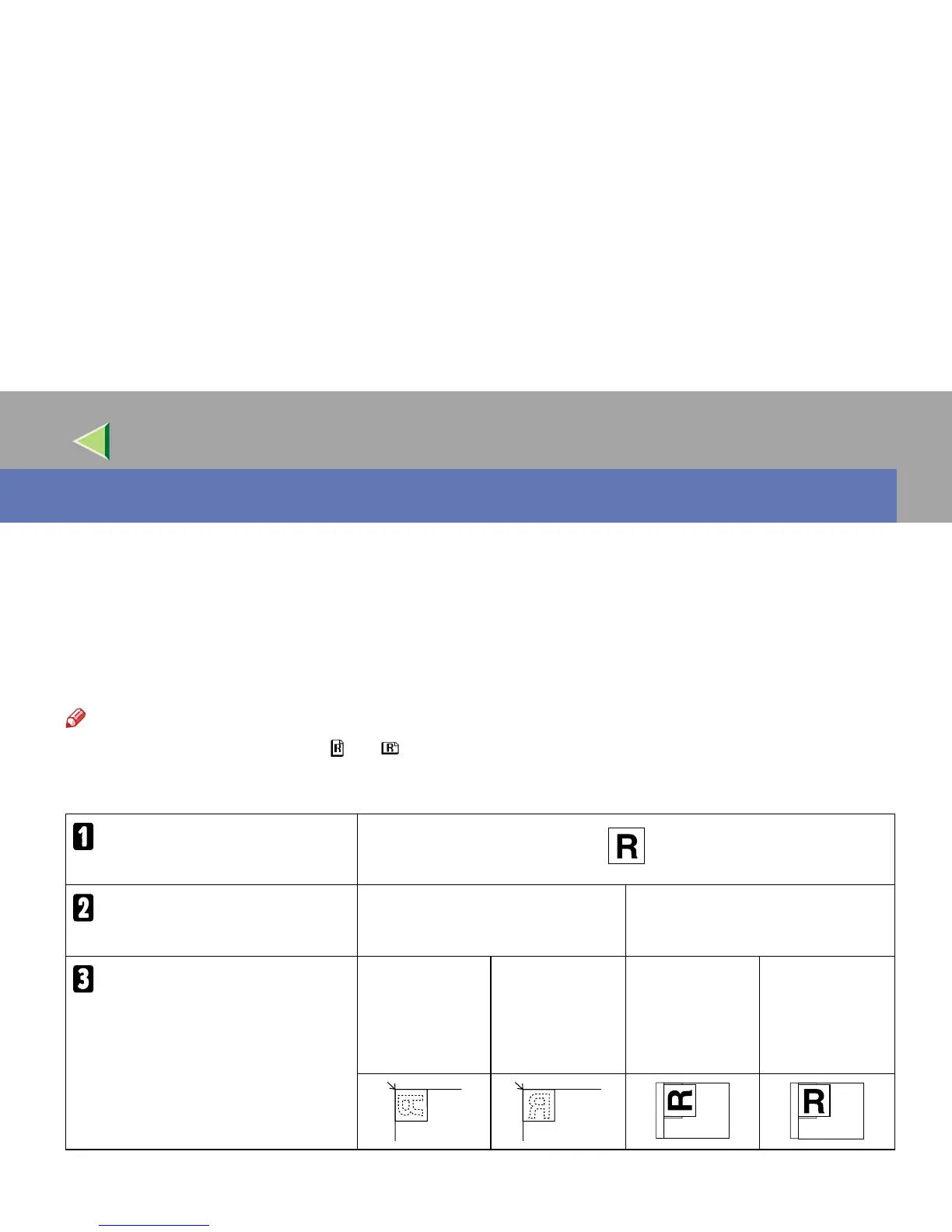
There are two orientations for placing the original. See the table below.
Note
❒ Normally, the original size is ( ) or ( ), but in the table below, a square original is used to make the
original orientation easy to understand. If the actual original size changes, a combination of original
orientation and the orientation specified on the control panel or scanner driver does not change.
Scanned original
Select the placement method.
Place the original on the exposure
glass.
Place the original in the automatic
document feeder (ADF).
Place the original.
(There are two original orientations.)
Place the origi-
nal so that the
top edge touches
the top left of the
exposure glass.
Place the origi-
nal so that the
top edge touches
the rear of the
exposure glass.
Place the top
edge of the orig-
inal first.
Place the origi-
nal so that the
top edge is set
into the ADF.



 To Next Page