Adjusting the Color Calibration
49
2
Restoring Previous Color
Calibration Settings
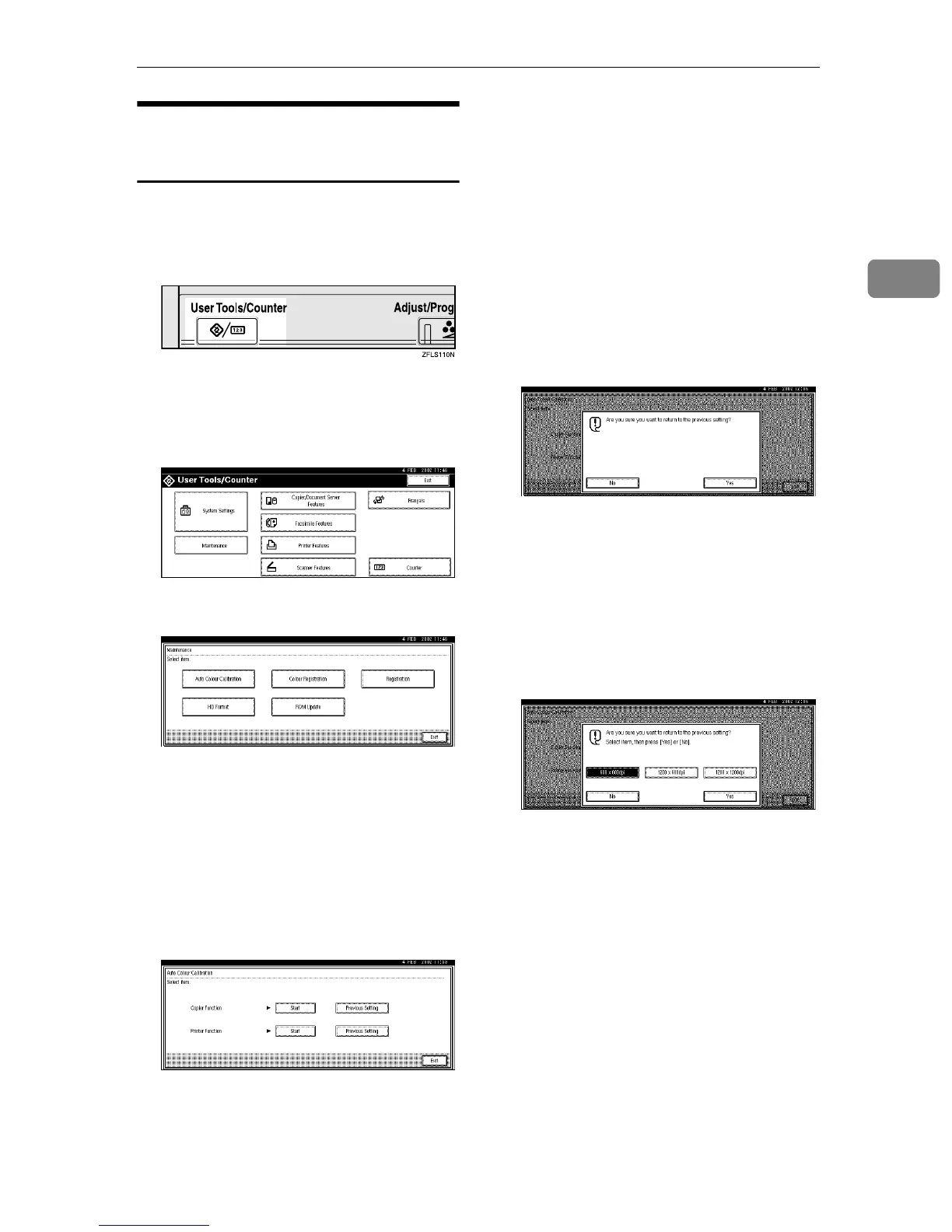
You can restore previous color cali-
bration settings.
A
AA
A
Press the {
{{
{User Tools/Counter}
}}
}key.
"User Tools/Counter" appears on
the panel display.
B
BB
B
Press [Maintenance].
C
CC
C
Press [Auto Color Calibration].
D
DD
D
To restore previous color calibra-
tion settings in copy mode, press
[Previous Setting] to the right of
[Copier Function]. To restore previ-
ous color calibration settings in
printer mode, press [Previous Set-
ting] to the right of [Printer Func-
tion].
If you have adjusted the color cali-
bration in copy mode, go to step
A.
If you have adjusted the color cali-
bration in printer mode, the reso-
lution selection display appears. In
this case, go to step B.
A When restoring previous color
calibration settings in copy
mode, the display shown be-
low appears. Press [Previous Set-
ting].
B When restoring previous color
calibration settings in printer
mode, the display shown be-
low appears. Select [600 x 600
dpi], [1200 x 600 dpi], or [1200 x
1200 dpi] as the resolution for
color calibration, and then
press [Previous Setting].
E
EE
E
When all the settings have been
made, press the
{
{{
{
User Tools/Counter
}
}}
}
key.
The initial display is shown.



 To Next Page