Operating Instructions Scanner Reference
77
Checking the Delivery Result
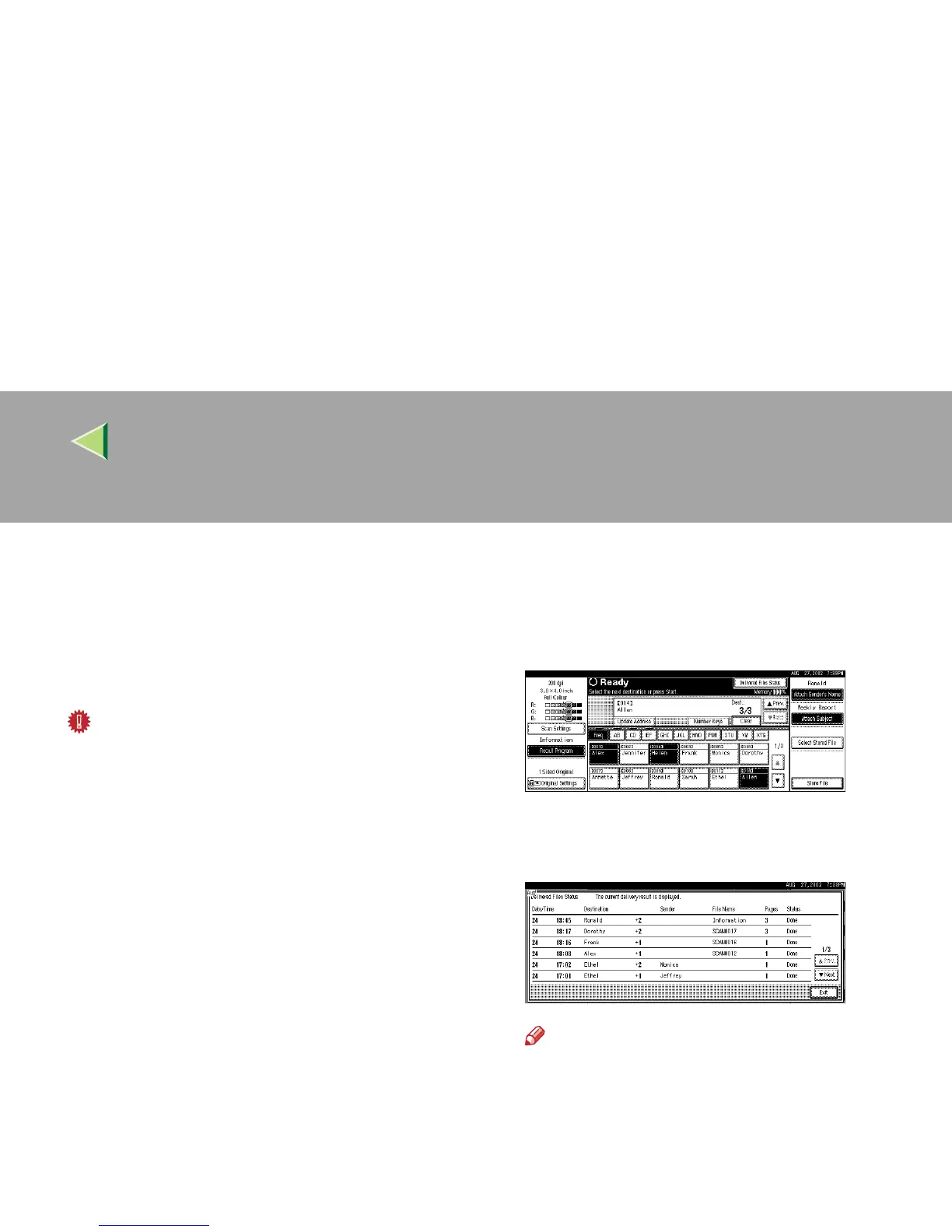
The delivery result can be checked for the last 50
delivery operations. If the delivery result exceeds
50 delivery operations, the delivery results are
deleted in the order of delivery.
Important
❒ When the main power switch of the machine
is turned off, all delivery result data is cleared.
❖
❖❖
❖ Items to be checked
• Date/Time
The date and time when the file transfer of
scan data from the machine to the delivery
server was completed is recorded.
If delivery retry was performed but unsuc-
cessful, the date and time refers to the last
retry operation.
• Destination
When multiple destinations were selected,
the first selected destination is displayed.
• Sender
• File Name
• Pages
Number of scanned pages
• Status
Indicates whether delivery was successful
or resulted in an error.
A
AA
A
Press [Delivered Files Status] on the network
delivery scanner screen.
The delivery status is displayed.
B
BB
B
Check the displayed results.
Note
❒ One screen shows the results for six deliv-
ery operations. Use [U
UU
UPrev.] or [T
TT
TNext] to
scroll through the display.
C
CC
C
Press [Exit].
The display returns to the network delivery
scanner screen.



 To Next Page