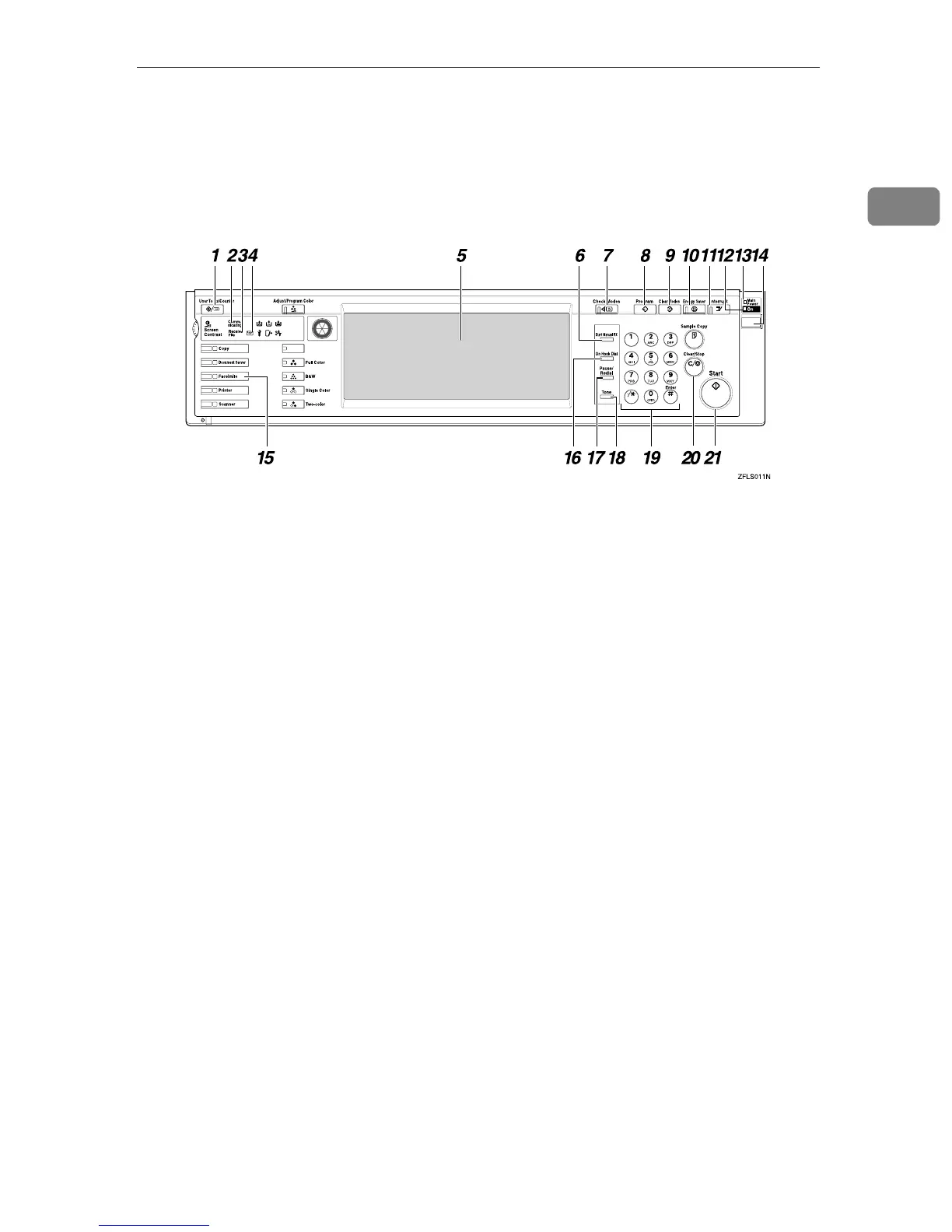
Control Panel
3
1
Control Panel
The illustration of the control panel will differ depending on the installed op-
tional unit. The following illustration has all the options installed.
1. {
{{
{User Tools/Counter}
}}
} key
User Tools:
Press to enter User Tools mode. These
tools allow you to customize the default
settings. ⇒ Chapter 7, “Facsimile Fea-
tures” in the Advanced Features manual
Counter:
Display and print the total number of
pages.
2. Communicating Indicator
Lights during transmission or reception.
3. Receive File Indicator
Lights when a message other than a Con-
fidential Reception or Memory Lock file
has been received. ⇒ Chapter 5, “Substi-
tute Reception” in the Advanced Fea-
tures manual
4. Confidential File Indicator
Lights when a message has been received
into memory with Confidential Recep-
tion. ⇒ Chapter 3, “Printing a Confiden-
tial Message” in the Advanced Features
manual
Blinks when a Memory Lock file has been
received into memory. ⇒ Chapter 3,
“Printing a File Received with Memory
Lock” in the Advanced Features manual
5. LCD display
This guides you through tasks and in-
forms you of the machine status. Messag-
es appear here. ⇒ p.9 “Reading the
Display”
6. {
{{
{Start Manual RX}
}}
} key
Press to start Manual Reception.
7. {
{{
{Check Modes}
}}
} key
Press this key before pressing the {
{{
{Start}
}}
}
key to check the settings selected for the
fax about to be sent.
8. {
{{
{Program}
}}
} key
Press to use the program function. ⇒
Chapter 6, “Programs” in the Advanced
Features manual
9. {
{{
{Clear Modes}
}}
} key
Press to cancel the current settings and
return to standby mode.
10. {
{{
{Energy Saver}
}}
} key
Hold down to enter Energy Saver mode.
11. {
{{
{Interrupt}
}}
} key
Press to interrupt the current fax opera-
tion in order to start copying.
12. On indicator
This indicator goes on when the opera-
tion switch is turned on.



 To Next Page