Operating InstructionsFacsimile Reference (option) <Advanced Features>
103
D
DD
D
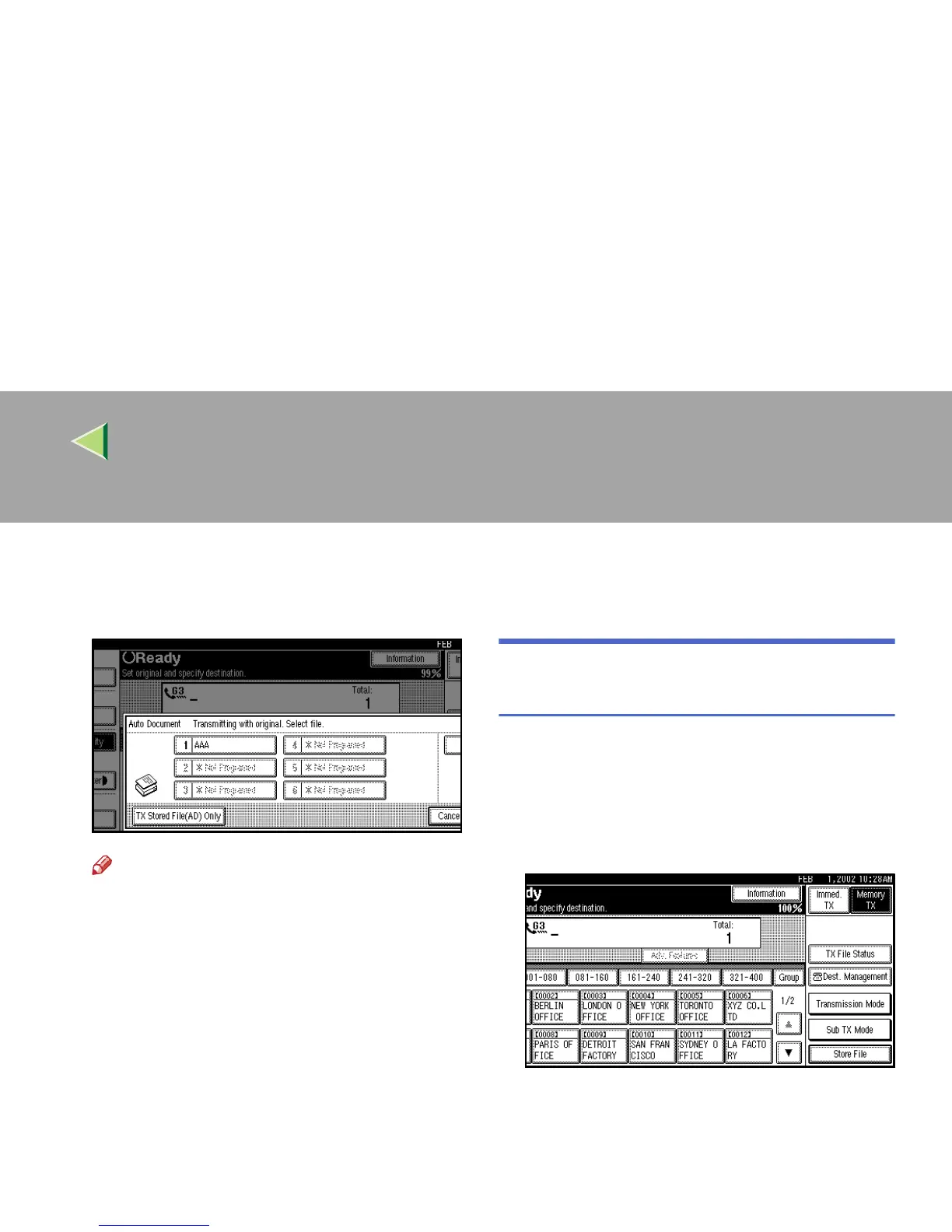
Select Auto Document file.
When you fax an Auto Document by itself,
press [TX Stored File(AD) Only].
Note
❒ Programmed Auto Documents are shown
in the keys. If there are none programmed,
the message “*Not Programed” is shown.
❒ If a desired file is not shown, press [U
UU
U
Prev.] or [T
TT
T Next].
❒ If you make a mistake, press [Clear] or the
{
{{
{Clear/Stop}
}}
} key and try again.
❒ To cancel the Auto Document, press [
Can-
cel
]. The display will return to step
C
.
E
EE
E
Press [OK].
The [Auto Document] is highlighted, and the
selected file name is shown.
F
FF
F
Press [OK].
G
GG
G
Dial, and then press the {
{{
{Start}
}}
} key.
Printing Documents Stored as
Auto Documents
This function is used for printing documents
stored as Auto Documents. This function is very
convenient as it can be used for confirming the
contents of stored files.
A
AA
A
Press [Sub TX Mode].
The Sub Transmission Mode menu is shown.



 To Next Page