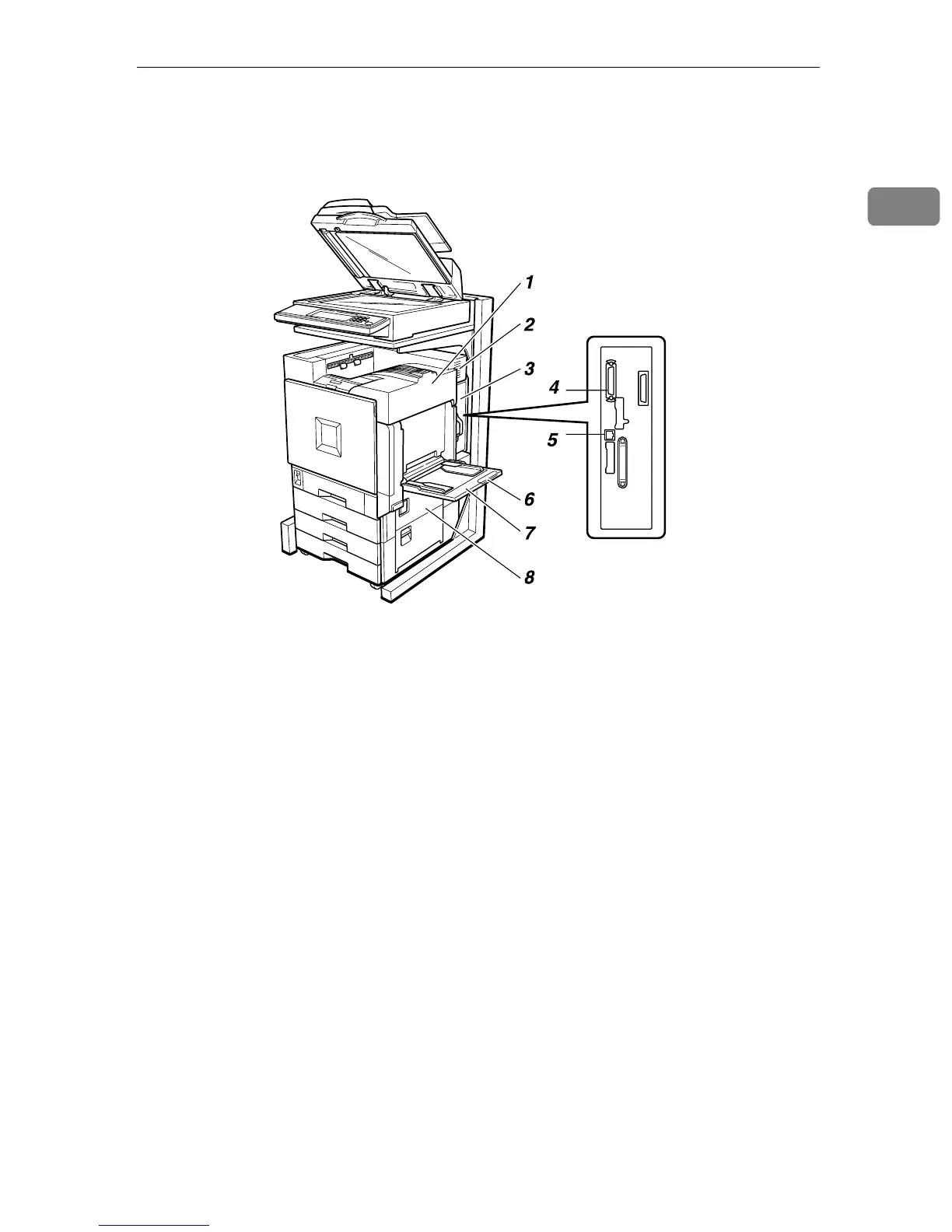
Outside: Right
3
1
Outside: Right
1. Upper Right Cover
Open this cover to replace toner car-
tridge.
2. Ventilator
This hole helps to keep components in-
side the printer from overheating. Do not
block or obstruct the ventilator. A mal-
function may occur due to overheating.
3. Controller Board
Slide out to install options, such as mem-
ory units and interface unit.
4. Parallel Port
Use a parallel cable to connect the printer
to the host computer.
5. Ethernet Port
Use a network interface cable to connect
the printer to the network.
6. Bypass Tray Extension
Pull out this extension to load paper in
the bypass tray when its length is longer
than A4 L.
7.
Bypass Tray
Use to print on thick paper, OHP trans-
parencies, custom size paper, as well as
plain paper. Up to 100 sheets of plain pa-
per can be loaded.
8. Right Cover
Open this cover to remove misfed paper.
ZFQH020J



 To Next Page