Starting the Machine
5
1
Starting the Machine
To start the machine, turn on the op-
eration switch.
Note
❒
This machine automatically enters
the Energy Saver mode or turns itself
off if you do not use the machine for
a while. ⇒ “Timer Setting -- Panel
Off Timer”, “Timer Settings -- Auto
Off Timer” in Administrator Refer-
ence 2 Copier System Edition
-
--
-Power switches
This machine has two power switch-
es: ⇒ p.1 “Guide to Components”
❖
❖❖
❖ Operation Switch (Right side of the
control panel)
Turn on this switch to activate the
machine. When the machine has
warmed up, you can make copies
or send faxes.
❖
❖❖
❖ Main Power Switch (Left front side of
the machine)
Do not touch the main power
switch. It should be used only by a
service representative when the
optional fax unit is installed.
Important
❒ If you leave the main power switch
off for more than 1 hour, all fax
files in memory are deleted.
⇒Chapter 10, “Power Failure Re-
port” in the Advanced Features
manual
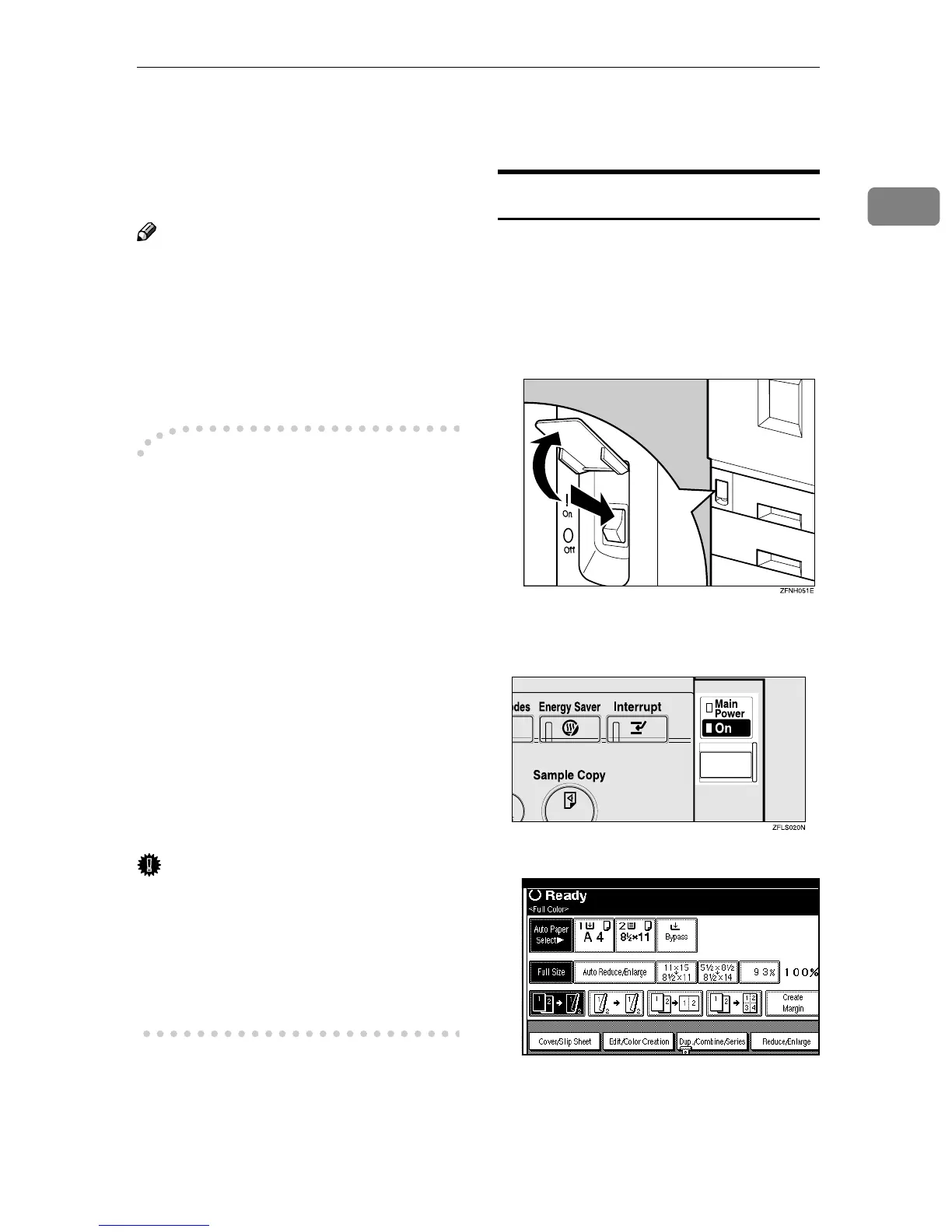
Turning On the Power
A
AA
A
Confirm that the power cord is
plugged into the wall outlet firm-
ly.
B
BB
B
Confirm that the main power
switch is on.
C
CC
C
Turn on the operation switch. The
On indicator should light up.
The copier screen is displayed.



 To Next Page