1
1. Getting Started
Guide to Components
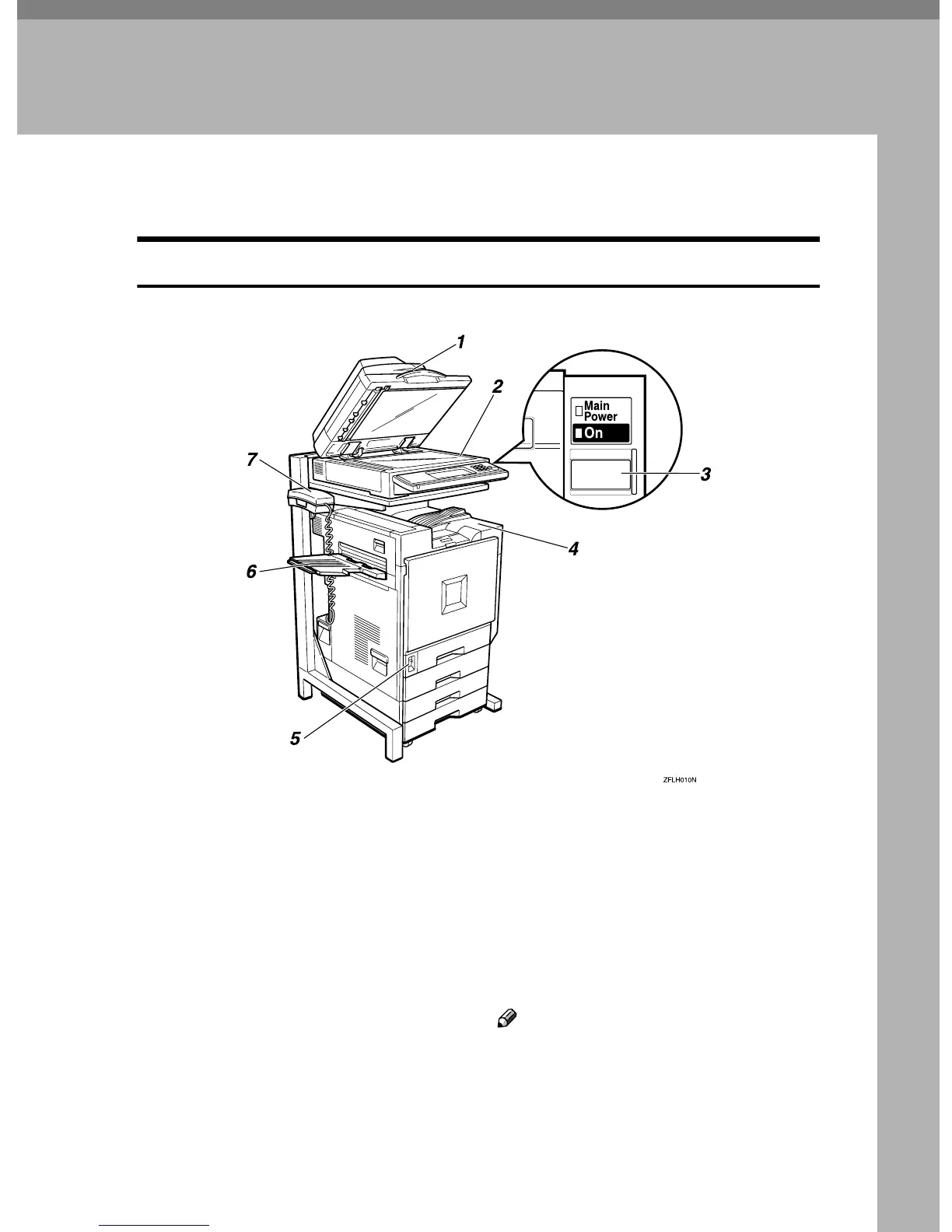
Front View
1.
Document Feeder (ADF) <op-
tion>/Exposure Glass Cover <option>
Holds a document stack of up to 80
sheets which are fed automatically one at
a time. Place documents here face up.
2. Exposure Glass
Place the original face down on the upper left
corner of the exposure glass, aligning the up-
per left corner with the reference mark. Close
the optional exposure glass cover when you
place a document on the exposure glass.
3. Operation Switch
Press this switch to turn the power on (the
On indicator lights up). To turn the power
off, press this switch again (the On indica-
tor goes off).
⇒
Chapter 10, “Power Failure
Report” in the Advanced Features manual
4. Standard Tray
Fax messages are delivered here. ⇒
“General Features
1
/
2
-- Output:Facsimi-
le” in Administrator Reference 2 Copier
System Edition
5. Main Power Switch
Do not touch this switch. This switch should
be only used by a service representative.
Note
❒ If the operation switch is on and there
is still no power, turn on the main
power switch.
❒ If you leave the main power switch off
for more than 1 hour, all files in mem-
ory are lost. ⇒ Chapter 10, “Power
Failure Report” in the Advanced Fea-
tures manual



 To Next Page