Clearing and Adjusting the Machine
36
2
Adjusting the Color Registration
When the printer is moved, the Fus-
ing Unit is replaced, or after printing
repeatedly for some time, registration
shifting might occur. By performing
color registration adjustment, you
can maintain optimum print results.
Note
❒ Normally, do not perform manual
color adjustment.
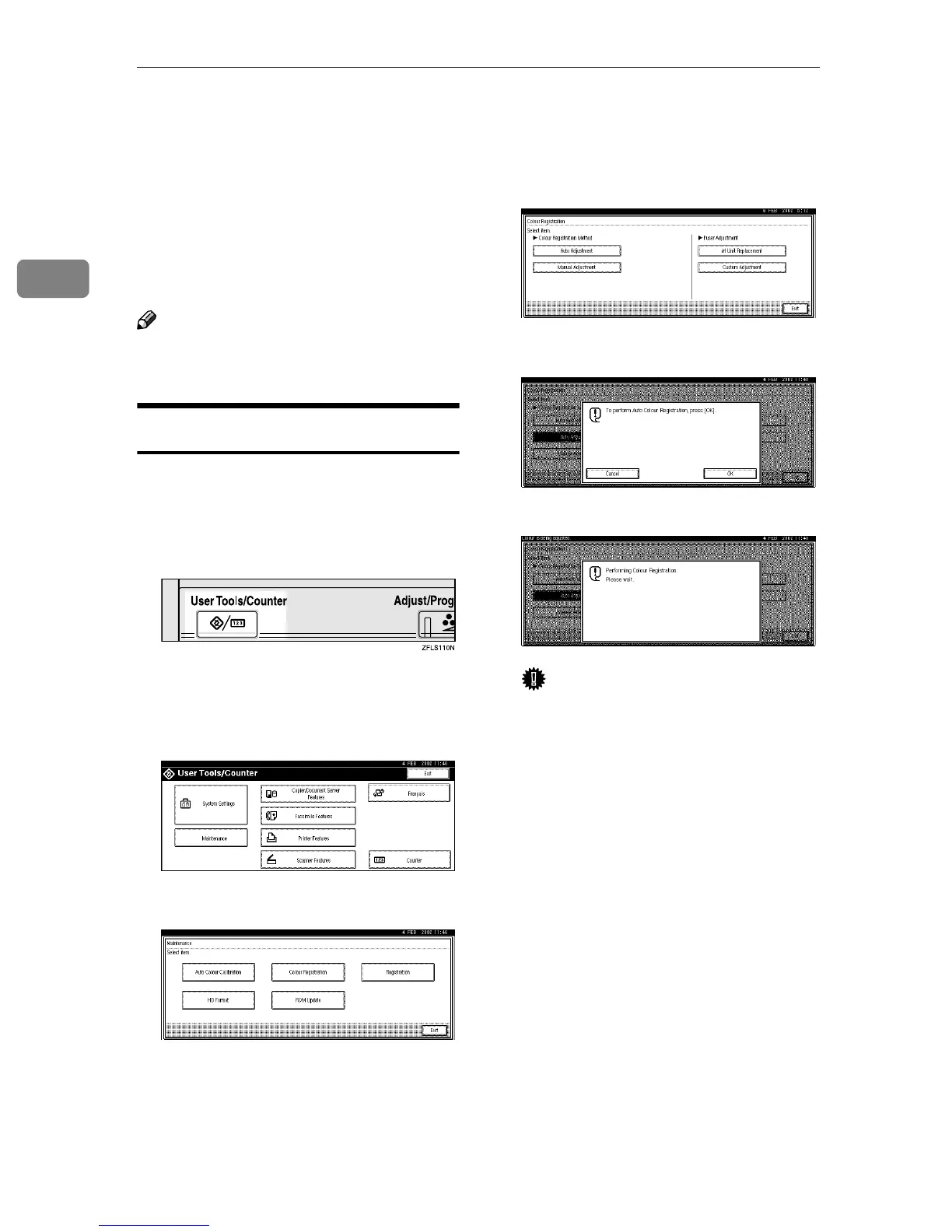
Auto Adjustment
If the color documents show registra-
tion shifting, perform automatic color
adjustment.
A
AA
A
Press the {
{{
{User Tools/Counter}
}}
} key.
"User Tools/Counter" appears on
the panel display.
B
BB
B
Press [Maintenance].
C
CC
C
Press [Color Registration].
D
DD
D
Press [Auto Adjustment].
E
EE
E
Press [OK].
Auto adjustment will be started.
Important
❒ Do not turn off the power
switch when "Color is Being ad-
justed." is shown on the panel
display. This will cause a print-
er malfunction.
Automatic color adjustment takes
about two minutes. When it is
completed, the display returns to
the color registration menu.
F
FF
F
When you have made all the set-
tings, press the {
{{
{User Tools/Counter}
}}
}
key.
The initial display is shown.



 To Next Page