Operating Instructions Copy Reference <Advanced Features>
40
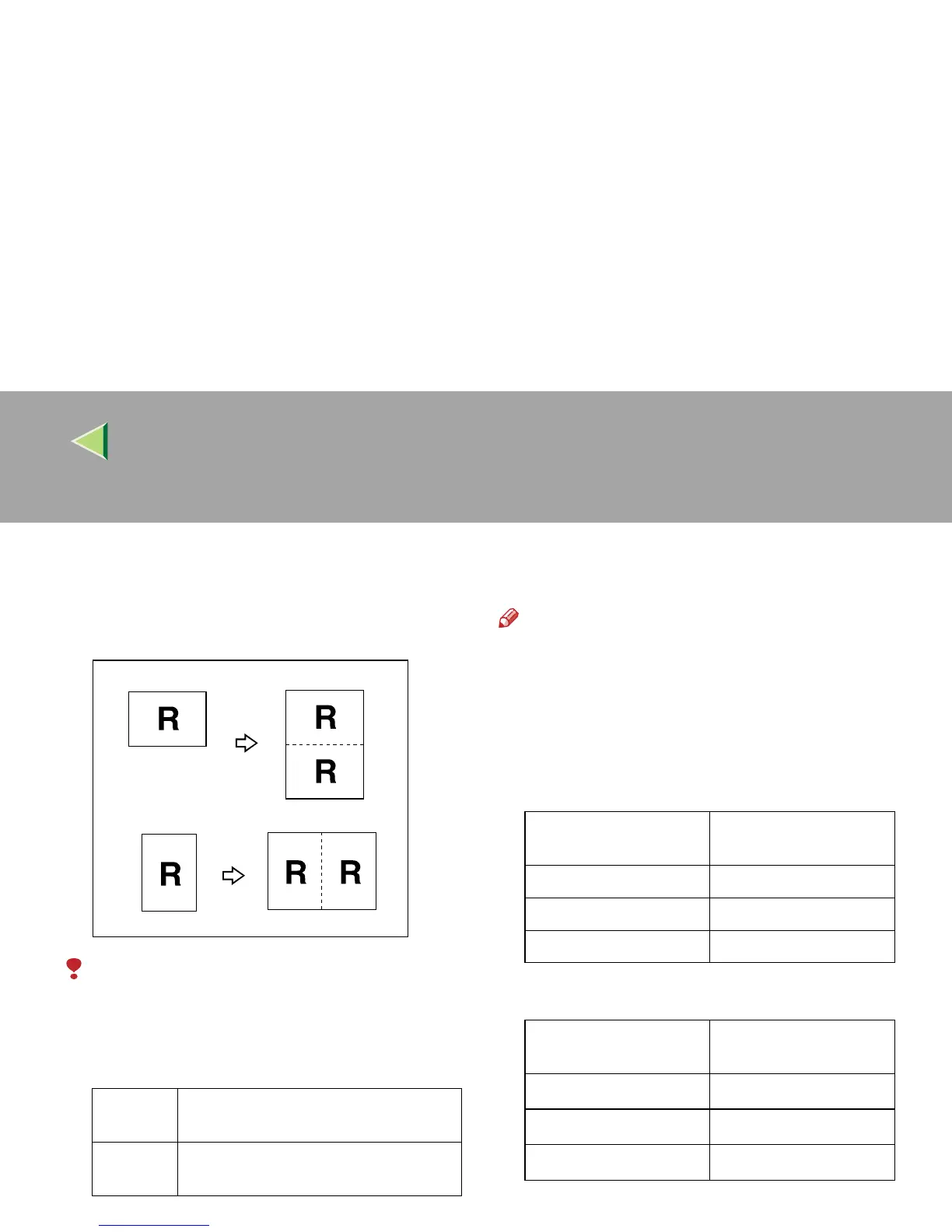
Double Copies
One original image is copied twice on one copy
as shown in the illustration.
Limitation
❒ The following originals cannot be detected
properly on the exposure glass. Be sure to se-
lect the copy paper manually or place the orig-
inals in the optional document feeder (ADF).
❒ You cannot use the Bypass Tray with this
function.
Note
❒ You can insert separation lines between re-
peated images.⇒ p.121 “Double Copies Sep-
aration Line”
❒ See the following table for original and copy
paper sizes when using a 100% ratio.
❖
❖❖
❖ Metric version
❖
❖❖
❖ Inch version
Metric
version
A5KL, B6KL
Inch
version
5
1
/
2
" × 8
1
/
2
"KL
Original Size and Di-
rection
Copy Paper Size and
Direction
A5L A4K
A4K A3L
A5K A4L
Original Size and Di-
rection
Copy Paper Size and
Direction
5
1
/
2
" × 8
1
/
2
"L 8
1
/
2
" × 11"K
5
1
/
2
" × 8
1
/
2
"K 8
1
/
2
" × 11"L
8
1
/
2
" × 11"K
11" × 17"L



 To Next Page