Getting Started
10
1
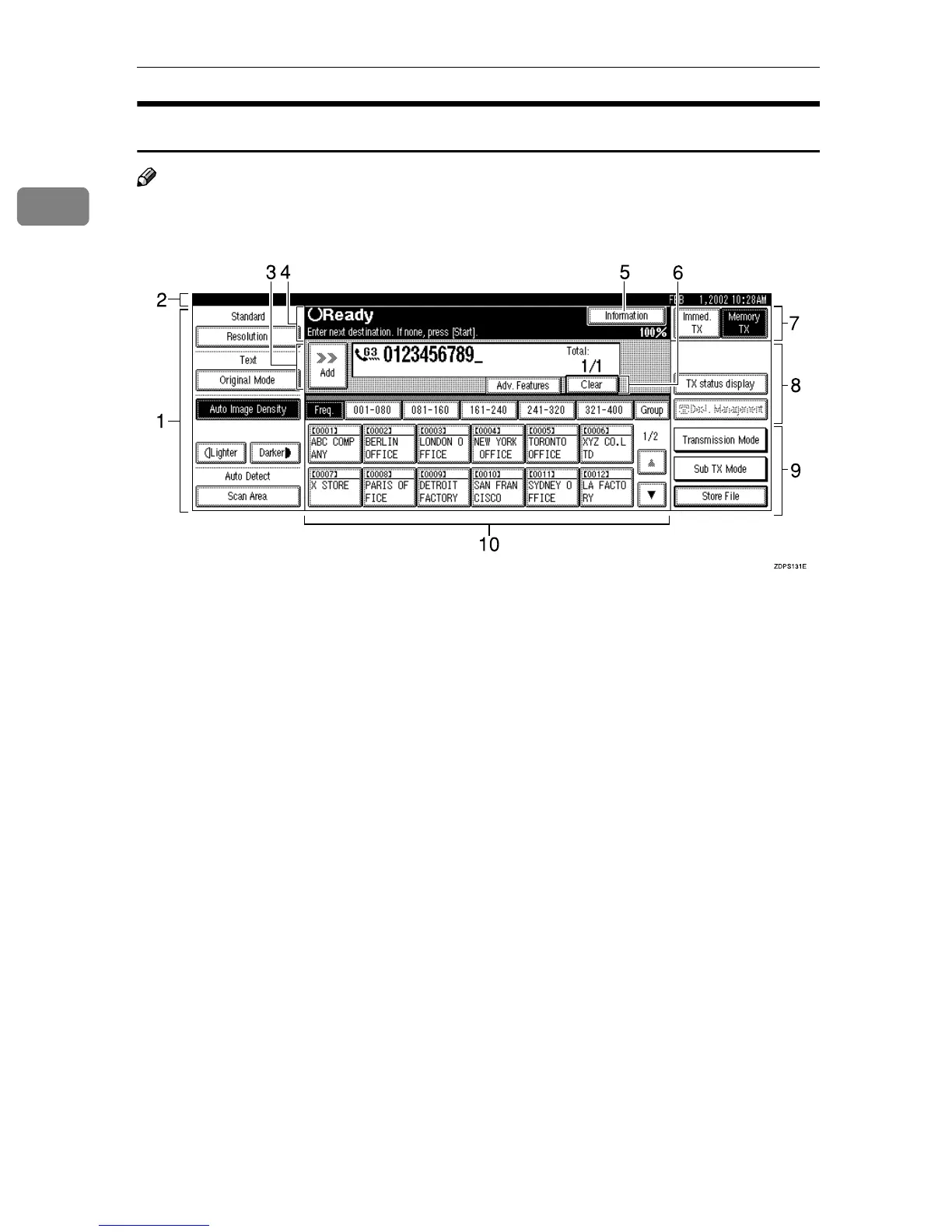
Reading the Display Panel and Using Keys
Note
❒ The screen contents will be different depending on the installed optional unit.
1. Displays the scanning conditions
and sizes you can choose.
2. Displays the date and time, the
name and facsimile number of a des-
tination when transmitting, and the
size of the original.
3. Displays the entered number of a
destination. When adding destina-
tions with the number keys, press
[Add].
4. Displays messages and the ma-
chine status.
5. Press to display various informa-
tion about transmission.
6. Appears when a destination is en-
tered. Press [Clear] or the {
{{
{Clear/Stop}
}}
}
key to erase characters or numbers
one by one.
7. Switches the transmission mode
between Memory Transmission and
Immediate Transmission.
8. Displays Quick Operation Keys
set for often used functions.
[TX status display] and [Dest. Management]
are preset.
9. Displays various functions for
transmitting.
10. Displays the Quick Dial Table
of programmed destinations.



 To Next Page