Operating Instructions Scanner Reference
90
❖
❖❖
❖ When using the Document Server only
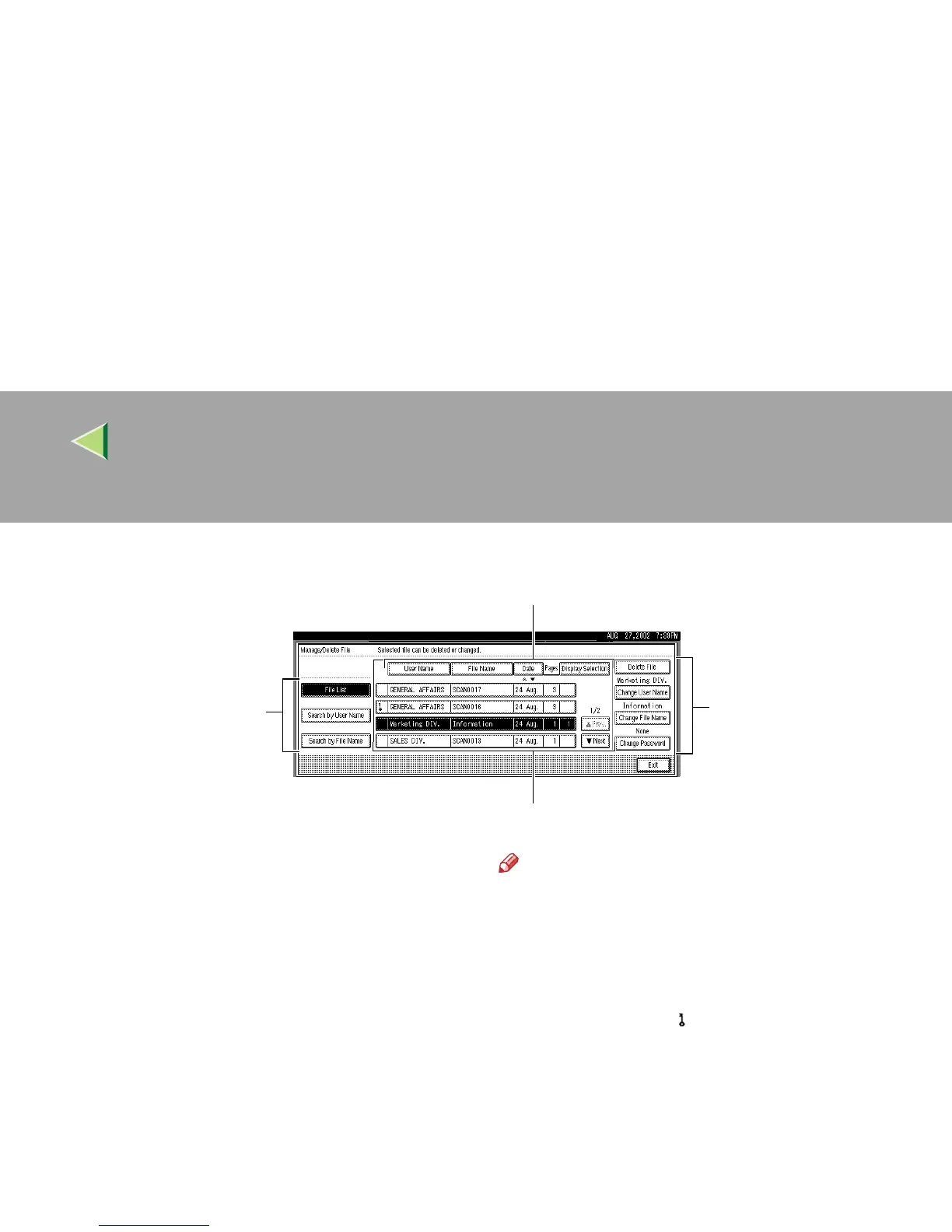
1.
Keys for searching files
Switches to the screens for searching file by
user name or file name, or to the screen for dis-
playing of all files.
2.
Keys for sorting files
Sorts the files using the selected item as the se-
lected key. Selecting the same item once more
causes reverse sort. However, delivery cannot
be sorted in descending order.
3.
Keys for changing file information
Use for deleting, changing the user name, file,
or password of the selected file, or for checking
file information.
4.
A list of stored files
A list of stored files is displayed.
Note
❒
Stored files are not shown when a function
other than the scanner function is used.
❒
If the desired file is not visible, use
[
U
UU
U
Prev.
]
or
[
T
TT
T
Next
]
to scroll through the display.
❒ For files which are password protected,
a key symbol( ) is shown to the left of
the file name.
5.
[Manage/Delete File]
Press to manage or delete the files stored in the
Document Server or change the file information.
6.
[Deliver]
Press to deliver the files stored in the Document
Server. For more information, see p.79 “Deliv-
ering Stored Files”.
1
3
2
4



 To Next Page