Replacing Consumables and Maintenance Kit
8
1
G
GG
G
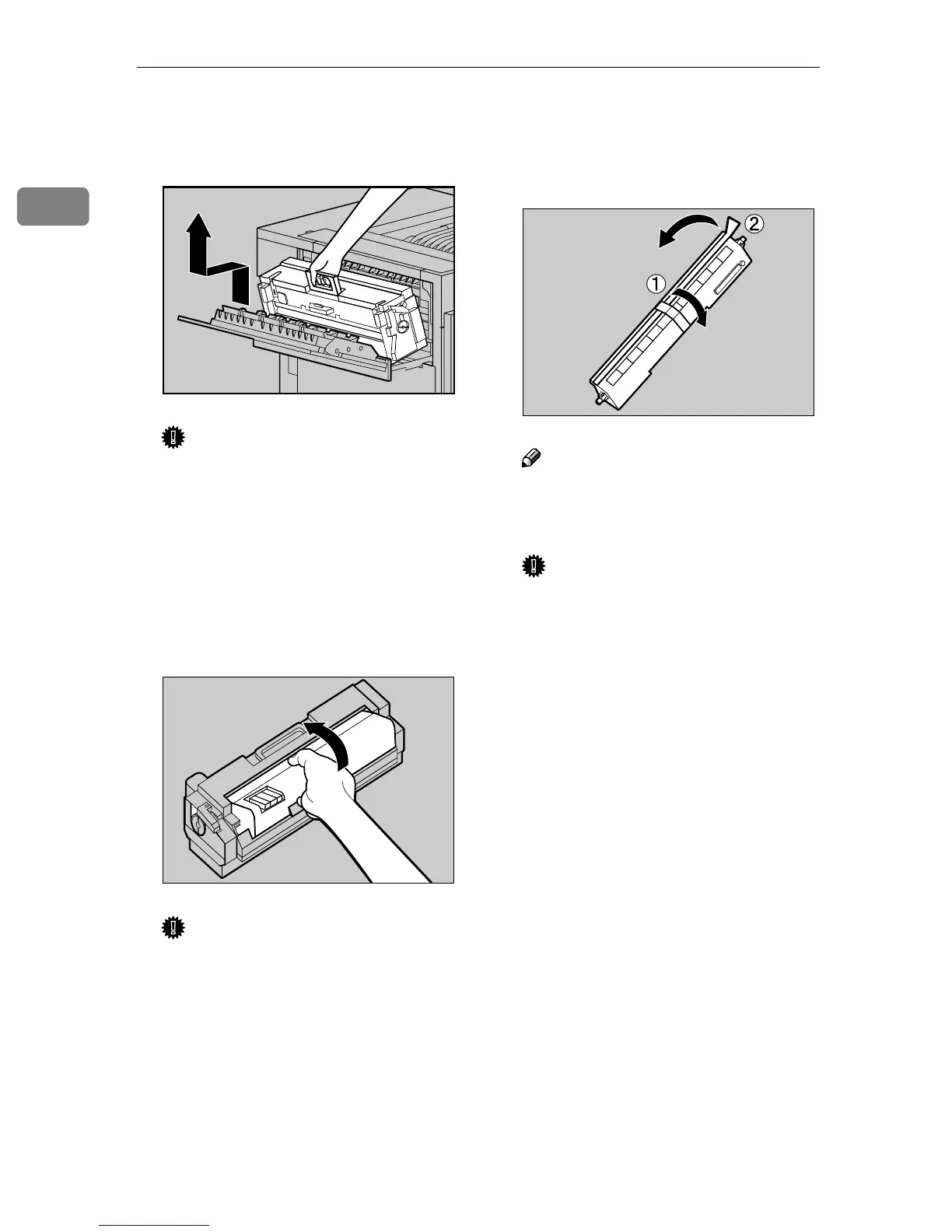
Holding the green handle, pull
up the Fusing Unit slowly in the
direction of the arrow.
Important
❒ Do not touch any areas other
than the handle.
H
HH
H
Put the removed Fusing Unit in a
stable and level place.
I
II
I
Lift the Fusing Oil Unit in the di-
rection of the arrow to remove it,
and put it in a stable and level
place.
Important
❒ Do not touch the inside of the
Fusing Unit.
❒ Be careful not to touch the area
other than that shown in the il-
lustration.
J
JJ
J
Take out the new Fusing Oil Unit
from the bag, remove seal (A
AA
A),
and then remove seal (B
BB
B) as
shown in the illustration.
Note
❒ Be sure to remove seal (A), and
then pull it out in a level man-
ner.
Important
❒ Be sure to remove the seals to
avoid printer malfunction.
❒ Be sure to remove seal (A) first,
and then remove seal (B) to
avoid an oil leak.
❒ Be sure to put the Fusing Oil
Unit in a stable and level place
to avoid an oil leak.
❒ There is oil on the removed
seals and fuser oil roller. Be
careful not to let them come in
contact with your clothes.
ZDJH208J
ZDJH052E
ZDJH053J



 To Next Page