Replacing Consumables and Maintenance Kit
28
1
E
EE
E
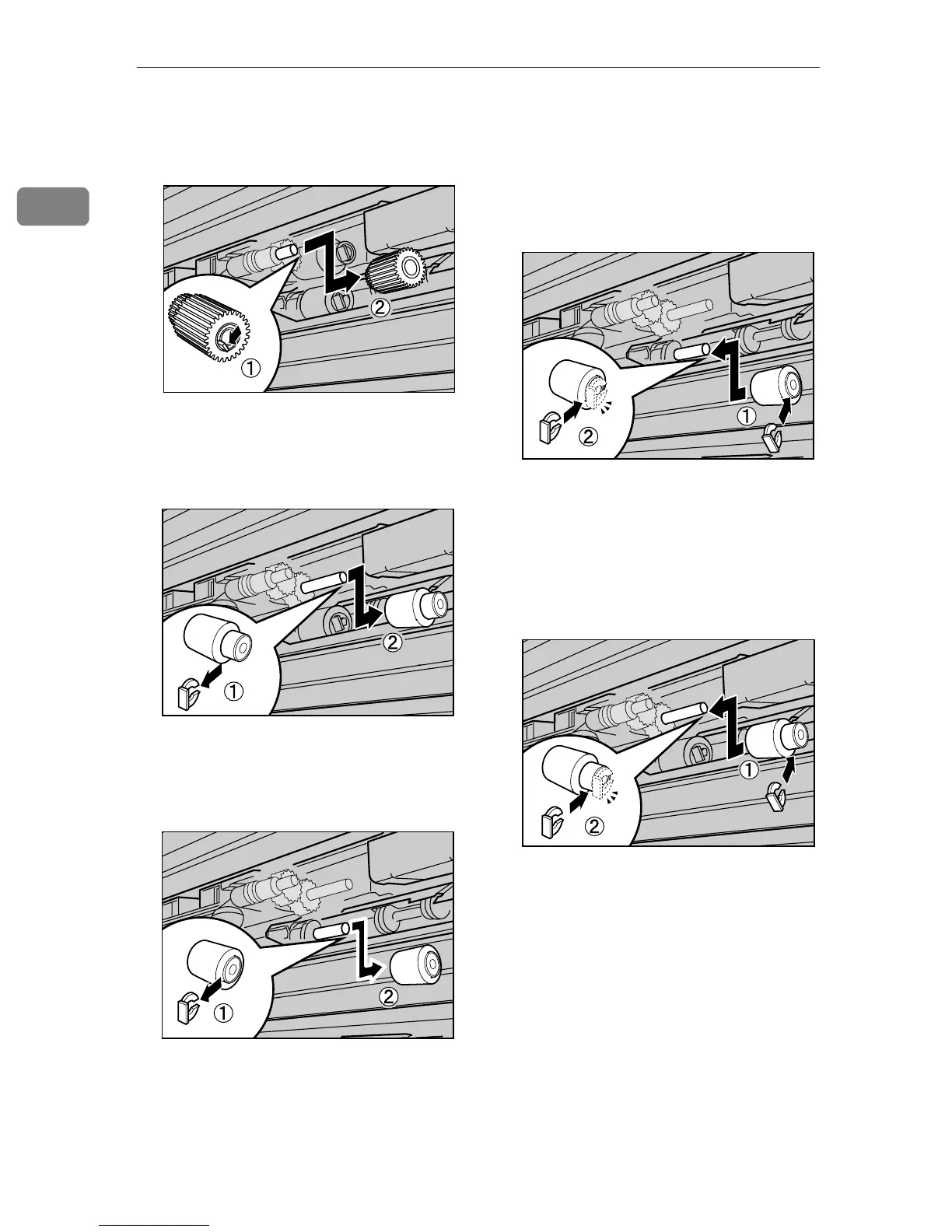
While pushing the pin of paper
feed roller A outwards (A
AA
A), re-
move the paper feed roller (B
BB
B).
F
FF
F
Remove the stopper from paper
feed roller B (A
AA
A), and remove the
paper feed roller (B
BB
B).
G
GG
G
Remove the stopper from paper
feed roller C (A
AA
A), and remove the
paper feed roller (B
BB
B).
H
HH
H
Hold the new paper feed roller C
with its gear towards the shaft. In-
sert it into the rear shaft so that
the roller gear is meshed with the
shaft gear (A
AA
A). Lock the roller
with the stopper (B
BB
B).
I
II
I
Hold the new paper feed roller B
with its gear towards the shaft. In-
sert it into the rear shaft so that
the roller gear is meshed with the
shaft gear (A
AA
A). Lock the roller
with the stopper (B
BB
B).
ZERH040E
ZERH050E
ZERH060E
ZERH070E
ZERH080E



 To Next Page