Replacing the Development Unit
17
1
H
HH
H
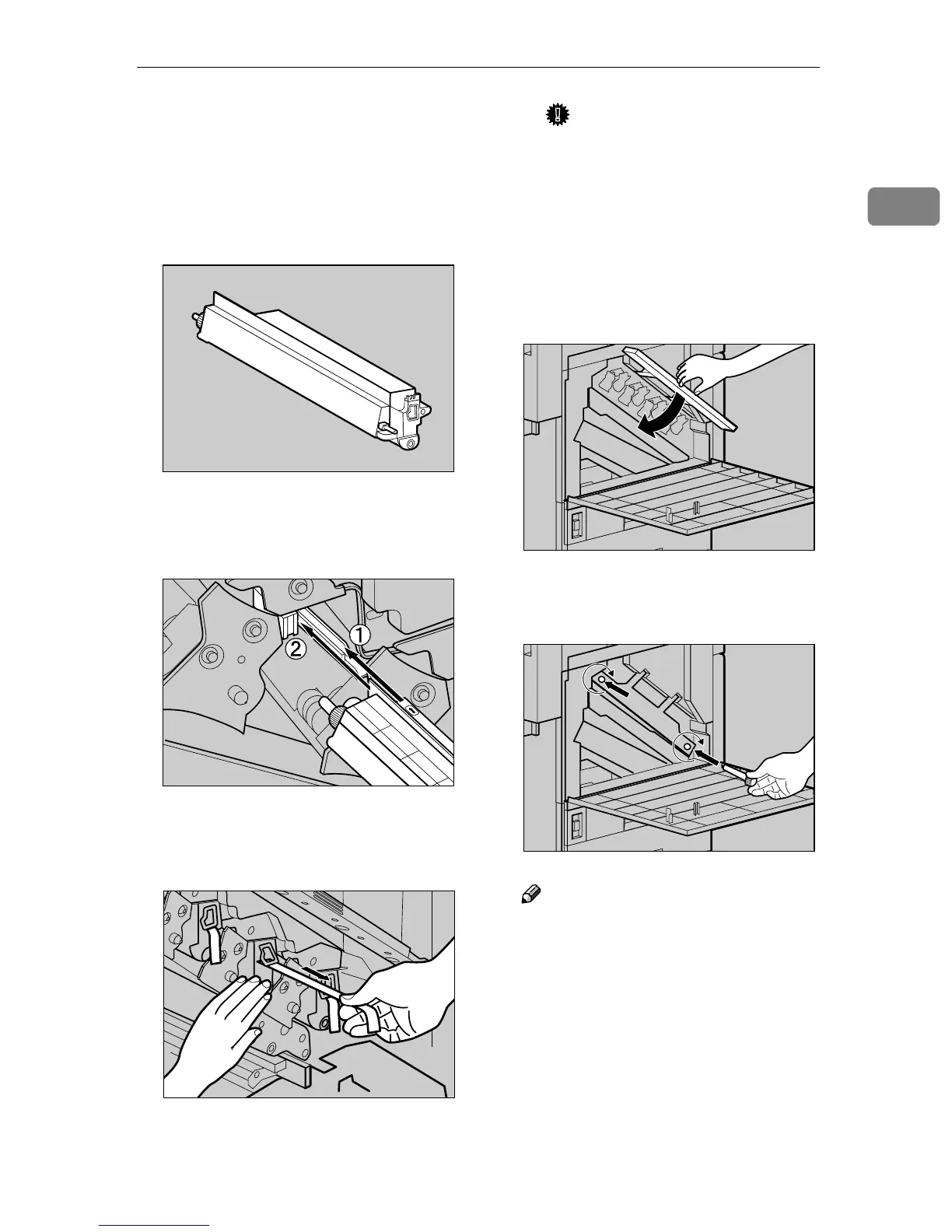
Install the new Development
Unit.
The procedure for attaching the
Development Unit is the same for
all four colors.
A Take the unit out from the bag.
B Insert the Development Unit
along the rail, and push in
slowly until it stops.
C Holding the Development
Unit, pull out the tape slowly
in a level manner.
Important
❒ Be sure to pull out the tape to
avoid printer malfunction
during operation.
❒ The removed tape is dirty. Be
careful not to let it get in con-
tact with your hands or
clothes.
I
II
I
Lower the inner cover slowly.
J
JJ
J
Tighten the two screws using the
provided screwdriver.
Note
❒ Be sure to return the provided
screwdriver to its original posi-
tion on the inside of the front
cover.
ZDJH226J
ZDJH227J
ZDJH039J
ZDJH018J
ZDJH019J



 To Next Page